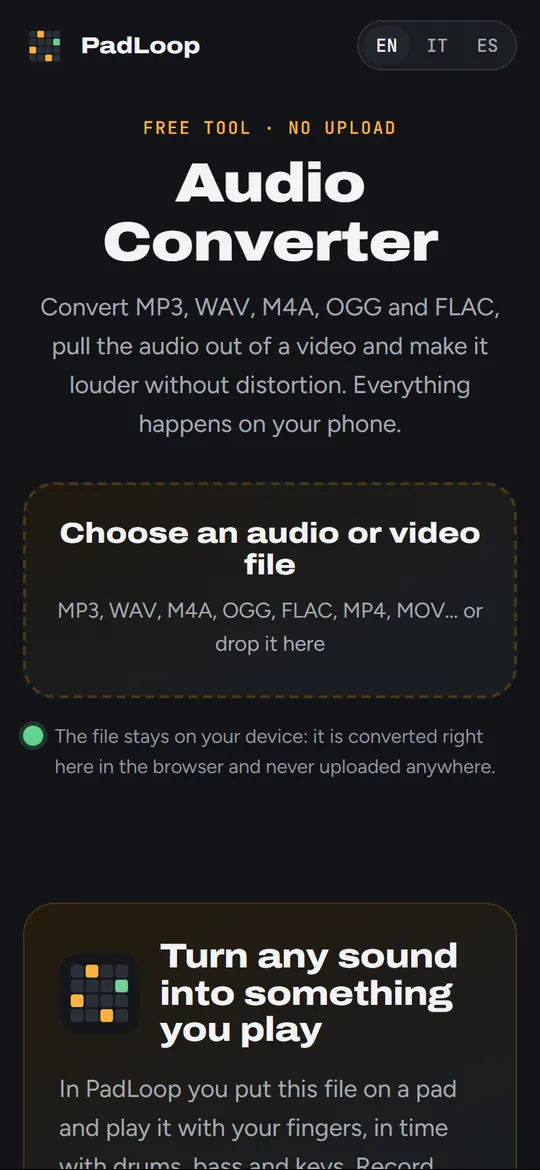
 PadLoop
Free tool · no upload
Audio Converter
Convert MP3, WAV, M4A, OGG and FLAC, pull the audio out of a video and make it louder without distortion. Everything happens on your phone.
The file stays on your device: it is converted right here in the browser and never uploaded anywhere.
Turn any sound into something you play
In PadLoop you put this file on a pad and play it with your fingers, in time with drums, bass and keys. Record your voice on top, then export the whole jam.


Available for Android and iPhone.
Which format should I choose?
MP3 opens everywhere: phones, cars, WhatsApp, computers. M4A (AAC) is the iPhone format and sounds a little better than MP3 at the same size. OGG (Opus) is the lightest for the same quality, but some apps and older iPhones can’t open it.
WAV and FLAC keep the full quality, with no loss: WAV is huge, FLAC is about half the size. Pick them to keep an original or to edit it in another app; pick MP3 or M4A to listen and share.
To get the audio out of a video, choose the video from your gallery: the picture is left out and you get only the sound.
Questions
Is my file uploaded?
No. Opening, converting and saving happen in your browser; the file never leaves your device. It works offline too, once the page is loaded.
Does “Louder” distort the sound?
No. It raises the volume to the level of streamed songs (about -12 LUFS) and a limiter gently holds back the peaks, so nothing goes over -1 dB. Very quiet files go up by 24 dB at most.
Can I convert WhatsApp voice messages?
Yes, if your browser opens them: WhatsApp saves them as OGG or OPUS. It works on Android and on computers; on iPhone it depends on the iOS version.
Can I convert a YouTube link?
No: this page only converts files that are already on your device. Downloading from YouTube goes against its rules and often against the rights of whoever made the music.
Where does the file go?
In your downloads, with “padloop.net” in the name so you can find it. On iPhone it goes to the Files app, in Downloads.
Why can’t I choose M4A or OGG?
Your browser can’t create them. Chrome and Edge can do all five formats; MP3, WAV and FLAC work everywhere.
More free tools
 Ringtone maker30 seconds of a song as MP3 for Android or M4R for iPhone.
 Voice recorderRecord with the microphone, trim and save. Nothing is uploaded.
 Loop cutterSeamless loops that snap to the bars, saved as WAV.
 Slow down musicChange speed or key, loop a part A-B to practice it.
All free tools → · Make whole tracks on your phone with PadLoop →