
Ready beats
Ready beats: a full groove, and you play on top
Pick a style, listen, load it with one tap and press ►: drums, bass and music start together at the right tempo. You get the pads, and in the classic beats they're already tuned to the groove.
- 24 styles, from lo-fi at 82 BPM to drum and bass at 172
- Sounds, tempo and swing load together
- Classic beats tune the pads to the groove
Transcript
- 0:00 A Funk beat on your phone
- 0:02 Tap ⊞ and open Ready beats
- 0:04 Pick Funk: bank, tempo and swing load by themselves
- 0:06 Press ►: drums, bass and chords are already recorded
- 0:10 Play the other pads on top: they are tuned to the beat
- 0:19 Like it? Tap REC on a free track and keep it
PadLoop comes with 24 backing tracks to play along with, the Ready beats: from lo-fi at 82 BPM (beats per minute) to drum and bass at 172, with drums, bass and the rest of the band already recorded. Load one with a tap and ten seconds later you're jamming on top, on the pads, with your voice or your guitar. Every beat has a ► button, so you can hear it before you pick it.
From the list to a jam
- In the PAD tab, tap ⊞ (the banks menu) next to the ↶ arrow, then tap Ready beats at the top of the list.
- Listen with the ► next to each name (■ stops it). Try as many as you like.
- Tap the name: the beat loads its sounds onto the banks and the project switches to its tempo and swing.
- Press ► at the top: in the 18 classic beats, drums are on track 1 and bass and chords on track 2; in the 6 complete ones, every instrument has its own track (tracks are the layers of the song).
- Play along: drum pads for fills, the Keyboard for a melody (one sound spread across the pads in a scale), or 🎤 on an empty track for vocals or guitar.
If loading it would replace something, PadLoop tells you first. A classic beat leaves your other tracks and banks alone; a complete one takes the whole looper.
Pick a groove and jam over it right away: all 24 Ready beats are unlocked for 7 days, and listening to them stays free forever.On iPhone: in MORE tap the top row, then Start the free trial. It costs nothing and does not renew.
Get PadLoop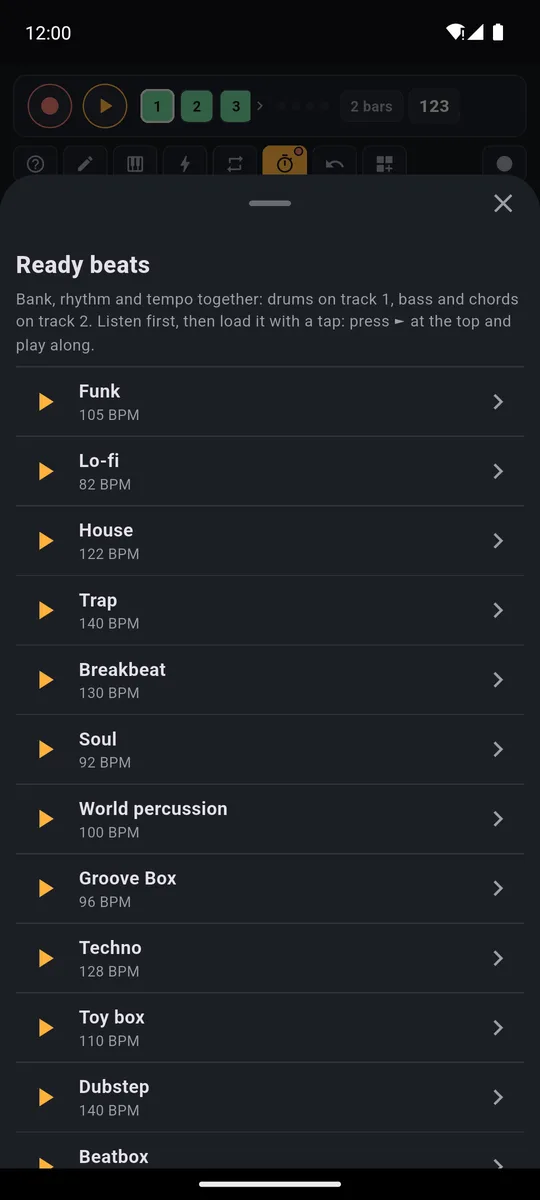
Every row shows its tempo and a ► button to hear it before loading.
Every note you play fits
In the classic beats, the bank you load isn't a random pile of sounds. Every musical pad is tuned to the note it plays most often in the beat: tap it by hand and the note fits. Levels are balanced too, so your hits sit in the mix like the recorded ones.
- Drum pads over the loop, for fills and extra hits
- The Keyboard on one of the musical pads: the first note, bottom left, is already in tune with the beat. Start with Min. pentatonic; if it doesn't click, try Major or Minor and keep the one that sounds best
- Hold-down effects on the bolt (filter, echo, reverb, lo-fi…) for a build-up or a breakdown
With the Keyboard, one sound is spread over all the pads in a scale: high notes at the top, low notes at the bottom.
The 6 complete beats: one track per instrument
At the top of the list there are six beats recorded inside the app: Trap soul, Phonk, Afrobeats, Deep house, UK drill and Afro house. They're 4 bars long instead of 2, and every instrument sits on its own track. In Trap soul, for example, piano, drums, 808 and violin are four separate tracks: mute one or replay it without touching the rest. Phonk puts cowbell, drums and 808 on three tracks, a quick start for phonk beats.
- They use plugin sounds. If one is missing, PadLoop tells you which and offers to open the Plugins page: download it, then load the beat.
- They take the whole looper. Loading one deletes the recordings on every track and replaces the sounds of the banks it uses. If there's anything to lose, it asks you first.
- They bring their own tempo and swing, just like the classic ones.
| Beat | BPM | Swing | Tracks | Plugins to download |
|---|---|---|---|---|
| Trap soul | 130 | 50% | Piano, Drums, 808, Violin | Grand Piano, Strings |
| Phonk | 130 | 50% | Cowbell, Drums, 808 | Phonk |
| Afrobeats | 104 | 53% | Piano and marimba, Drums, Bass, Flute | Grand Piano, Afro & Amapiano, Marimba & vibraphone, Winds |
| Deep house | 122 | 50% | Chords, Drums, Bass, Vibes | Marimba & vibraphone |
| UK drill | 142 | 50% | Cello, Drums, 808, Violin | Strings |
| Afro house | 120 | 50% | Marimba and cello, Perc loops, Bass, Kick and congas | Strings, Percussion, Marimba & vibraphone |
The 18 classic beats, with tempo and swing
The classic beats use only the sounds already in the app. Each one is 2 bars long and brings its own bank: drums on track 1, bass and chords on track 2.
Swing is how late every other note lands, and it makes the beat sway: at 50% it's straight, and the higher it goes, the looser the groove. To start slow, Lo-fi and Hip hop leave room between hits: they're the way into lofi beats and boom bap hip hop beats.
| Beat | BPM | Swing |
|---|---|---|
| Lo-fi | 82 | 60% |
| Hip hop | 90 | 58% |
| Soul | 92 | 58% |
| Beatbox | 95 | 58% |
| Groove Box | 96 | 56% |
| World percussion | 100 | 52% |
| Funk | 105 | 54% |
| Islands | 105 | 56% |
| Toy box | 110 | 54% |
| Disco | 120 | 50% |
| House | 122 | 52% |
| Techno | 128 | 50% |
| Breakbeat | 130 | 50% |
| Trap | 140 | 50% |
| Dubstep | 140 | 50% |
| Drill | 142 | 50% |
| 8-bit | 150 | 50% |
| Drum and bass | 172 | 50% |
Trap at 140 and Drill at 142 are a quick start for trap beats and drill beats. Hip hop, Soul, Trap and Drill also make good freestyle rap beats: they loop for as long as you rap.
For the dance floor, House and Techno at 122 and 128 BPM lead into house and techno beats, and Drum and bass at 172 is the fastest way into drum and bass and jungle.
From Ready beat to your own track
A Ready beat is a starting point. You work on it like any loop of your own:
- Drop a part. Mute the drum track (track 1 in the classic beats) and play the drums yourself; mute the others and keep just the rhythm.
- Edit it in SEQ. They are pad hits like yours: switch squares on and off, change hit strength.
- Add layers on the empty tracks, up to 16 in the full version.
- Make it longer with x2 and record a variation twice as long.
- Change tempo and swing in the top bar and in MORE: the hits follow.
Tip: load a beat, mute the drum track and replay the drums your own way. You hear right away whether your hit lands where it should: the fastest way to learn a groove.
Prefer to build a beat from scratch? See how to make beats on your phone. Need a short track for a video? Start from a Ready beat to make music for TikTok and Reels, exported as an MP3.
Can you try them for free?
Listening to Ready beats with ► is always free, even on free PadLoop. Loading them to jam on top is part of the full version, and during the 7-day trial you can load all 24, plugins included.
Then you choose. PadLoop stays free forever with 2 banks full of sounds, 2 looper tracks and one project, or a single purchase unlocks Ready beats and everything else, for good, at a one-time price shown in your currency in the store (€9.99 in Europe). No subscription, no ads.
More sounds: plugin kits
In MORE → Plugins you download only the kits you want (plugins come with the full version), 1 to 9 MB each: Reggaeton (26 sounds), Afro & Amapiano (30), Jungle & DnB (31), Phonk (16), Drum Machines (48) and Percussion (24). The Reggaeton kit is how you build a reggaeton beat on the dembow, and Afro & Amapiano brings the log drum for afrobeats and amapiano. They show up in Ready banks marked "Plugin", and you can load one onto a bank even next to a Ready beat.
There are also four instruments with real recorded notes (grand piano, marimba & vibraphone, strings, winds) to play on the Keyboard. The 6 complete beats use the four instruments and the Phonk, Afro & Amapiano and Percussion kits.
Good to know
- To play in time, use wired headphones or the speaker. Bluetooth headphones add 100-300 ms of delay: you hear the hit after you tap.
- Run “Calibrate by tapping” once in MORE, so what you record lands where you played it.
- Want to keep the jam? Record performance captures everything you play over the beat, effects included, for up to 30 minutes (full version, free during the trial).
Mute the drums of a Ready beat and play them your way, or sing over it with the mic: it's all included in the 7-day trial.On iPhone: in MORE tap the top row, then Start the free trial. It costs nothing and does not renew.
Get PadLoopQuestions about Ready beats
What are PadLoop's Ready beats?
They're 24 grooves already recorded, each with its own sounds, tempo and swing. The 18 classic ones are 2 bars long, with drums on track 1 and bass and chords on track 2. The 6 complete ones are 4 bars long, with a track per instrument. Press play and jam on top.
Are the Ready beats free?
Listening to them is always free, for everyone. Loading them is part of the full version: a full groove under your fingers in one tap. During the 7-day trial you can load them all, then a one-time purchase keeps them. No subscription.
Why does a beat ask me to download plugins?
The 6 complete beats use sounds from some plugins, such as Strings or Marimba & vibraphone. If one is missing, PadLoop tells you which and offers to open the Plugins page: download it, then load the beat. It only takes a moment, and you download each plugin once.
Can I use them as drum beats to play guitar along with?
Yes. Press ► and the loop keeps going as long as you like. If you only want drums, mute track 2 (bass and chords) in a classic beat, or the other instruments' tracks in a complete one. To record your guitar or vocals, use the 🎤 button on an empty track, with wired headphones.
Which genres are included?
The 6 complete ones: Trap soul, Phonk, Afrobeats, Deep house, UK drill and Afro house. The 18 classic ones: Funk, Lo-fi, House, Trap, Breakbeat, Soul, World percussion, Groove Box, Techno, Toy box, Dubstep, Beatbox, Disco, Drill, Drum and bass, Hip hop, 8-bit and Islands. From 82 to 172 BPM in all.
Will loading a beat erase what I've already made?
A classic beat only replaces tracks 1 and 2 and the sounds of the bank it goes onto: your other tracks and banks stay as they are. A complete one takes the whole looper, so the recordings on every track are deleted, and it replaces the sounds of the banks it uses. If there's anything to lose, PadLoop asks you first.
Can I change the tempo of a backing beat?
Yes. The beat brings its own tempo, but you can change the BPM in the top bar and the hits stay in time. The tempo is only locked if another track holds microphone audio.
Last updated:


