
First beat
How to make a beat on your phone, even if you've never made music
Five minutes, sixteen pads, no lessons: play roughly in time, the app snaps your hits into place and the loop keeps playing. Any mistake is one tap away from gone.
- A full beat on free bank A, step by step
- Ready beat: one tap, then play over it on pads in key
- Banks A and B and 2 looper tracks free forever
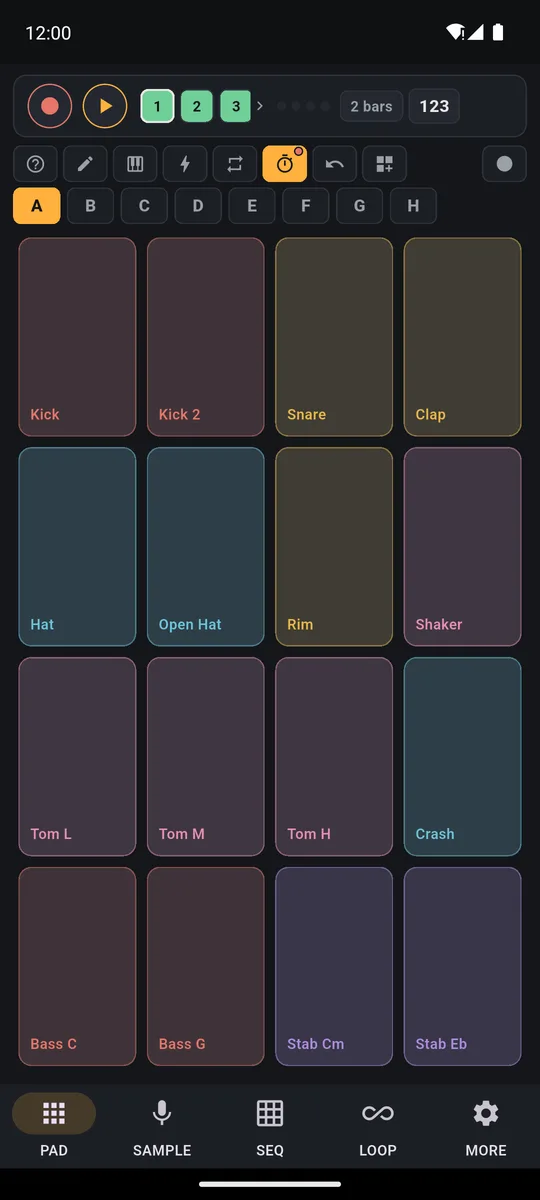
You can make a beat on your phone with PadLoop in five minutes, even if you've never played anything. Press REC, tap kick and snare on the pads and the loop repeats on its own, in time. Then layer hi-hats, bass and chords, one at a time. In a hurry? Load a Ready beat and play over it straight away.
Transcript
- 0:00 Make a beat from zero
- 0:02 Pick track 1 and tap REC: a one-bar count-in starts
- 0:05 Play the kick on every beat and the clap on 2 and 4
- 0:08 The loop starts again by itself: listen before adding more
- 0:12 REC again on the same track: hi-hats layer on top
- 0:16 Track 2: chord stabs, two chords per loop
- 0:21 Track 3: the bassline follows the chords
- 0:25 Four layers, all in time. Now arrange it.
- 0:28 LOOP tab: mute the drums in time for a break
- 0:33 …then the bass: the tension builds
- 0:37 Drop: everything comes back in
- 0:40 Hold an effect while it plays: filter down, then echo
- 0:48 Note repeat on the hi-hat: rolls in time
- 0:52 The performance recording is ready to share or export
Your first beat, from REC to MP3
- In the top bar, tap number 1 (the numbers are the tracks, the layers of your beat) and press REC.
- After the GO 4, 3, 2, 1 count-in, count “one, two, three, four”: tap Kick on “one” and “three”, Snare on “two” and “four”. The loop closes and plays back on its own.
- Press REC again on the same track and tap Hat eight times per bar, counting “one and two and three and four and”: the hi-hats layer on top of the drums.
- Tap number 2, press REC and play Bass C and Bass G (bass notes C and G) with the Stab Cm and Stab Eb chords (C minor and E♭): bass and chords loop on track 2.
- In the LOOP tab, tap Export and pick MP3 or WAV to save your beat and send it to anyone.
Messed up a layer? Tap ↶ and only that one disappears. Steps 1 to 4 work in the free version, forever. Export and loading Ready beats are part of the full version: your first beat as an MP3 to send a friend, and a full groove whenever you want one. Both are included in the 7-day trial, so you can send it right away.
Make your first beat tonight: kick, snare, hi-hats and a bass line, all in time. The 7-day trial adds Ready beats and export.On iPhone: in MORE tap the top row, then Start the free trial. It costs nothing and does not renew.
Get PadLoopNot sure where to start? Play over a Ready beat
Ready beats are 24 ready-made grooves: 18 classic ones of 2 bars, from Funk and Lo-fi to House and Trap, and 6 complete ones of 4 bars, with a track per instrument. Each has its own sounds, speed and swing (every other hit lands a touch late and the groove sways). Never played anything? It's the easiest way to make music without playing an instrument.
Tap ⊞ in the toolbar, next to the ↶ arrow: the Ready beats sit at the top of Ready banks. The ► next to a name lets you hear it. Tap the name and the beat loads (loading is part of the full version, included in the trial): a classic one goes onto a free bank, drums on track 1, bass and chords on track 2; a complete one puts each instrument on its own track and uses plugin sounds. Press ► at the top and play the pads over it: in the classic ones every melodic pad is tuned to the note the beat plays most, so what you tap fits.
Transcript
- 0:00 A Funk beat on your phone
- 0:02 Tap ⊞ and open Ready beats
- 0:04 Pick Funk: bank, tempo and swing load by themselves
- 0:06 Press ►: drums, bass and chords are already recorded
- 0:10 Play the other pads on top: they are tuned to the beat
- 0:19 Like it? Tap REC on a free track and keep it
Listening is free forever, so try as many as you like before you pick one. Every style is on the Ready beats page.
How to play drums and hi-hats in time
Bank A is all you need: it comes full and, like bank B, is already in the free version, with 16 sounds including Kick, Snare, Clap, Hat, Open Hat, two bass notes and two chords. The speed starts at 100 BPM (beats per minute) and the loop at 4 bars: a bar is four beats, 1, 2, 3, 4. Want a shorter loop? Tap the bar count in the top bar: it steps through 1, 2, 4 and 8. You can also pick it in the LOOP tab.
After REC you hear one bar of count-in, four clicks with the first one louder. On GO, count "one, two, three, four" and play. At the end of the loop the recording closes by itself and the drums keep going.
For the hi-hats, press REC again: the track blinks and recording starts at the top of the loop. Eight hits per bar: "one and two and three and four and". New hits are added to the old ones.
The finger trick: tap low on the pad for a full hit, higher up for a soft one. Mix loud and soft hi-hats and your beat stops sounding like a machine.
Bass and chords: the simplest idea that works
On track 2 recording starts at the top of the loop, so the new part lands in time with the drums. An idea that works right away: Bass C with Stab Cm in the first half of the loop, Bass G with Stab Eb in the second. If it's easier, record the bass first and the chords with another REC.
When you want more notes, the Keyboard puts any sound in key across the pads: the guide on how to make beats on your phone shows how. For a specific style, see making trap beats on your phone.
Messed up a hit? ↶ removes only the last layer
The ↶ arrow removes the last layer of the selected track, even while the loop plays. Wonky hi-hats? Only their layer goes; kick and snare stay put. If it's the track's only layer the app asks first, and to start over there's the bin in the LOOP tab.
Transcript
- 0:00 Undo the last layer: a mistake goes with one tap
- 0:01 REC on track 3: claps on 2 and 4
- 0:07 The loop ends and the layer stays. REC again for another layer
- 0:11 This layer came out wrong...
- 0:18 ↶ Undo: the last layer is gone, the first one stays
- 0:21 Undo one layer at a time, even while it plays
Break and drop: mute and unmute parts
In the LOOP tab each track has its own row. Tap the colored square with the number, on the left: the track goes quiet without being erased, and another tap brings it back. Drop the drums for a loop and bring them back in: that's your break and drop.
By default the change happens Now. To make it land on time even if you tap a little early, go to MORE, Metronome section, and set Mute in time to 1 bar or End of loop. More tools are on the 16-track looper page.
Transcript
- 0:00 Mix your loops in the LOOP tab
- 0:02 A House beat is playing
- 0:05 LOOP tab: one row per track, with volume, mute, undo, x2 and delete
- 0:08 Turn a track down while it plays...
- 0:12 ...and bring it back up
- 0:16 Mute the drums: it waits for the bar, so it is always in time
- 0:21 Tap again and they come back in
Save your beat and send it to friends
Your project saves itself. For a file to share (export is part of the full version and included in the trial), tap Export in the LOOP tab, pick MP3 or WAV and how many times to repeat the loop (1, 2 or 4). With Separate tracks you get one WAV per track instead, in a zip, to finish the song on a computer.
Transcript
- 0:00 Export your track
- 0:02 Your track is ready (here a Funk Ready beat)
- 0:04 LOOP tab: your tracks, then Export
- 0:10 Pick the format: MP3, WAV or separate tracks
- 0:11 How many times to repeat the loop: 1, 2 or 4
- 0:13 Done: share the file or save it wherever you like
Beginner tips and common mistakes
- Count out loud. "One, two, three, four" is all it takes to stay in time. If one bar of count-in feels short, set it to two in MORE.
- Start slow. Lower the BPM with the slider or tap it on TAP. Record slower, then raise the tempo: loops played on the pads follow the new BPM.
- Click stops after the loop? It isn't broken: by default the metronome, the stopwatch button, goes quiet as soon as the loop closes. In MORE you can set it to Always.
- Hits or sound arrive late. First run Calibrate by tapping in MORE, on the phone speaker: tap along with the click; the first hit doesn't count, then it needs eight. If you use headphones, go for wired ones: Bluetooth headphones add a delay no app can remove.
- Nothing was recorded. Whatever you play before GO isn't captured: wait for the count-in to end, or for the top of the loop if the track is blinking.
- Two close hits turned into one. The grid was too wide: pick a finer one in MORE.
- Loaded a Ready beat and want to start from scratch? Clear its tracks with the bin in the LOOP tab (1 and 2 for a classic one) and go back to bank A, or start a new project from MORE → Projects → New (extra projects come with the full version).
- You've scrambled bank A. In Ready banks, Factory A brings it back as new.
- Let the app guide you. On first launch, with Guide me the pads light up in time and you tap as they glow. Reopen it from the ? with Replay the intro, or watch the two-minute tutorial.
Got a groove in your head? Try it on the pads and record it on two tracks, even in the free version.On iPhone: in MORE tap the top row, then Start the free trial. It costs nothing and does not renew.
Get PadLoopBeginner beat-making questions
Can you make beats on your phone?
Yes. With PadLoop you press REC, play kick and snare on the pads and the loop repeats on its own. Layer hi-hats, bass and chords on top, then export it as an MP3 or WAV.
Can I make a beat without knowing how to play?
Yes. Recorded hits snap to the nearest 16th note, so playing roughly in time is enough. With Ready beats the drums, bass and music are already recorded: you just play over them.
How do I make beats on my phone for free?
PadLoop gives you 7 days with everything unlocked, then stays free forever with banks A and B and the first 2 looper tracks: bank A alone covers drums, bass and music. The full version, a single purchase with no subscription, adds loading Ready beats and export.
How do I make a trap or rap beat on my phone?
Same method, different tempo. In the Ready beats Trap sits at 140 BPM, Drill at 142 and Hip hop at 90: preview them with ► for free and, in the full version or during the trial, load the one you like with a tap.
What BPM should a beginner use?
PadLoop starts at 100 BPM, a comfortable place to begin. The slider goes from 40 to 220, or tap the beat on TAP.
What if I mess up a hit?
Tap the ↶ arrow: it removes only the last layer of the track and keeps the rest. While you're recording, it throws away just the take in progress.
Why are my recorded hits slightly off time?
Every phone has a small delay between finger and sound. Run “Calibrate by tapping” once in MORE, on the phone speaker, and skip Bluetooth headphones, which add 100 to 300 milliseconds of delay.
Do I need internet to make a beat?
No. You play, record and export offline. Internet is only needed to download the optional plugins.
Last updated:


