
Beatbox looper
Loop your beatbox on your phone, like a loop station
Lay down kick and snare with your mouth, the loop plays back on its own, and on top you add hi-hats, bass and vocals. Or turn your sounds into pads and play them.
- Beatbox from the mic straight onto a track in time
- Layers on the same track or on separate tracks
- Your mouth sounds chopped onto the pads automatically
Your phone can be a beatbox looper. In PadLoop you tap the mic on a track, lay down kick and snare with your mouth, and the loop plays back on its own, in time. On top you record hi-hats, bass and vocals, layer after layer, like a loop station, and the first 2 tracks are free forever. Your mouth sounds can even become pads you play with your fingers.
Transcript
- 0:00 A beat made of voices: the Vocal Crew bank
- 0:01 Tap ⊞: 29 banks are already built in
- 0:07 ► next to Vocal Crew: hear a taste
- 0:11 Tap the name and load it onto a free bank: F
- 0:16 Beatbox kick and snare, clicks, shouts and vocal chops on one bank
- 0:26 Or record your own beatbox with the microphone
Your first beatbox loop
- In the LOOP tab pick how long the loop is (1, 2, 4 or 8 bars; a bar is four beats) and tap the BPM at the top to set the tempo, in beats per minute.
- Plug in wired headphones, tap the mic on an empty track (a layer of your beat) and pick With the beat muted: while recording, only the click remains.
- After the count-in lay down the first layer with your mouth, for example kick and snare: at the end of the loop it plays back on its own.
- Tap the red mic on the same track to add hi-hats on top, or use another track for the bass.
- If a layer comes out wrong tap ↶: it removes only the last one and the rest stay.
Record your first beatbox loop in five minutes, free on 2 tracks. Want 16 tracks and your mouth sounds on the pads? It's all included in the 7-day trial.On iPhone: in MORE tap the top row, then Start the free trial. It costs nothing and does not renew.
Get PadLoopDecide the tempo up front: as soon as a track holds mic audio, the BPM is locked. Before recording, the sheet shows a level bar: hit a kick and check that it moves.
Beatboxer's tip: record the kick alone, in a first layer, and the rest after. A clean kick is the foundation of everything, and if you mess it up you redo it without losing the other layers.
Why does the kick feel late? Calibrate once
The first time you record with the mic the app offers to measure the delay: about ten seconds of clicks on the speaker. Don't skip it: beatbox hits are short, and a few milliseconds are enough to make them drag. You can redo it anytime with Calibrate latency (click test) in MORE.
Same track or separate tracks?
On the same track layers add up into one beat. Handy for drums: kick and snare, then hi-hats, then a roll. ↶ always removes just the last one.
On separate tracks each part has its own volume and mute. That's the right call for things you want to bring in and out: a mouth bass line, a whistled melody, a rapped line.
To mute, tap the colored square with the track number. With Mute in time on 1 bar or End of loop (in MORE), the part drops in and out on the beat even if your finger is a little early.
Want to play your mouth on the pads?
Record kick, snare and hi-hat once, then play them like a drum kit. It's done with the sampler, which belongs to the full version along with tracks 3 to 16: during the 7-day trial you use both without limits, then one purchase keeps them.
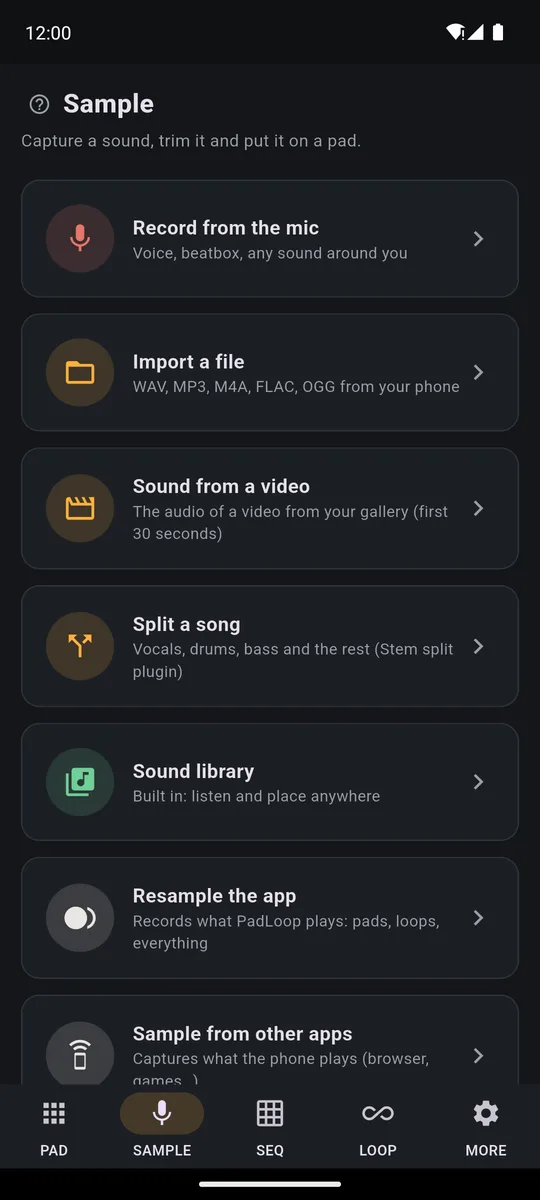
- In the SAMPLE tab tap Record from the mic and make your sounds one after another, with a short gap: kick, snare, hi-hat, a bass hit. You have up to 30 seconds.
- In the editor move the two handles to keep the good part. Normalize volume, on by default, brings everything to a full, even level.
- Hum or fan in the room? Clean up noise removes constant background noise, not the TV or voices.
- Tap Split on hits (auto-chop): the app finds each sound and puts them on consecutive pads, from the pad you choose, up to sixteen. Occupied pads get replaced.
Transcript
- 0:00 Sample a loop and play it in pieces
- 0:01 SAMPLE tab: Import a file
- 0:06 Pick a groove from your phone: WAV, MP3, M4A, FLAC or OGG
- 0:08 Listen to it in the editor: the handles trim it
- 0:16 Split on hits: the app finds 16 hits
- 0:23 Pick the first pad: bank E, pad 1
- 0:30 16 pieces on 16 pads: played in order, the groove comes back
- 0:39 Change the order: repeat the bar, stutter, make it yours
If the automatic chop cuts a long sound badly, like a sung bass note, use Chop by hand: the sound plays and you tap CUT where you want it split.
Now hit REC in the PAD tab and play. By default your hits snap to the 16th, so the beat comes out tight even if your finger isn't.
- Soft and loud: low on the pad is a full hit, higher up a light one.
- Fast hi-hats: turn on ⟳ (it repeats the hit in time) and hold the pad, the hit repeats at 1/16 or 1/32.
- Different colors: with the pencil (it edits the pads) change pitch and filter, or add Lo-fi. A kick pitched down a few semitones sounds deeper.
For everything else the sampler does, see the sample your voice and any sound page.
From loop to file
Export in the LOOP tab saves the loop as MP3 or WAV; Record performance captures up to 30 minutes of what you play, loops, pads and effects included. Both are part of the full version and work during the trial: that's how your beatbox leaves the phone as a real track. Want to sing over your beat next? Start from the guide to recording vocals over a beat.
Good to know
- Wired headphones, always. That way the click and earlier layers don't bleed back into the mic. Bluetooth headphones add 100 to 300 milliseconds of delay that can't be removed.
- Same distance from the phone. Lean in for the kick and pull back for the hi-hat, and the levels jump around.
- One track at a time. The mic records on a single track: if it's busy, the app tells you.
- If the audio crackles, switch on Safe audio mode in MORE and restart the app: it's steadier, with a touch more delay.
Want a groove to practice over first? Ready beats include Beatbox, at 95 BPM on the Vocal Crew bank. You can listen to it for free; loading it in one tap comes with the full version and is included in the trial.
Turn your mouth into a drum kit you play with your fingers: 7 days with the sampler, 16 tracks and export unlocked, then it's one purchase.On iPhone: in MORE tap the top row, then Start the free trial. It costs nothing and does not renew.
Get PadLoopBeatbox looper questions
Can I use my phone as a beatbox looper?
Yes. In PadLoop every looper track has a mic button: make the beat with your mouth, the loop plays back on its own in time, and you record more layers on top until you have a full track.
Is there a free beatbox looper app?
PadLoop is free to download, and the mic looper works free forever on 2 tracks: one for the rhythm, one for bass or vocals. A single one-time purchase takes you up to 16 tracks and opens the sampler, so your own sounds become a drum kit. No subscription.
Is there a beatbox looper online?
With PadLoop the looper lives on your phone, Android 7 and up or iPhone with iOS 15 and up: it records and plays right there, offline too.
Do I need an external mic?
No, PadLoop records from the phone's microphone. Keep it at the same distance from your mouth and check the level bar before you start: if it turns red, you're too close.
How do I put my beatbox sounds on the pads?
In the SAMPLE tab record up to 30 seconds from the mic, then Split on hits finds each sound on its own and puts them on consecutive pads, up to sixteen. The sampler is part of the full version, and you can use it freely during the 7-day trial.
Does the looper fix my beatbox timing?
Not on mic audio: you hear exactly what you did, and the delay calibration makes your layers land in the right place. Hits played on the pads, on the other hand, snap to the grid, to the 16th by default.
Why do my layers come in slightly late?
Every phone has a delay between sound and mic. Run Calibrate latency (click test) in MORE, on the speaker with the loop stopped: it takes about ten seconds.
Can I change the tempo after recording?
No: once there's mic audio in the loops the BPM is locked. Set the tempo before you start, or clear the mic tracks to change it.
Last updated:


