
Bassless tracks
Remove the bass from a song and take its place
Hear the bass line on its own, note by note, until you find it on the neck. Then mute it and play it yourself, over the drums and chords of the real band.
- The bass line isolated, to learn it by ear
- Original drums and chords, minus the bassist
- Your own line recorded over the band
Want to remove the bass from a song and play the line yourself? PadLoop splits the track on your phone and lets you hear the bass alone, so you can learn it by ear. Then you mute it and the drums, vocals and chords remain. You work on phrases of up to 30 seconds that can repeat for as long as you like. Nothing gets uploaded. Split a song is part of the full version, and you can try it free for 7 days.
Watch the video on its own page →
Transcript
- 0:00 Pick any song from your phone
- 0:02 It is split right on the phone, offline
- 0:05 4 parts: vocals, drums, bass and the rest
- 0:10 Just the vocals
- 0:16 Or just the beat
- 0:21 Put the parts on your pads
- 0:24 …and remix the song live
From the file to an isolated bass line
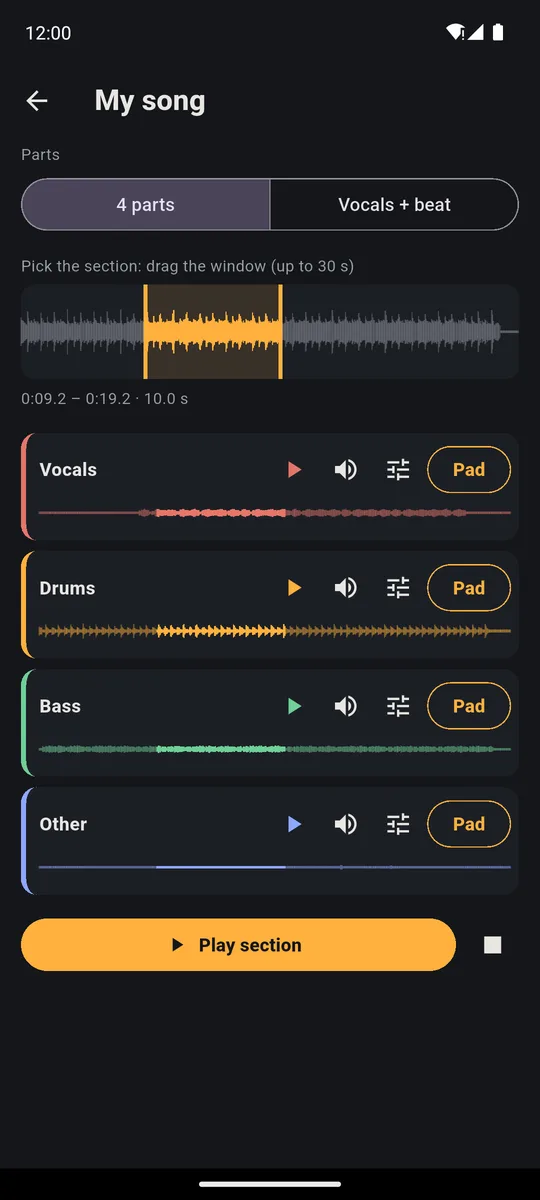
- Open the SAMPLE tab, tap Split a song and pick the track; the first time you download the Stem split plugin PadLoop offers you.
- When the split is done, narrow the window at the top to a phrase of two or four bars.
- Tap the ► on the Bass row and replay the phrase until you can hum the line.
- Mute the bass with the speaker on its row, hit Play section and play the line yourself over the band.
A bar is a group of four beats: 1, 2, 3, 4. Under the window you see the start, end and length of the section.
Isolate the bass in the song you're learning and work it out note by note: splitting songs is included in the 7-day trial.On iPhone: in MORE tap the top row, then Start the free trial. It costs nothing and does not renew.
Get PadLoopBefore you start
You need the Stem split plugin (79 MB, downloaded once), a phone with at least 3 GB of RAM (4 GB on iPhone) and the song as a file: requirements and formats are on the Split a song page. Above all, headphones or a speaker that can reproduce low end: through the phone speaker the line almost disappears. If a synth plays in the same register as the bass, a few notes may stay in the other parts.
How do you find the notes on the neck?
In the full mix the bass is the most buried part: the kick lands on top of it, guitars and keys cover it. On its own you hear every note, passing notes included.
Start from the first note of each bar: it's usually the one the chord rests on. Find it on your instrument, then fill in the gap to the next one. No theory needed: hum the note and hunt for it string by string until your bass sounds like the record. If a spot won't come, narrow the window again and listen to just that half second.
The rhythm of the line often comes from the drums. Listen to them alone too, with the ► on their row: you hear where the kick lands, and plenty of lines follow it hit for hit.
When the phrase comes, unmute the bass and play it alongside the real bassist with Play section. If the two lines melt together, you've got it. Then mute it again and you're alone with the band.
The band on repeat while you practice
To repeat the same phrase twenty times without touching anything, tap Pad on the Drums row: the section lands on a pad. In the PAD tab turn on the pencil (the button for editing pads), open that pad and under Mode choose Loop. One tap and the drummer starts, another and they stop. You and them, like in the rehearsal room.
With only the drums you hear clearly whether you're in the pocket or rushing. Once you're sure, do the same with Other on another pad and add the chords.
Slowing down without losing the key
For a bass player the pad's pitch control is the wrong tool: it lowers the speed but also the key, and the track no longer matches your strings. The right one is tempo.
With the pencil on, tap the band's pad and under Tempo switch to In time with the project: PadLoop detects the section's BPM (beats per minute), and if it comes out doubled or halved you fix it with ÷2 or ×2. Now tap the tempo in the top bar and lower it. The pad slows down from the next tap and stays in the original key, working best within about 30%.
Transcript
- 0:00 Change the tempo while the beat plays
- 0:02 A House beat is playing
- 0:05 Tap the tempo at the top: the slider opens
- 0:07 Drag left: slower, and the beat follows right away
- 0:13 To the right: faster
- 0:17 TAP: beat the tempo with your finger and the beat takes it
- 0:24 Your recorded pad loops follow the new tempo
Recording your line over the band
A Loop pad plays live but doesn't go into recordings. To get the band into the looper's loop, switch the pad back to One-shot (it plays once per tap). Then in the SEQ tab (the step grid) tap Add pad, pick the band's pad and switch on the first step: it starts on its own every loop. The section has to match the loop length; the karaoke backing track page shows how.
Now tap the 🎤 on a free track and play, with the phone in front of your amp. The two looper tracks with the mic are already in the free version. The first time, run Calibrate latency (click test) in MORE, using the phone speaker: from then on your notes land in time.
When you like the take, tap Export in the LOOP tab for an MP3 or WAV to send the band (export is part of the full version, and you can use it freely during the 7-day trial). More mic tips are in the guide to recording vocals over a beat: with bass it works the same.
Good to know
- While you play, a cable is better. With Bluetooth headphones the sound reaches you 100 to 300 milliseconds late: wired, or through a plugged-in speaker, you hear the band when it actually plays.
- Publishing: studying is fine with any song, but putting someone else's backing online needs the rights, as the Split a song page explains.
Record your own line over the real band: splitting the song is part of the full version (and included in the trial), while the 2 looper tracks with the mic stay free forever.On iPhone: in MORE tap the top row, then Start the free trial. It costs nothing and does not renew.
Get PadLoopQuestions about removing bass from a song
How do I remove the bass from a song?
In PadLoop you split the track from the SAMPLE tab with Split a song. You get vocals, drums, bass and other on separate rows: tap the speaker on the Bass row and the band plays without a bassist.
Can I hear only the bass of a song?
Yes: the ► on the Bass row plays just the bass line of the chosen section. Without the kick and guitars on top, the notes are far easier to pick out.
Can I do it with no connection?
Yes. You download the Stem split plugin once, then the phone splits songs on its own, at rehearsal or on the road, and the tracks stay on the device.
How do I slow the track down without changing the key?
Put the part on a pad, choose In time with the project in its panel and lower the project BPM. The section slows down in the original key, best within about 30%.
Can I record my bass over the backing?
Yes: you bring the backing into the looper and record your bass with the 🎤 on a free track, with the phone in front of the amp. The 2 mic tracks are free forever.
How much does it cost to remove the bass from a song?
During the 7-day trial you use Split a song without limits. After that a single purchase unlocks it for good, no subscription, so any song can become a backing track for your bass, in sections of up to 30 seconds.
Can I post a bass cover over the bassless track?
Practicing is fine with any song. To publish another band's backing, even with your bass on top, you need the rights to the song.
Last updated:


