
Drum pads
A real drum pad app, with 128 pads, in your pocket
Eight banks of sixteen pads that respond to how you play: hard at the bottom, soft at the top. Shape every sound, repeat it in time or play it in a scale, with 558 ready-made sounds when you need more.
- 8 banks of 16 pads, every sound replaceable
- Touch dynamics, note repeat, arpeggiator and 16 levels
- Reshape any sound: higher or lower, shorter, filtered, with echo or lo-fi grit
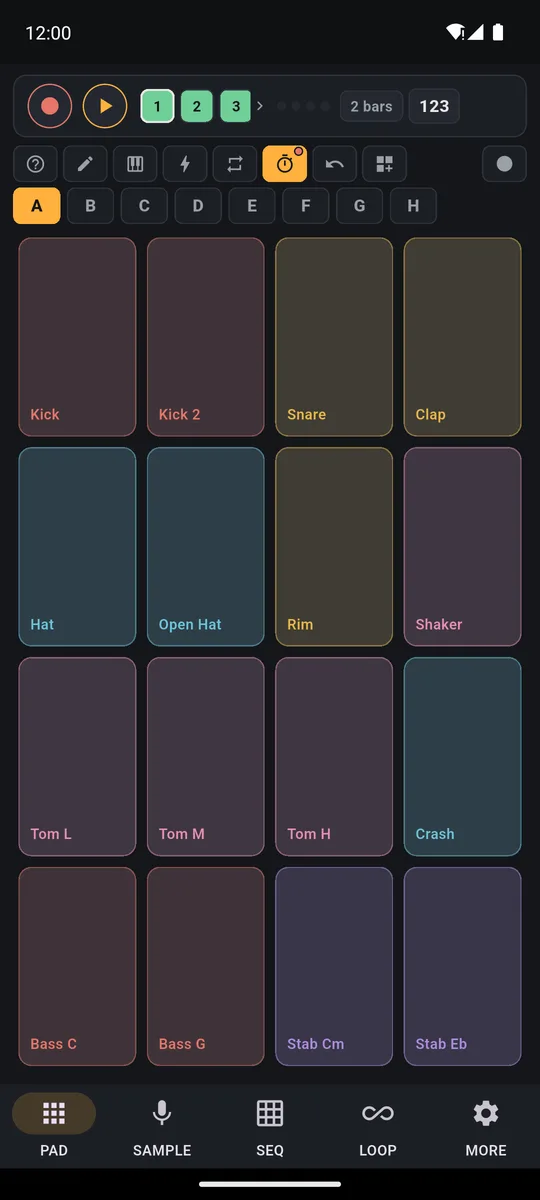
PadLoop turns your phone into a drum pad app with 128 pads in eight banks (a bank is a page of 16 pads: the letters A to H), and they know where you tap: low on a pad for a full hit, higher up for a soft one. A minute later you have a finger-drummed beat, recorded in time, and you can reshape every sound until it is yours.
Kick first, then snare, hi-hat and bass: each layer is finger-drummed and recorded in time without stopping the music.
Your first beat on the pads, step by step
- Pick a bank: tap a letter from A to H. The 16 pads change sound, and your recorded loop keeps going.
- Play: low on the pad is a full hit, higher up is soft. Kick with your thumb, hi-hat with your index finger, snare with your middle finger.
- Record: hit REC, the red dot at the top, and play. When the loop ends, what you played starts again on its own.
- Swap a sound: in the SAMPLE tab, open the Sound library, preview with ► and drop the sound on any pad.
- Shape it: turn on the pencil at the top (it edits the pads) and tap the pad. Pitch, Filter, Echo, Lo-fi and more open up.
Banks A to D come loaded with drums, basses, synths, pianos and chord stabs. E to H are room for your own samples. Banks A and B stay free forever: a full drum kit and a trap kit with 808s. The other six banks, the sampler, the Sound library and the Ready banks make up the full version, the one that puts your voice and any sound on the pads. You can play all of it during the 7-day trial before deciding.
Finger-drum all 128 pads for 7 days, plugins included: after that banks A and B stay free forever, already full of sounds.On iPhone: in MORE tap the top row, then Start the free trial. It costs nothing and does not renew.
Get PadLoopHard and soft hits, with your finger or a controller
A phone can't feel how hard you press, but it knows where. So you hit low for a full hit and higher up for a soft one. Want every hit at the same level? Switch off Touch dynamics in MORE.
Prefer real pads? Plug in a MIDI controller or keyboard:
- USB: plug it in with the app open and it connects on its own
- Bluetooth: go to MORE → MIDI and tap Search Bluetooth devices
- note 36 is the first pad of bank A, and your hit strength becomes velocity
- if your controller sends other notes, Map key → pad assigns them one by one, and it is saved
Make every sound your own
With the pencil on, the pads stop playing: tapping one opens its settings.
Transcript
- 0:00 Shape the sound of every pad
- 0:02 The beat plays the pads of bank E
- 0:04 Pencil on: tap a pad and its panel opens
- 0:07 Echo on the chords pad: you hear it right away in the loop
- 0:09 Filter: the chords get darker
- 0:11 Snare: pitch up and a touch of Lo-fi
- 0:17 Volume, attack, release, mode, reverse: every pad is yours
- Volume and Pan
- Pitch: up to 12 semitones up or down
- Attack and Release: fade the sound in, or leave a tail when it stops
- Filter: left to muffle it, right to leave just the air
- Echo in time with the project, and Lo-fi to crush it like an old-school sampler
- Reversed: for sucked-in cymbals and transitions
- In time with the project: a loop follows the BPM without changing pitch (enter the sample BPM or tap Detect)
You can rename and recolor the pad from the same panel. To copy a pad, or swap two, drag one onto the other with the pencil on.
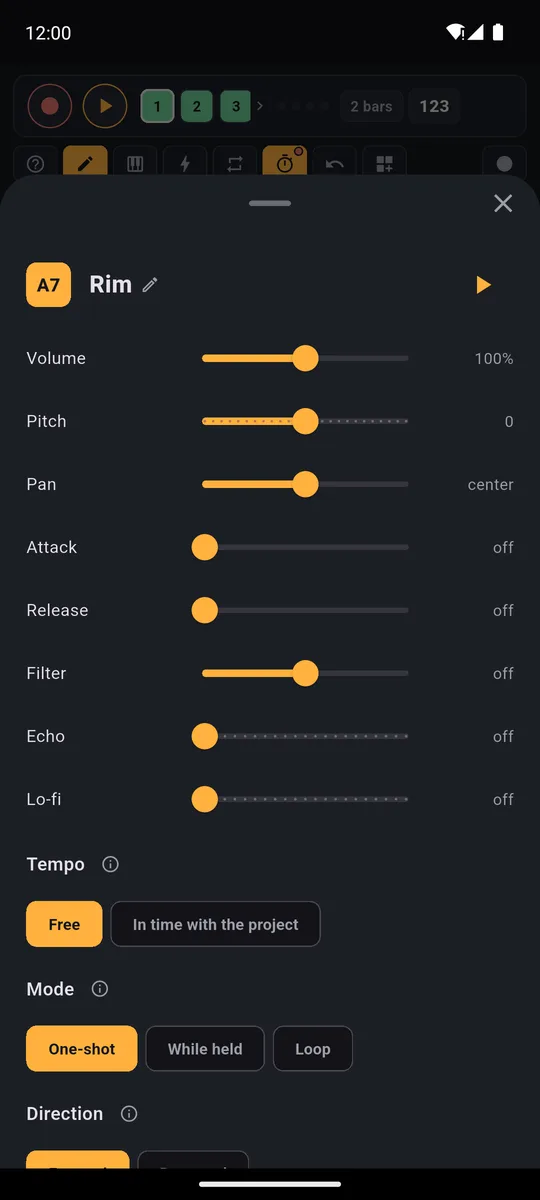
Volume, pitch, pan, play mode, what happens when you retap it, color and choke group, all on one screen.
Long notes, loops and hi-hats that cut each other
Every pad has a Mode:
- One-shot: tap and the whole sample plays, like a drum hit
- While held: plays while your finger is down, for long notes and chords
- Loop: one tap starts it looping forever, one tap stops it
Transcript
- 0:00 Pad modes: how each pad plays
- 0:01 A normal vocal: tap and it plays to the end (One-shot)
- 0:03 Pencil, Direction: Reversed. The same vocal, backwards
- 0:10 Mode: While held. The loop plays only while your finger is down
- 0:20 Loop: one tap starts it, one tap stops it
There's also the real-kit trick: put the closed and open hi-hat in the same Choke group and the closed one cuts the open one off. The other settings have sensible defaults: touch them only if you need to.
Transcript
- 0:00 Choke groups: pads that cut each other off
- 0:01 Two loops on bank E: Rave loop...
- 0:04 ...and Disco loop: without a choke group they pile up
- 0:10 Pencil: Choke group 1 on both loops
- 0:19 Now start one loop...
- 0:23 ...and tap the other: the first one stops. One tap to switch sections
- 0:27 The classic use: open and closed hi-hat in the same group
Rolls, bursts and arpeggios without the effort
Turn on ⟳ and hold a pad: the hit repeats on its own, in time. Pick the speed: 1/4 is slow, 1/16 and 1/32 are hi-hat rolls, 1/8T and 1/16T are triplets (three hits in the space of two). If a track is recording, the repeated hits go into the loop as if you had played them. With Latch you lift your finger and the repeat keeps going.
Below sits the arpeggiator: with Up, Down, Order or Random your held notes play one at a time (by default it is on Together). Hold three notes on the Keyboard and you get a line that runs by itself.
The Keyboard spreads one sound across all the pads in a scale: pick the pentatonic and there are no wrong notes. The last scale option is 16 levels: the same note at sixteen velocities, very soft at the bottom to very loud at the top. More on the Keyboard on the page about playing in key.
For a roll that builds: Keyboard on 16 levels, ⟳ on, and slide your finger from the bottom cell upwards.
Transcript
- 0:00 A snare roll that builds, with 16 Levels
- 0:03 Keyboard: pick the Snare, then 16 Levels
- 0:05 16 cells, one sound: level 1 is soft, level 16 is loud
- 0:06 ⟳ on, 1/16: hold a cell and the hit repeats in time
- 0:09 Move up the levels: the roll gets louder and louder
- 0:13 ...and a crash on the drop
The drop with one finger: hold-down effects
Tap the bolt and the grid turns into eight effects you hold down: Filter down, Filter up, Echo, Reverb, Pitch down, Lo-fi, Flanger and Robot. Hold one and the whole sound changes; let go and it is clean again. That is your filter sweep before the drop, or the echo throw at the end of a phrase.
Transcript
- 0:00 Note repeat and live effects
- 0:02 A beat is playing (here House, from the Ready beats)
- 0:05 ⟳ Repeat the hit: pick 1/16 and hold a pad
- 0:09 1/32 on the snare: the roll before the new loop
- 0:11 ⚡ Live effects: 8 effects to hold down
- 0:13 Filter down: hold it and the sound closes up
- 0:18 Echo on the last hit
- 0:19 Pitch down, then Robot
- 0:23 Lift your finger and the sound is clean again
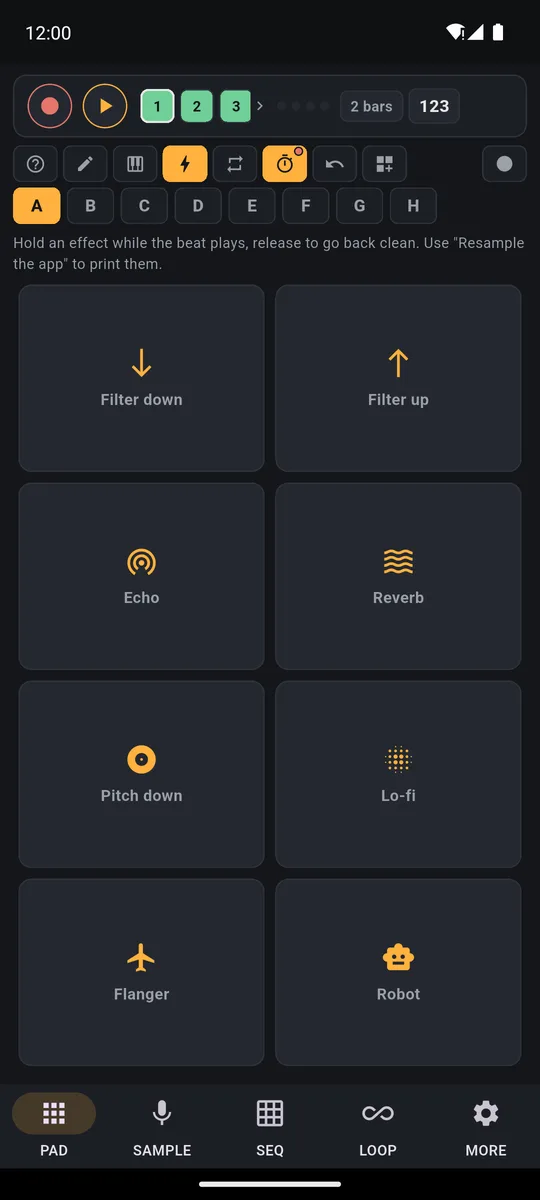
Hold them while the beat plays, release to go back to the clean sound.
558 sounds and 29 Ready banks
Need a different snare, a vocal shout or a whole new kit? The Sound library, in the SAMPLE tab, holds 558 sounds by category (drums, bass, melodic, voices, grooves, songs, FX), with search by name.
Transcript
- 0:00 Ready sounds for your pads
- 0:01 SAMPLE tab: Sound library, 558 sounds already in the app
- 0:05 Pick a category: drums, bass, melodic, voices, grooves
- 0:07 ► next to the name: hear it before you choose
- 0:10 Tap the sound, then Assign to a pad: bank F, pad 1
- 0:17 One more: the "hey" goes on pad 2
- 0:23 PAD tab, bank F: your sounds are there
- 0:25 Free track 3, REC: one bar of count-in
- 0:28 Play the voices just once
- 0:32 The loop repeats them in time, over the House beat
- 0:40 Nothing to download: the sounds work offline
At the top are the Ready banks, which you also reach with the ⊞ button (the banks menu): 29 banks of 16 pads, from groove box and arcade to dark techno and cinema FX, part of the full version. Preview one, then choose which bank to load it onto. The app asks before covering any sounds, and your recorded loops stay. Kits from any plugins you downloaded show up here too.
Transcript
- 0:00 16 new pads in one tap
- 0:01 Tap ⊞: 29 banks already set up, plus the plugin kits
- 0:07 ► next to the name: hear a taste
- 0:11 Tap the name and choose the bank: grey = already full, F is free
- 0:16 8-bit Arcade on bank F: video game sounds, ready to play
- 0:26 Your recorded loops stay: you change the sounds, not the track
Made a bank you love? Save it (saving banks comes with the full version; importing one is always free): keep up to 16 and send them to friends as a file. Want to sample your voice or any sound? See how to sample your voice and any sound.
Transcript
- 0:00 Save your own banks
- 0:01 Bank A with your sounds and settings
- 0:04 Tap ⊞, then Save the active bank
- 0:08 Give it a name
- 0:10 It's in the list: share it as a file or delete it
- 0:13 Load it onto any bank: here F
- 0:17 The same 16 pads, ready in every project
Good to know
- Messed up bank A or B? In Ready banks, Factory A and Factory B put them back as they were, free for everyone.
- Want to keep the hold-down effects? Export saves a clean file; to capture the effects too, use Record performance, or Resample the app in the SAMPLE tab to turn them into a new sound (both are full-version features).
Load your own sounds and the 29 Ready banks onto the pads: both are included in the 7-day trial, then it's one purchase.On iPhone: in MORE tap the top row, then Start the free trial. It costs nothing and does not renew.
Get PadLoopDrum pad questions
How many pads does PadLoop have?
128: eight banks, A to H, with 16 pads each. Tap a letter to switch bank and your recorded loop keeps playing. Banks A and B are already in the free version; the full version adds the other six, from more loaded kits to empty banks for your own samples.
Is there a free drum pad app for Android?
PadLoop is a free download and stays free forever with 2 banks full of sounds, 2 looper tracks and one project. You get everything unlocked for the first 7 days; after that, one purchase opens the rest, at a one-time price shown in your currency in the store (€9.99 in Europe). No ads, no subscription.
Is there an online drum pad machine?
PadLoop works as an app on your phone, Android and iPhone: pads, banks and effects are already inside and play even without internet.
Are the pads velocity sensitive?
A phone screen can't measure pressure, so PadLoop uses where your finger lands: low on the pad gives a full hit, higher up plays softer. If you want an even volume, turn off Touch dynamics in MORE.
Can I load my own samples onto the pads?
Yes: the sampler is part of the full version and included in the 7-day trial. With it you record from the mic, import a file or grab the audio from a video, trim it and assign it to a pad. Or pick from the 558 sounds in the Sound library, searchable by name.
Does it work with a MIDI controller?
Yes, with MIDI controllers and keyboards over USB and Bluetooth. Note 36 is the first pad of bank A, your hit strength becomes velocity, and MIDI learn lets you map any key to any pad.
What is note repeat?
Hold a pad and the hit repeats on its own, in time, at the rate you pick: from 1/4 to 1/32, triplets included. Turn on Latch and it keeps going after you lift your finger.
Last updated:


