
Keyboard
Play in key, even if you know zero theory
Pick a sound and the Keyboard spreads it across the 16 pads, note by note, in the scale you choose. Every key fits with the others, so melodies, bass lines and chords come out right first time.
- Any pad sound becomes a keyboard locked to a scale
- 4 scales, plus 16 velocity levels
- Piano, marimba, strings and winds with real notes
Watch the video on its own page →
Transcript
- 0:00 Play in key with the Keyboard
- 0:01 Tap the piano key and choose the sound to play in scale
- 0:03 Pick the scale: here C minor. Every pad is a note that fits
- 0:06 REC: chords with two fingers, no wrong notes
- 0:11 Back to the pads: drums on track 2
- 0:21 Keyboard again, with the bass: track 3
- 0:26 Chords, drums and bass: a track in a minute
The PadLoop Keyboard turns any sound into a scale keyboard spread across the 16 pads. Pick a scale from a list and only the right notes are left: tap at random and it still sounds good. A minute later you have a bass line or a melody over your beat, with zero music theory. And the Keyboard is already in the free version.
Play in key, step by step
- In the PAD tab, tap the piano button next to the pencil and the bolt.
- When asked Which sound do you want to play in scale?, pick the bank (the letters at the top: each is a page of 16 pads) and tap a pad, for example Bass C from bank A.
- Pick a scale above the grid. Not sure which? Start with Min. pentatonic.
- Play: low notes bottom left, high notes top right. Chords work with several fingers at once.
- Like it? Pick a track at the top, hit REC and record it in the looper.
To go back to normal pads, tap the piano button again.
Play your first melody with no wrong notes: the Keyboard is free forever, and during the 7-day trial you also get grand piano, marimba, strings and winds with real notes.On iPhone: in MORE tap the top row, then Start the free trial. It costs nothing and does not renew.
Get PadLoopWhy there are no wrong notes
A piano gives you every note, including the ones that clash. Here the only keys are the ones in the scale you picked: notes that don't fit simply aren't there. You go up the grid the way you read a page, left to right, then the row above. That's why the Keyboard is the simplest way to make music without playing an instrument.
Any pad with a sound works, except pads in Loop mode. Basses, stabs and keys work better than drum hits. Bank A already has Bass C, Bass G, Stab Cm and Stab Eb, bank B has tuned 808s: two banks, both in the free version. With the sampler (part of the full version, included in the trial), a sound you recorded yourself becomes a keyboard too.
Where to start: Bass C from bank A, the Min. pentatonic scale, and move your fingers around at random. You already get a bass line that holds together.
Chords, melodies and bass lines that play themselves
Chords. In the Major and Minor scales one shape always works: take a pad, skip the next, take the third, skip, take the fifth, in grid order. In the minor scale, starting from C gives you C minor: C, E♭ and G (the pads label the E♭ as D#). Shift the shape by one pad and you get the next chord. If the sound is already a chord, like Stab Cm, one finger per key is enough.
Melodies. On the Min. pentatonic you can improvise without fear: even random notes sit fine over the beat. Low on the pad is a full hit, higher up is softer.
Bass lines and arpeggios. Turn on ⟳: hold a key and the note repeats in time. In the Arpeggio row choose Up, hold three keys and the notes cycle one at a time, low to high: the pulsing bass of electronic music. Down, Order and Random change the pattern; Latch keeps it going after you lift your finger.
Transcript
- 0:00 Arpeggiator: hold the notes, the line plays itself
- 0:02 Keyboard: pick the sound (here Bass C) and the Minor scale
- 0:05 ⟳ on: 1/16 and arpeggio Up
- 0:09 Hold three notes (C, D#, G): they climb by themselves, in time
- 0:13 Random, one octave up: four notes in a new order
- 0:19 Up, Down, Order, Random: with basses, stabs and pianos
Four scales, plus one special option
- Chromatic: all twelve notes. Wrong notes do exist here, so it is for people who already know what to play. Just over one octave.
- Min. pentatonic: five notes per octave, the scale of blues, rock and a lot of electronic music. The easiest one. Three octaves.
- Major: seven notes, an open, bright sound. A bit more than two octaves.
- Minor: seven notes, the darker sound behind a lot of hip hop, trap and pop. A bit more than two octaves.
- 16 levels: not a scale. The same note at 16 velocities, very soft at the bottom to very loud at the top, for even rolls and accents.
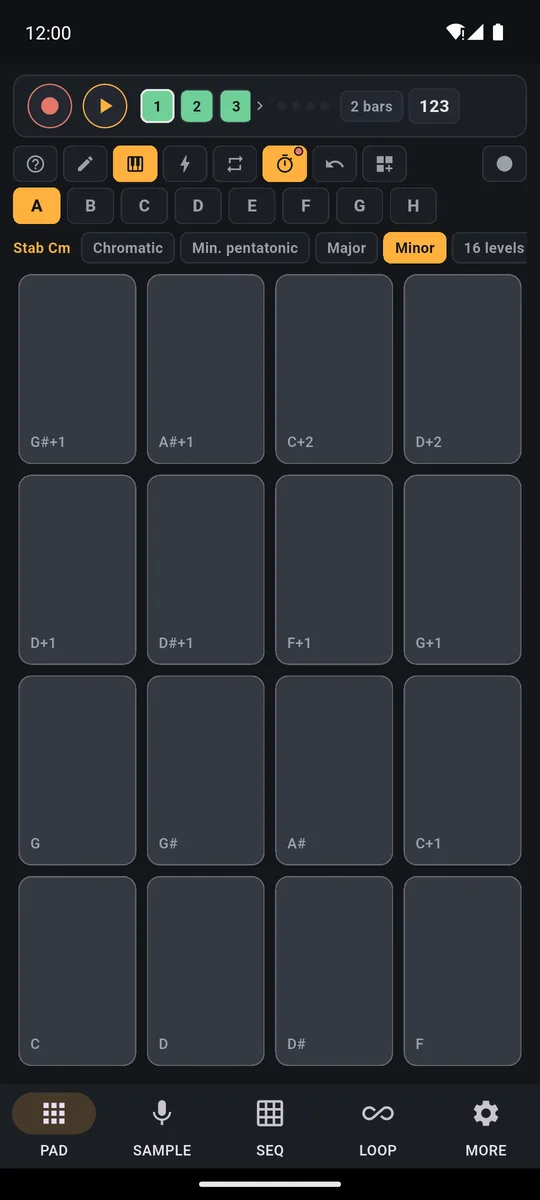
The Stab Cm sound spread over 16 pads: C bottom left, then D, E♭ (shown as D#), F and up to two octaves higher. The scale selector sits on top.
Real notes: piano, marimba, strings and winds
One sound stretched up and down two octaves sounds fake. That is why there are four instrument plugins, in MORE → Plugins (1 to 9 MB each). They're part of the full version, real instruments in place of one stretched sound, and you can play every one of them during the 7-day trial:
- Grand Piano
- Marimba & vibraphone
- Strings: violin and cello
- Winds: flute, alto sax and trumpet
Transcript
- 0:00 Real instruments on your phone
- 0:02 Grand piano plugin: real recorded notes, one per pad
- 0:05 REC: four chords become a loop
- 0:10 Bank C: marimba, played live on top
- 0:15 Bank D: alto sax melody
- 0:26 Piano, marimba, vibraphone, strings, winds: always in tune
These are real notes, recorded from the instrument: for each key PadLoop uses the nearest recording, so they sound natural across the whole grid. The grand piano has two recordings per note, soft and loud: tap higher on the pad and you hear the soft one.
Each instrument shows up in Ready banks (the ⊞ button, the banks menu) marked "Plugin": 16 pads already in a major scale, each named after its note (Piano C3, Marimba D3…). Play them as they are, or pick one in the Keyboard to get the other scales with real note names.
Grand piano chords recorded in the looper, then marimba and a sax melody played live on top. Every pad is a real note.
Changing key and octave
With an ordinary sound the letters on the pads are relative: C is the sound as it is, the other letters are the scale steps above it, +1 and +2 the octaves up.
Want everything higher or lower? Turn on the pencil (it edits the pads; the Keyboard closes), tap the starting pad and move Pitch, from -12 to +12 semitones (12 is a whole octave). Open the Keyboard again and the whole scale has moved.
With the plugin instruments the pitch is known and the pads show real names: E3 is an E. Start from Piano A3 with the Minor scale and you are playing in A minor.
From here to a whole track
Keyboard notes record like any pad hit, pitch included:
- Keyboard with Stab Cm and the Minor scale, track 1, REC: play the chords.
- Tap the Keyboard button again, track 2: record the drums.
- Open the Keyboard with Bass C, track 3: record the bass.
Track 3 comes with the full version; in the free version, layer the bass on track 2. Each track keeps looping while you add the next, so the song grows under your fingers. A take gone wrong? The ↶ arrow removes it. The rest is on the page about how to make beats on your phone.
Good to know
- Loop-mode pads stay out. A pad that loops on its own (Loop mode) can't be spread over the Keyboard: set it back to One-shot with the pencil.
Record chords, bass and melody one on top of the other: the 7-day trial gives you 16 tracks and the plugin instruments, then it's one purchase.On iPhone: in MORE tap the top row, then Start the free trial. It costs nothing and does not renew.
Get PadLoopKeyboard questions
Do I need to know music theory to use the Keyboard?
No. You pick a scale from a list and only the notes of that scale are left on the pads, so there are no wrong notes. If you are not sure which one, start with the minor pentatonic.
Can I play piano without knowing the notes?
Yes. Download the Grand Piano plugin, load it onto a bank from Ready banks and pick it in the Keyboard with a scale: only the right notes are left, each with its name on it. The plugin comes with the full version, and you can use it free for 7 days: a real piano, with real notes, on your pads.
Which scales are there?
Chromatic, minor pentatonic, major and minor. There is also a 16 levels option, which puts the same note on every pad at 16 different velocities.
How do I change the key?
With an ordinary sound the scale starts from the sound as it is, so you move it with the pad's Pitch setting, from -12 to +12 semitones. With the plugin instruments you start from the pad of the note you want, for example Piano A3 to play in A.
Can I play chords?
Yes, with several fingers at once. In the major and minor scales the same shape always works: one pad on, one pad off, three times.
Can I use any sound?
Any pad that holds a sound, except pads set to Loop mode. Basses, stabs and keys work better than drum hits.
Is the Keyboard free?
Yes, it works in the free version with the sounds of banks A and B. The plugin instruments (grand piano, marimba and vibraphone, strings, winds) can be tried free for 7 days; the one-time purchase keeps them, so your melodies sound like real instruments.
Last updated:


