
MIDI controller
Play your phone with a MIDI keyboard or pad controller
Rubber pads and real keys under your fingers, the sounds and the looper in your phone. Plug in with the app open and play: no drivers, no menus.
- USB: plug it in with the app open and it connects itself
- Hit harder, play louder, like a real kit
- Any key on any pad, and the looper run with your feet
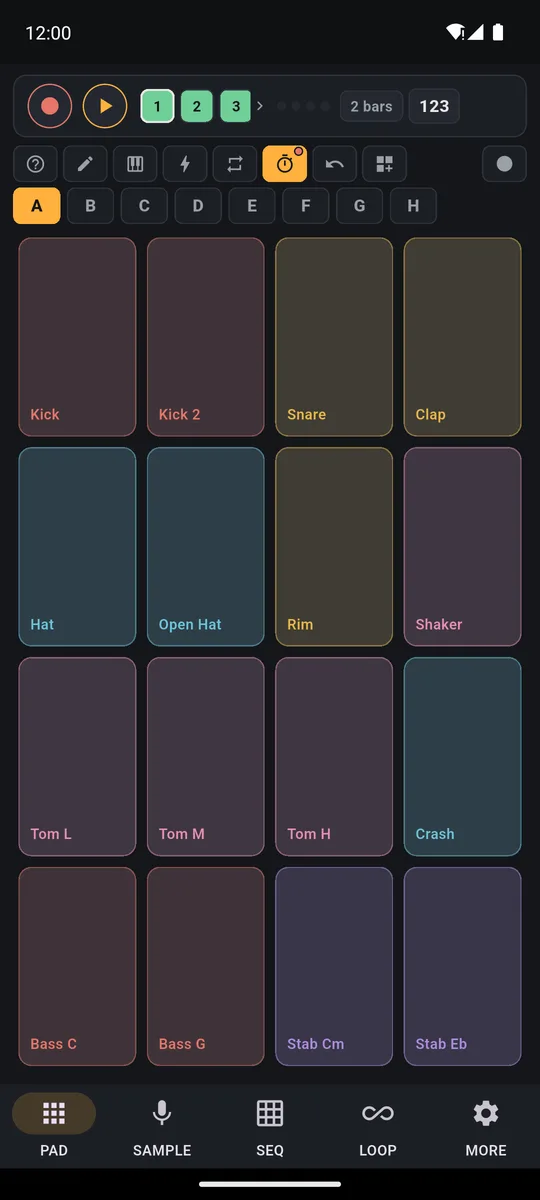
A MIDI keyboard or pad controller plugged into your phone lets you play PadLoop on real keys. Over USB, plug it in with the app open and it connects by itself; over Bluetooth, find it in MORE → MIDI. Every key plays a pad, so a different sound, like on a pad controller: how hard you press becomes dynamics, and the looper records it all in time. MIDI support is free forever.
Connect it and play
- Open PadLoop and plug in the controller with a USB cable, using the right adapter for your phone's port: with the app open it connects by itself. If it was already plugged in, tap its name in MORE → MIDI.
- For a Bluetooth MIDI controller, switch it on, tap Search Bluetooth devices in MORE → MIDI, then tap its name when it shows up.
- Press a key and check the Last note received line: if the note appears, the app hears you.
- Play: note 36 is pad 1 of bank A, and how hard you press becomes the velocity of the sound.
- If the keys don't land on the right pads, tap Map key → pad (MIDI learn), press the key and pick the pad.
The controller plays the same banks your finger can (a bank is a page of 16 pads, the letters A to H). A and B are free forever; the other six come with the full version, and during the 7-day trial your controller reaches all eight.
Want to play real notes from the keys? Load an instrument plugin (grand piano, marimba, strings or winds, part of the full version) onto a bank: its 16 pads are 16 notes of a major scale.
Got a controller gathering dust? Plug it in and play: 7 days with all 8 banks unlocked, then banks A and B stay free forever.On iPhone: in MORE tap the top row, then Start the free trial. It costs nothing and does not renew.
Get PadLoopWill your controller work? Here's what you need
Most modern USB MIDI controllers work without drivers: they're the "class compliant" ones. If yours needs software on a computer, your phone probably won't see it.
- USB-C phone: a cable from USB-C to your controller's port, or a USB-C adapter.
- Micro-USB phone: an OTG adapter.
- iPhone with a Lightning port: Apple's Lightning to USB adapter. USB-C iPhones work like Android phones.
- Bluetooth controller: it has to be a Bluetooth MIDI controller. Bluetooth headphones and speakers have nothing to do with it.
A large controller with lots of lights can draw more power than a phone supplies: use a powered USB hub.
USB and Bluetooth, in detail
USB. If the controller was already plugged in, MORE → MIDI lists it as Tap to connect: one tap and it says Connected. The Last note received line shows note, number and velocity, for example "C2 (36) · vel 98": it tells you what your controller sends.
Bluetooth. On Android the app asks for Bluetooth permissions: without them the search can't start. It runs for about fifteen seconds, and you always choose the connection yourself: the app never grabs the first device that comes along.
Which key plays which pad
PadLoop uses the standard pad-controller map: note 36 (C2) is pad 1 of bank A, and as notes go up they move through the banks.
| Notes | Pads |
|---|---|
| 36–51 | bank A, pads 1–16 |
| 52–67 | bank B, pads 1–16 |
| 68–83 | bank C |
| 84–99 | bank D |
| 100–115 | bank E |
| 116–127 | bank F, pads 1–12 |
Banks G and H are reachable with MIDI learn. A key on an empty pad stays silent. The scale Keyboard, which spreads one sound across all the pads, is played on the phone's screen instead.
Rolls, accents and ghost notes: hit strength becomes dynamics
With a controller it's how hard you strike: the note's strength (its velocity, in MIDI terms) becomes the volume of the hit. Rolls that build, ghost notes (very soft hits between the main ones) on the snare, accented hi-hats, without thinking about it.
If you record while you play, the hits go into the loop with their strength. Then you fix them square by square in the SEQ step sequencer: the drum machine page shows how.
MIDI learn: keys where you want them
Your controller sends different notes, or you want the pads in another order? In MORE → MIDI tap Map key → pad (MIDI learn):
- Press a key on your controller appears: hit the key or pad you want to map.
- Pick the target pad, in any bank from A to H.
- The app confirms, for example "Done: C2 now plays pad 5 of bank A".
The mapping stays saved even when you switch projects; Restore standard map deletes them all, after a confirmation.
Hands on your instrument, feet on the looper
MORE → MIDI → Foot switch & controller for the looper has six commands: Record / overdub, Play / stop, Undo last layer, Next track, Previous track and Mute the track.
Tap Assign next to a command and press the pedal: MIDI pedals sending Control Change, Program Change or notes all work (a note assigned to a command no longer plays its pad). Bluetooth page turners work straight away: Page Down records and Page Up undoes the last layer. There's a separate guide to the loop station with a pedal.
Good to know
- PadLoop receives MIDI, to play the pads and run the looper. It doesn't send it: for a computer or other apps you need another controller.
- PadLoop sets the tempo: it's the project's BPM (beats per minute), set with the slider or by tapping TAP. It doesn't follow the MIDI clock of an external drum machine.
- Listen on wired headphones or the speaker: Bluetooth headphones add 100-300 ms of delay. The controller itself can be Bluetooth.
Play the pads from real keys and record it all in the looper: 7 days with all 8 banks, 16 tracks and the real-note instruments, then it's one purchase.On iPhone: in MORE tap the top row, then Start the free trial. It costs nothing and does not renew.
Get PadLoopMIDI controller questions
Can I connect a MIDI keyboard to my phone?
Yes. With PadLoop a USB MIDI keyboard or pad controller connects by itself when you plug it in with the app open. Each key plays a pad, starting from note 36, which is the first pad of bank A.
Can I use my phone as a MIDI keyboard for my computer?
Not with PadLoop. It receives notes, Control Change and Program Change to play pads and run the looper, but it doesn't send MIDI out and doesn't sync to MIDI clock.
Does a Bluetooth MIDI keyboard work with iPhone and Android?
Yes, with Bluetooth MIDI controllers. In MORE → MIDI tap Search Bluetooth devices, the search runs for about fifteen seconds, then tap your controller's name to connect it.
What adapter do I need for a MIDI keyboard on iPhone or Android?
It depends on your phone's port: with USB-C a USB-C cable or adapter is enough, older micro-USB phones need an OTG adapter, and Lightning iPhones need Apple's Lightning to USB adapter. The controller must work without drivers.
Is my MIDI controller velocity sensitive in PadLoop?
Yes. The controller's velocity becomes the dynamics of the sound: a light hit plays soft, a firm hit plays full.
Does it work on an Android tablet?
Yes, just like on a phone: USB with the right adapter for the tablet's port, or Bluetooth if the controller is Bluetooth MIDI. You need Android 7 or later.
Can I control the looper with a MIDI foot switch?
Yes. In MORE → MIDI → Foot switch & controller for the looper you assign record, play/stop, undo, track change and mute to a MIDI pedal, a note or a Bluetooth page-turner pedal.
Last updated:


