
Virtual drums
Virtual drums on your phone, over a beat or your favorite song
Bank A is already a drum kit: you play it with your fingers, record it and it keeps looping. Then you put a real band under it, a song you love or your own electronic drum kit.
- Two full drum kits free, ready the moment you open the app
- Play over a Ready beat or a song with the drums taken out
- Electronic drum kits and MIDI pads over USB or Bluetooth
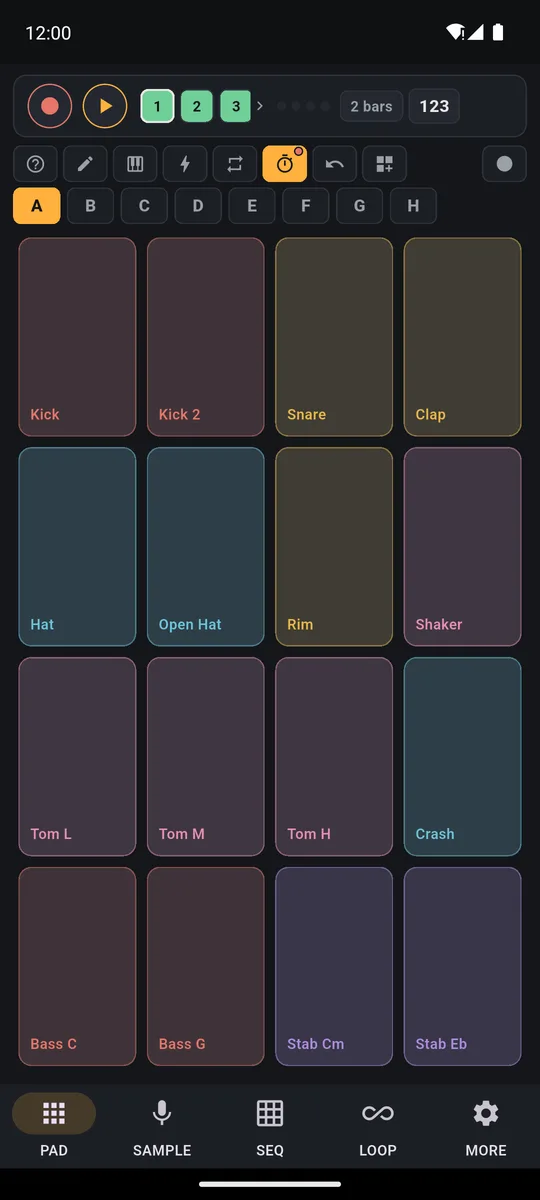
Drums on your phone are fun from the first hit. Open PadLoop and bank A (a page of 16 pads: the letters A to H) is already a kit, with kick, snare, hi-hats, three toms and a crash. The loud hit sits low on the pad, the light one higher up. Press REC and the groove loops by itself while you play over it.
Watch the video on its own page →
Transcript
- 0:00 How PadLoop works
- 0:02 Pick a track, tap REC and play the pads
- 0:05 What you play becomes a loop…
- 0:08 …and it keeps repeating, in time
- 0:12 Add a new layer on track 2
- 0:16 Track 3: chords
- 0:20 Track 4: bass
- 0:24 Four layers, all in time. No editing.
The kit is already set up: start playing
- Open PadLoop: bank A is already a drum kit, ready to play.
- Pick the speed: tap the BPM (beats per minute) in the top bar, or tap the beat on the TAP button.
- Tap number 1 in the top bar (each number is a track, one layer of your song) and press REC: after the count-in play kick and snare, and the loop comes round by itself.
- Press REC again on the same track and add the hi-hat on top.
- A layer went wrong? Tap the ↶ arrow: that one's gone, the others stay where they are.
Now that the loop is going, jam toms and crash over it without recording: that's the most fun part.
Sit down at the kit right now: banks A and B are two full drum kits to play and record, free forever.On iPhone: in MORE tap the top row, then Start the free trial. It costs nothing and does not renew.
Get PadLoopPlay over a beat, or over your own song
Playing alone gets old fast. Tap ⊞ (the menu for banks and Ready beats), load one of the 24 Ready beats (loading them is part of the full version, included in the trial) and press ►: drums, bass and chords start together. Then mute its drums: in the LOOP tab tap the square with number 1 (in the 6 complete ones it's square 2, Drums; in Afro house the drums are on squares 2 and 4). Now you're the drummer, over real bass and chords, on the beat's own pads or back on bank A.
Transcript
- 0:00 A Funk beat on your phone
- 0:02 Tap ⊞ and open Ready beats
- 0:04 Pick Funk: bank, tempo and swing load by themselves
- 0:06 Press ►: drums, bass and chords are already recorded
- 0:10 Play the other pads on top: they are tuned to the beat
- 0:19 Like it? Tap REC on a free track and keep it
Or take the drums out of a song you love and play over it on the pads, as the page on how to remove drums from a song explains.
Drummer and band take turns: tap square 1 again and the original drums come back. With Mute in time on in MORE, the switch always lands on the beat, even if you tap early.
More kits: from funk to world percussion
Bank B is a trap kit: kick, snare, clap, hi-hats, rim, crash and cowbell, with four 808s (the deep trap basses) tuned to different notes. Like bank A, it's already in the free version. Tap a letter to switch kit: the recorded loop keeps playing.
In the ⊞ menu you'll also find the Ready banks, 29 pages of pads already built. For drums there are Groove Box, Funk Machine, Breakbeat, House 95, Trap & Drill and World Percussion, with cajon, claves, agogo and timbales. Preview one with ►, then tap the name and pick where to load it.
Transcript
- 0:00 A classic 80s drum machine on your phone
- 0:01 Tap ⊞: the Drum Machines plugin adds three kits
- 0:07 ► next to Machine 80: hear a taste
- 0:11 Tap the name and load it onto a free bank: F
- 0:16 Kick, clap, hats, cowbell, congas, toms and 808 bass: play it with your fingers
- 0:24 Or program it square by square in the SEQ tab
Want a different kick? In the SAMPLE tab the Sound library has a whole drums category. Ready banks, the Sound library and plugins come with the full version. In MORE → Plugins you download the Drum Machines kit (48 sounds, including Machine 80 and Machine 90) and the Percussion kit (24 sounds, with congas, bongos and djembe).
Like a real kit, in short
Three things bring the kit to life. The finger drumming page goes deep on them, with drills.
- Soft and loud: it depends on where you tap the pad, full low down and light up high.
- The hi-hat: in banks A and B the closed one silences the open one, like real cymbals.
- Rolls: turn on ⟳ (it repeats the hit in time), hold a pad and the roll plays itself.
Hits a little off? Fix them in SEQ
While you record, every hit moves by itself to the nearest point of the grid: the loop comes out tight even if you were slightly off.
In the SEQ tab the groove you played becomes a grid: one row per drum, one column per moment of the loop. Switch squares on or off with your finger; hold one to set the Hit strength. Prefer to write the beat instead of playing it? The drum machine app page covers the whole sequencer.
Transcript
- 0:00 Program a beat, cell by cell
- 0:02 SEQ tab: add a pad, for example the Kick
- 0:05 Tap the cells: here each cell is an eighth note
- 0:07 Add the Clap on beats 2 and 4
- 0:11 Press play: the loop starts
- 0:14 Add hi-hats while it plays: you hear every change at once
- 0:20 The bass follows the kick: a complete beat
Got an electronic drum kit? Plug it into your phone
PadLoop receives MIDI notes over USB (plug the cable in with the app open and it connects on its own) or Bluetooth MIDI, from MORE → MIDI with Search Bluetooth devices. The harder you strike, the louder it plays.
With many electronic drum kits the kick and snare already land on the right pads. For toms and cymbals use Map key → pad: hit the drum pad, tap the app pad and the mapping stays saved. Your phone becomes the sound module for your kit, with whichever banks you like. Cables and details are on the MIDI controller with your phone page.
Good to know
- To play in time, use wired headphones or the speaker: Bluetooth adds 100-300 ms of delay, too much for drums.
- Load the beat first, then record your drums. A classic Ready beat takes over tracks 1 and 2, a complete one the whole looper (if there's something to lose, the app asks first): your groove goes on a free track after the beat's ones.
- Before recording, run Calibrate by tapping in MORE once, on the speaker: a few seconds, and hits land where you played them.
The two kits on banks A and B, 2 looper tracks and MIDI stay free forever. Ready beats, more kits and split songs make up the full version: your favorite tracks without drums, ready for you to play over them. You can use all of it during the 7-day trial, then it's a single purchase, €9.99 in Europe.
Be the drummer in a real band: during the 7-day trial you load every Ready beat and take the drums out of your favorite songs.On iPhone: in MORE tap the top row, then Start the free trial. It costs nothing and does not renew.
Get PadLoopQuestions about virtual drums on a phone
Can you play drums on your phone?
Yes. In PadLoop bank A is already a full kit: you play it with several fingers, soft or loud depending on where you tap, and record the groove in a looper that keeps going round.
Is there a free virtual drums app?
PadLoop stays free forever with banks A and B, which are two full drum kits, plus 2 looper tracks, one project and MIDI, with no ads. For the first 7 days you get everything else too.
Can I play drums along to a song?
Yes, two ways: load a Ready beat and mute its drums, or take the drums out of one of your tracks with Split a song and play over it on the pads. Both belong to the full version; the 7-day trial includes them.
Can I connect an electronic drum kit to my phone?
Yes, if it sends MIDI notes over USB or Bluetooth. With many kits the kick and snare already land on the right pads; toms and cymbals you sort out with Map key → pad, and the mapping stays saved.
Does the virtual drum set respond to how hard I hit?
Glass can't measure pressure, so PadLoop uses where you tap: low is a full hit, higher up is light. With an electronic drum kit it's how hard you strike that counts.
Are there other drum kits?
Yes. The 29 Ready banks include Groove Box, Funk Machine, Breakbeat, House 95, Trap & Drill and World Percussion, and the Drum Machines and Percussion plugins add more. They belong to the full version, included in the 7-day trial: a different kit for every groove.
Last updated:


