
Make a song
How to make a song on your phone, played and sung by you
A beat underneath, your voice on top, verse and chorus trading places on time. No AI writes it for you: you play it and sing it, and at the end you have a file to share.
- A Ready beat, or one you play yourself on the pads
- Vocals from the mic, in time with the loop
- Verse and chorus with Mute in time, then a WAV or MP3 file
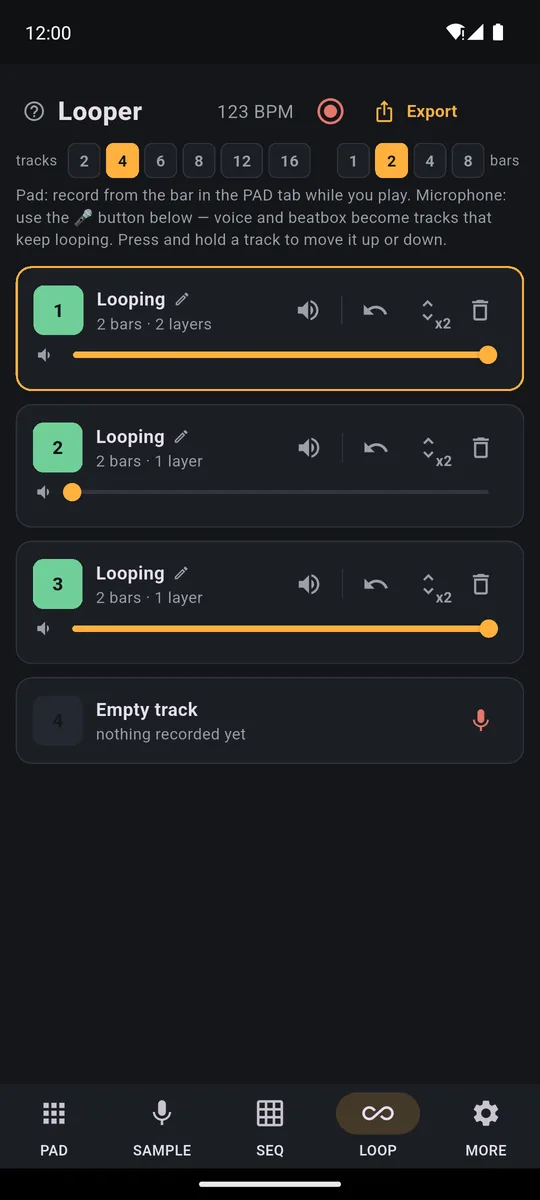
To make a song on your phone with PadLoop, set up a beat, sing the chorus and the verse with the 🎤 on two different tracks, and switch them in and out on time. Then capture everything with Record performance. One limit to know right away: each vocal recording lasts at most 8 bars, so you sing the verse in pieces. It's your song: you play it and you sing it.
Your song in six steps
- Set up the beat: load a classic Ready beat (drums on track 1, bass and chords on track 2) or play it yourself on the pads. Tracks are the layers of the song: the numbers at the top.
- At the top of the LOOP tab choose 8 bars and, if needed, change the BPM (the tempo, in beats per minute) now: after the first vocal the tempo locks.
- Plug in wired headphones, tap the 🎤 on track 3, choose With the beat in the background and sing the chorus.
- Tap the colored square of track 3 to mute it, then sing the verse with the 🎤 on track 4.
- In MORE, set Mute in time to End of loop: verse and chorus will always switch in and out on time.
- Press Record performance in the LOOP tab and play the song by turning tracks on and off; when you stop, the share sheet opens.
Ready beats, tracks 3 and up, and Record performance are part of the full version: during the 7-day trial you can use all of them.
Sing your chorus over a Ready beat and capture the whole song: the 7-day trial gives you 16 tracks, Record performance and export.On iPhone: in MORE tap the top row, then Start the free trial. It costs nothing and does not renew.
Get PadLoopFirst the beat: ready-made or played by you
The fast way. In the PAD tab, tap ⊞ (the menu for banks and Ready beats) and open Ready beats. Preview each style with ►, tap the name, then press ► at the top: drums, bass and chords are already playing. After you load a classic beat the selected track is still track 1: to record over it, use track 3 and up.
Your own way. On bank A (a bank is a page of 16 pads), press REC and play kick and snare; the loop restarts on its own. Then add hi-hats, bass and chords, one layer at a time. The full walkthrough is in the guide to making beats on your phone.
A classic Ready beat loads and ► starts it: drums on track 1, bass and chords on track 2. The free tracks are left for your vocals.
Pick the tempo before you sing. A slow song sits well around 80-90 BPM (Lo-fi is 82, Hip hop 90), a dance song around 120 (Disco, House). Once a track holds your voice, the BPM locks.
Verse and chorus inside a looper
In PadLoop all the tracks loop together. You build the song by deciding which tracks play and when: that's how it's done live with a loop station.
- One part, one track. Chorus on track 3, verse on track 4. Name each track by tapping its name: "chorus", "verse 1".
- Long verse? At 90 BPM, 8 bars last about 21 seconds. Split the verse across two tracks: at the end of the loop, turn on the second and mute the first.
- Muting is your arrangement. Tap the colored square with the track number to silence it without erasing it. With Mute in time set to End of loop, the change lands on the next loop even if you tap a little early. While it waits, an hourglass shows.
- A longer chorus. The x2 button doubles a recorded loop, up to 16 bars: then you sing a variation on top.
- The break. Mute the drums for one loop before the chorus, then bring them back: you'll hear the difference.
If you can't see track 4, choose how many tracks to show at the top of the LOOP tab: up to 16 with the full version.
Vocals that sound like a record
A single vocal sounds bare. Double it: tap the red mic on the same track and sing the line again, and the two takes stack. If the second one comes out worse, ↶ removes just that layer. Harmonies go on another track, with their own volume, so they come in only on the chorus.
Singing in time takes two things: wired headphones and the microphone delay measurement, which the app offers the first time (about ten seconds of clicks, using the speaker). You can run it again in MORE with Calibrate latency (click test). All the details are on the page about how to record vocals over a beat.
From jam to finished song
There are two ways to get the song out of your phone:
- Record performance captures what the app plays while you perform, up to 30 minutes, effects and mute changes included. That's the whole song, with verse and chorus in the order you chose. When you stop, the WAV file opens in the share sheet.
- Export, in the LOOP tab, creates a clean MP3 or WAV of the loops, with 1, 2 or 4 repeats. Muted tracks are left out. With Separate tracks you get one WAV per track, all in a zip, if you want to finish the mix on a computer.
Before Record performance, run through the song a couple of times: decide how many loops the verse lasts and when the chorus comes in. Live mistakes stay in the file, like at a gig. The rest of the looper's tools are on the 16-track looper page.
Free or full version?
Free forever, you get 2 tracks, microphone included, and one project: the beat on track 1, your voice on track 2. That's enough for a demo, so you never lose an idea, and the project stays saved on your phone.
For a real song, with verse, chorus, doubles and harmonies, you need more tracks and a way to share it. Ready beats, up to 16 tracks, Record performance and export are part of the full version: one purchase, €9.99 in Europe, no subscription. Every item is explained on the price and FAQ page.
The song is yours
PadLoop's sounds, Ready beats and Ready banks can be used in your music, released or not; they can't be redistributed as standalone sounds. If your song includes parts of other people's tracks, you need their rights to release it.
Good to know
- Record first, then perform. Record performance doesn't turn on the microphone: your voice is included if it's already on a track.
- Natural vocals. PadLoop doesn't correct pitch. MORE has reverb, tempo-synced echo and a filter on the whole song; export saves the clean loops, so to keep those effects use Record performance.
- Wired headphones. With Bluetooth ones the beat reaches you late and your vocal can end up off time.
- The tempo locks as soon as a track holds vocals: to change it you'd have to clear the microphone tracks.
Had that chorus stuck in your head for weeks? Record it today: 7 days with everything unlocked, then one purchase or the free version.On iPhone: in MORE tap the top row, then Start the free trial. It costs nothing and does not renew.
Get PadLoopQuestions about making a song on your phone
Can you make a song using only your phone?
Yes. In PadLoop you set up the beat, record your vocals with the phone's microphone, arrange verse and chorus and capture everything in a file. No computer needed.
How do I record a song on my phone?
Put the beat on the first looper tracks, then tap the 🎤 on an empty track and sing, ideally with wired headphones. Each part goes on its own track, so you can redo it without touching the others.
How long can a sung part be?
As long as the loop: 1, 2, 4 or 8 bars. At 90 BPM, 8 bars last about 21 seconds, so you split a long verse across two tracks that take turns.
Does AI make the song?
No. PadLoop doesn't compose music or write lyrics: you pick or play the beat, and the voice is yours. It's a way to record your own song, not to generate one.
How do I save my song as an MP3?
Export in the LOOP tab creates an MP3 or WAV of the loops; Record performance captures the whole song as a WAV, the way you play it, with verse and chorus. Both are part of the full version, unlocked during the 7-day trial.
Can I make a song for free?
A demo, yes: the 2 free tracks are enough for the beat on track 1 and your voice on track 2, and the project stays saved. For more parts, Ready beats and the final file you need the full version, a one-time purchase of €9.99 in Europe.
Can I release a song made with PadLoop?
Yes: PadLoop's sounds, Ready beats and Ready banks can be used in your music, released or not. You can't redistribute them as standalone sounds, and parts taken from other people's songs require their rights.
Last updated:


