
Remix a song
How to remix a song, right on your phone
Take a track you have on your phone, pull out the vocal and play it over a completely new beat, whenever you choose. Then add layers, effects and chops until it's yours.
- Vocals, drums, bass and the rest split on your phone
- The vocal on a pad, to play whenever you want
- A new beat underneath, recorded in layers
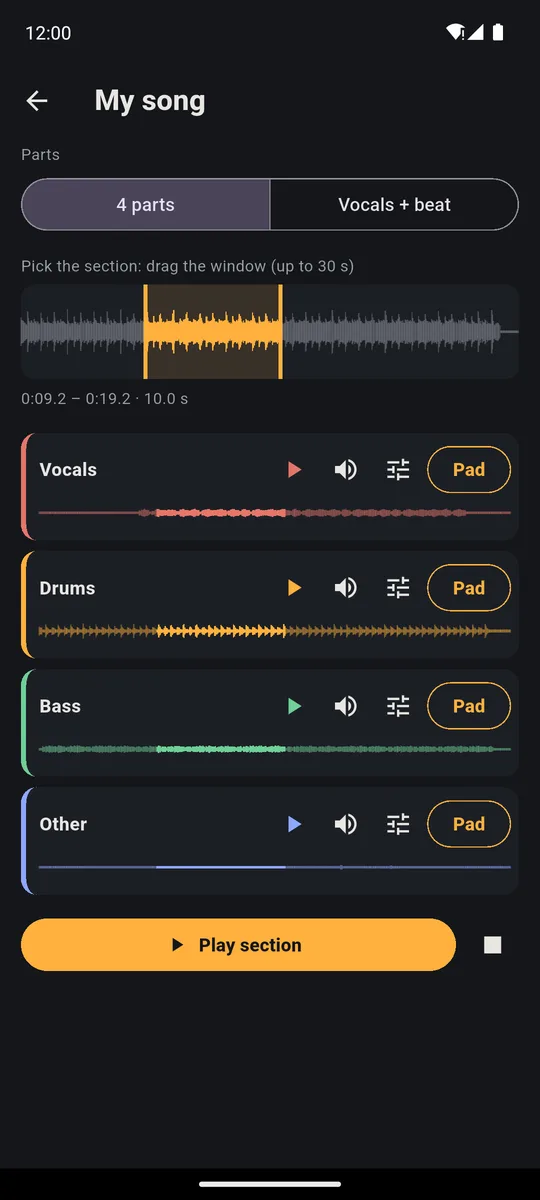
A remix on your phone takes three moves in PadLoop: load a fresh beat, split the track and put the vocal on a pad. The vocal comes in when you decide, and you record it in layers over the beat. Split a song is part of the full version, and you can try it free for 7 days. All you need is an audio file saved on your phone; you work with the song in sections of up to 30 seconds.
Watch the video on its own page →
Transcript
- 0:00 Pick any song from your phone
- 0:02 It is split right on the phone, offline
- 0:05 4 parts: vocals, drums, bass and the rest
- 0:10 Just the vocals
- 0:16 Or just the beat
- 0:21 Put the parts on your pads
- 0:24 …and remix the song live
Your remix in four moves
Order matters: a classic Ready beat takes over tracks 1 and 2 (a complete one would clear the whole looper), so it goes in first.
- In the PAD tab tap ⊞ (the menu for banks and Ready beats), then Ready beats, and tap the name of a classic beat (the 18 below the 6 complete ones): that's your new beat, on tracks 1 and 2.
- In the SAMPLE tab tap Split a song and pick a track from your phone; the first time, PadLoop has you download the Stem split plugin.
- Once the song is split, move the window onto the chorus and tap Pad on the Vocals row and pick a pad: PadLoop confirms the bank and pad number.
- Press ► at the top, play the vocal pad over the beat and, when it feels right, tap track 3 and press REC to record it into the loop.
Each track is one layer of your piece, and the numbers at the top tell them apart. Split a song, Ready beats and the tracks after the second all belong to the full version: the pieces of any song plus room to rebuild it. They're included in the 7-day trial, so you can finish your first remix before you decide.
Put the vocal from your favorite song over a new beat: song splitting, Ready beats and extra tracks are all included in the 7-day trial.On iPhone: in MORE tap the top row, then Start the free trial. It costs nothing and does not renew.
Get PadLoopChop the song your way
The Pad button puts the whole window you picked on one pad. Often one piece per pad works better. Tap Edit (the sliders icon) next to a part and the editor opens:
- Split on hits finds the drum hits and puts them on consecutive pads, up to sixteen. The original drums replay in a brand-new order.
- Chop by hand is for vocals: while the sound cycles, tap CUT at each point you want to separate. A line becomes one word per pad.
Then switch on the pencil (with it on, pads open their settings instead of playing) and tap a pad: Pitch from -12 to +12 semitones, Reversed, Filter, tempo-synced Echo and Lo-fi. One word reversed, or dropped an octave, is often all it takes to make the remix sound like yours.
Vocal and beat at the same speed
The song has its own tempo, the Ready beat another. If they don't match, the vocal drifts off the beat. The fix lives on the vocal pad: open it with the pencil, under Tempo choose In time with the project, then tap Detect. PadLoop finds the section's BPM (beats per minute) and from then on the vocal follows your beat, without turning into a chipmunk. If the number comes out double or half, use ÷2 and ×2.
Want to keep the song's tempo instead? Tap the BPM in the top bar and enter the number Detect found: the beat adapts to the vocal.
Build the track layer by layer
Every time you press REC on a track, what you play goes into the loop and comes round again by itself. On the tracks after 3, add what's missing: your own drums from the banks, a new bass line on the Keyboard, a phrase of the original drums chopped on hits. You have up to 16 tracks.
The Ready beat loops over 2 bars (each bar counts four beats: 1, 2, 3, 4). If the vocal line is longer, pick 4 or 8 bars at the top of the LOOP tab before you press REC.
In the LOOP tab, tap the square with a track's number to mute and unmute it: drop the drums, leave the vocal alone, then bring everything back. With Mute in time (in MORE) the switch always lands on the right beat. A layer gone wrong? The ↶ arrow removes just the last one. The other tools are on the looper app page.
Effects under your finger, and a remix of the remix
Switch on the bolt (effects you hold down) and the grid turns into eight effects: Filter down, Filter up, Echo, Reverb, Pitch down, Lo-fi, Flanger and Robot. Let go and the sound is clean again. With ⟳ (repeats the hit in time), a held pad becomes a roll: instant vocal stutter.
Transcript
- 0:00 Note repeat and live effects
- 0:02 A beat is playing (here House, from the Ready beats)
- 0:05 ⟳ Repeat the hit: pick 1/16 and hold a pad
- 0:09 1/32 on the snare: the roll before the new loop
- 0:11 ⚡ Live effects: 8 effects to hold down
- 0:13 Filter down: hold it and the sound closes up
- 0:18 Echo on the last hit
- 0:19 Pitch down, then Robot
- 0:23 Lift your finger and the sound is clean again
When the loop feels right, Resample the app (in the SAMPLE tab, a full-version feature) records up to 60 seconds of whatever PadLoop is playing and hands it back as a single sound. Split it on hits again and you have material for the next remix.
Transcript
- 0:00 Resample the app: what plays becomes a new sound
- 0:01 SAMPLE > Resample the app: recording starts
- 0:04 On PAD, play whatever you like: here two loops of a House beat
- 0:16 Back on SAMPLE, tap STOP
- 0:20 Here is the sample, already trimmed to the part that plays
- 0:28 Split on hits: 16 pieces on bank F
- 0:33 In order, the beat comes back
- 0:40 Reshuffled: the same beat, played another way
More sound sources, from the mic to files, are on the page about how to sample your voice and any sound.
From your phone to a file people can hear
In the LOOP tab, Export makes an MP3 or WAV of the loops, with 1, 2 or 4 repeats. Separate tracks gives you one WAV per track, if you want to finish the mix on a computer. The Lo-fi and Filter set on a single pad stay in the file. To capture the remix as you play it live, hold-down effects included, use Record performance, up to 30 minutes. Both belong to the full version and are included in the trial: your remix ready to post or send.
Good to know
- Want a piece to end up in the recording? Leave it on One-shot (it plays once per tap). Loop is handy live, but what cycles by itself isn't recorded: to keep it, use Record performance.
- What splitting needs. An audio file on your phone (not streaming), at least 3 GB of RAM on Android or 4 GB on iPhone, and the 79 MB Stem split plugin. How to get clean parts is on the Split a song page.
- Rights. A remix you listen to at home is fine; to publish it you need the rights to the original track, or start from your own songs.
Finish the remix and save it as MP3 or WAV: after the trial you keep it all with one purchase, no subscription.On iPhone: in MORE tap the top row, then Start the free trial. It costs nothing and does not renew.
Get PadLoopRemixing a song on your phone: questions
Can you remix a song on your phone?
Yes. In PadLoop you split the track into vocals, drums, bass and the rest, put the vocal on a pad and play it over a new beat, recording everything in layers on the looper. No computer needed.
How do I separate the vocals from the beat for a remix?
With Split a song, in the SAMPLE tab. The Stem split plugin runs on your phone, with no internet, and in a few minutes gives you vocals, drums, bass and the rest.
How do I get the vocal in time with my beat?
Open the vocal pad with the pencil, under Tempo choose In time with the project, then tap Detect. From then on the vocal follows your beat's speed and its pitch doesn't go up or down.
Which songs can I use?
Audio files saved on your phone, such as MP3, WAV, M4A, FLAC or OGG, up to 6 minutes. Tracks from streaming apps can't be split.
Which phones does it work on?
Splitting a song needs at least 3 GB of RAM on Android and 4 GB on iPhone, plus 300 MB free. The rest of the app works from Android 7 and iOS 15.
Can I post my remix online?
For study, practice or listening at home you can use any track. To publish a remix you need the rights to the original song, or start from your own tracks or ones with a license that allows it.
Is there a free app to remix songs?
PadLoop gives you 7 days with everything unlocked. After that, Split a song, Ready beats and export are part of the full version: a single purchase, €9.99 in Europe, no subscription.
Last updated:


