
Loop station with pedal
A loop station in your phone, run with your feet
PadLoop's looper has up to 16 tracks in sync. Add a foot pedal and you record, overdub, undo and mute without taking your hands off your instrument.
- Bluetooth page turners ready out of the box: record and undo
- USB and Bluetooth MIDI pedals on six commands
- Mute in time and per-layer undo, from the pedal too
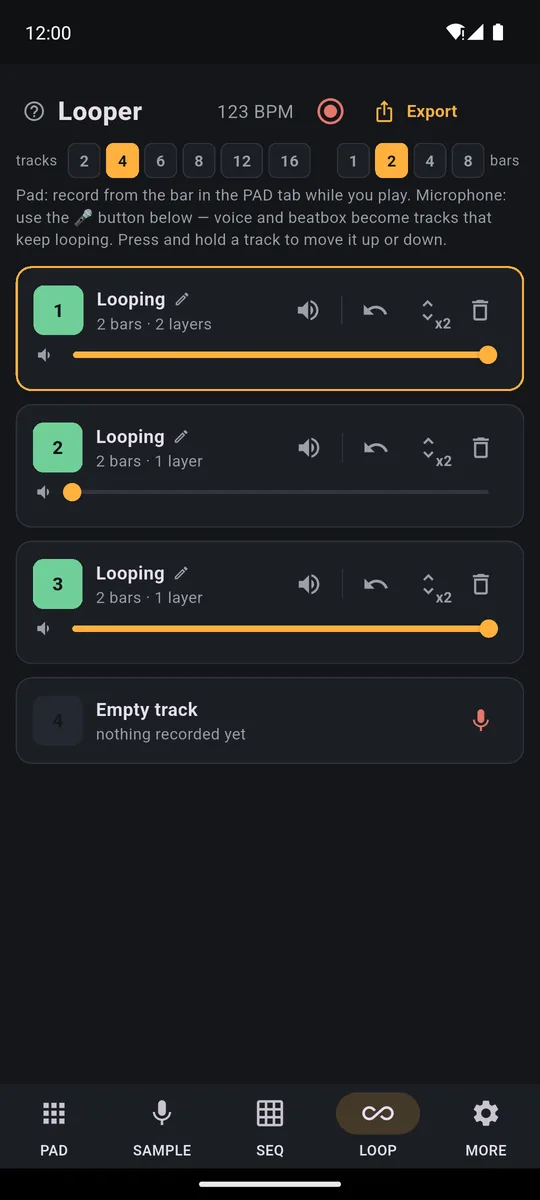
PadLoop turns your phone into a 16-track loop station (tracks are the layers that play together): record a phrase with your voice, guitar or the pads and stack layers on top, always in time. With a Bluetooth page turner you work with your feet: Page Down records, Page Up undoes the last layer. Only the first mic layer starts on screen. The looper, pedal included, is free forever on 2 tracks.
Watch the video on its own page →
Transcript
- 0:00 How PadLoop works
- 0:02 Pick a track, tap REC and play the pads
- 0:05 What you play becomes a loop…
- 0:08 …and it keeps repeating, in time
- 0:12 Add a new layer on track 2
- 0:16 Track 3: chords
- 0:20 Track 4: bass
- 0:24 Four layers, all in time. No editing.
From pedal to first loop
- Connect the pedal: a Bluetooth page turner from your phone's Bluetooth settings, a MIDI pedal with a USB cable while the app is open, or with Search Bluetooth devices in MORE → MIDI.
- Check it's heard: in MORE → MIDI open Foot switch & controller for the looper and press the pedal, the Last heard line should show it. If it doesn't send Page Down and Page Up, tap Assign next to a command and press the pedal.
- Record the first loop: set the BPM (the tempo, in beats per minute) and the loop length. With pads, start from the REC pedal; for vocals or guitar the first layer starts on screen, with the mic button on an empty track. From then on, your feet do the rest.
- Build it with your feet: overdub with the REC pedal, remove mistakes with the Undo pedal and move between tracks with Next track.
- Bring parts in and out with the Mute the track pedal, with Mute in time switched on in MORE.
Pair your pedal and record your first loop with your feet: free on 2 tracks, and the 7-day trial gives you all 16.On iPhone: in MORE tap the top row, then Start the free trial. It costs nothing and does not renew.
Get PadLoopNo pedal? The looper works the same from the screen: the pedal just keeps your hands on your instrument. How it works layer by layer is on the 16-track looper page.
Which pedal works?
- Bluetooth page turners. Sheet-music pedals for phones send Page Down and Page Up, like a keyboard: PadLoop is ready for them. If yours sends arrow keys, you map them by hand.
- Bluetooth camera remotes. Many send the Volume Up key, and that can be mapped. Inside PadLoop that key will no longer change the volume until you remove it: the app tells you.
- MIDI pedals and controllers. Notes, Control Change or Program Change: all of them work. A continuous pedal, like a sustain or expression pedal, counts as one press each time you push it down.
One pedal does one thing, while a command can have several pedals: Page Down and a MIDI key together, for example. The x next to a command removes its pedals, and Restore the defaults puts everything back to Page Down and Page Up, after asking you to confirm. If the USB controller was already plugged in when you opened the app, tap it in the list in MORE → MIDI.
What the six commands do
- Record / overdub follows the rules of the REC button. On an empty track it records pads; pressed while recording, at the end of the loop it keeps going on top instead of stopping. On a mic track it records from the mic again, on top.
- Play / stop starts and stops playback.
- Undo last layer removes the last pass on the selected track, without stopping the loop. While recording it throws away only the take in progress.
- Next track and Previous track step through the tracks in view, wrapping from the last back to the first.
- Mute the track silences or brings back the selected track, following Mute in time.
Two safety rules. The last remaining layer of a track can only be removed on screen with ↶ when the confirmation is on (it is by default): a stray stomp never wipes a whole track. And the first vocal or guitar layer starts from the mic button on screen, where you choose whether to hear the beat in the background.
What does a guitar and vocal set look like?
Track 1: tap the mic, pick With the beat muted and record the chord progression. Track 2: the mic again, and record an arpeggio or some percussion on the guitar body. From here your hands stay on the instrument: the REC pedal adds layers, Undo removes the bad one, and mute drops the arpeggio out for the verse and back in for the chorus.
Transcript
- 0:00 In the LOOP tab you mute tracks, in time
- 0:04 …the bass too
- 0:08 Drop!
- 0:11 Hold an effect while it plays: filter, echo…
- 0:19 Note repeat: hi-hat rolls, in time
- 0:23 Record everything you play and share it as audio
Playing pads? The REC pedal arms the empty track and your fingers never leave the grid.
Before you go on stage: name your tracks ("chords", "arpeggio", "vocals"), set Mute in time to 1 bar or End of loop, and decide the count-in in MORE: one bar of click by default, two bars or none if you prefer.
Does it work on iPhone too?
On Android both Bluetooth page turners and MIDI pedals, USB and Bluetooth, work. On iPhone PadLoop also takes MIDI controllers and pedals, USB and Bluetooth. Bluetooth page turners on iPhone are worth testing: open Foot switch & controller and press the pedal. If it shows up under Last heard, it works.
Record your set
Record performance captures up to 30 minutes of what the app plays, with or without the click, mistakes included: like recording the gig. If you'd rather have the clean track, Export in the LOOP tab makes an MP3 or WAV of the loops, or one WAV per track. Both are part of the full version, along with all 16 tracks: the gig recorded and the clean song ready to send. They're included in the 7-day trial, so you can record a whole set before you decide.
Good to know before the gig
- Test the pedal at home: open Foot switch & controller and check it shows up under Last heard.
- The pedal only drives the main screen. Open the Guide or the settings and it goes quiet, so a real keyboard never arms a recording by accident.
- With two pedals, use Record and Undo; with four, add Next track and Mute the track.
- If the audio drops out, switch on Safe audio mode in MORE and restart the app.
For headphones, mic and calibration, see the guide to live looping with guitar and vocals.
Try a whole set hands-free: 7 days with 16 tracks, Record performance and export included, then it's one purchase.On iPhone: in MORE tap the top row, then Start the free trial. It costs nothing and does not renew.
Get PadLoopLoop station and pedal questions
Can I use my phone as a loop station?
Yes. PadLoop has a looper with up to 16 tracks playing together in sync: record a loop, it plays back on its own and you stack layers on top from the pads or the mic. With a foot pedal you run it with your feet.
Is there a free looper pedal app?
PadLoop is free to download and the looper, mic and pedal included, works free forever on 2 tracks. A single one-time purchase, no subscription, opens all 16 tracks for full arrangements, and you can use them during the 7-day trial.
Do I need a pedal at all?
No. Without one you do everything on screen: REC, the mic button, ↶ to undo and the track's colored square to mute. The pedal is for when your hands are on your instrument.
What foot pedal do I need?
A Bluetooth page-turner pedal works as soon as it's connected: Page Down records, Page Up undoes the last layer. MIDI pedals and controllers, USB or Bluetooth, work too, mapped in Foot switch & controller.
Which commands can the pedal control?
Six: Record / overdub, Play / stop, Undo last layer, Next track, Previous track and Mute the track. You can map more than one pedal to the same command.
Can I start a vocal recording from the pedal?
The first vocal or guitar layer on a track starts from the mic button on screen. From then on, on that track, the REC pedal records from the mic again, on top.
Does it work on iPhone?
MIDI pedals and controllers, USB and Bluetooth, are supported on Android and iPhone. For a Bluetooth page turner on iPhone, test it on the Foot switch & controller page: the Last heard line tells you right away whether the app receives it.
Does a Bluetooth camera remote work?
Often yes, because many send the Volume Up key: map it with Assign. Inside PadLoop that key will no longer change the volume, until you remove it with the x.
Last updated:


