
16-track looper
A real looper on your phone, layer after layer
Hit REC, play a loop and PadLoop keeps it going. Stack bass, chords and vocals on top: up to 16 tracks playing together, always in time.
- Up to 16 tracks, 2 in the free version (microphone included)
- Undo the last layer without stopping the music
- Comes out tight even if your timing isn't, then save it as MP3 or WAV
Watch the video on its own page →
Transcript
- 0:00 How PadLoop works
- 0:02 Pick a track, tap REC and play the pads
- 0:05 What you play becomes a loop…
- 0:08 …and it keeps repeating, in time
- 0:12 Add a new layer on track 2
- 0:16 Track 3: chords
- 0:20 Track 4: bass
- 0:24 Four layers, all in time. No editing.
PadLoop turns your phone into a looper app: hit REC, play a loop on the pads and it repeats on its own, locked in time. Then stack bass, chords or vocals on top, one part at a time, on up to 16 tracks (the layers of your song). Five minutes later your own track is playing on repeat, on Android or iPhone, even offline.
Your first loop, start to finish
- In the LOOP tab, pick the loop length: 1, 2, 4 or 8 bars (a bar is a group of four beats: 1, 2, 3, 4; two bars is plenty to start).
- In the PAD tab, hit REC (the red dot at the top) and wait for the GO 4, 3, 2, 1 count-in.
- Play the pads. When the loop ends, recording closes and the loop starts again by itself.
- Pick another track with the numbers at the top and hit REC again. No count-in this time: the track blinks and starts on its own at the top of the next loop, already in sync.
- When you like it, tap Export in LOOP and choose MP3 or WAV.
Two tracks, microphone included, stay free forever. All 16 tracks, export and Record performance come with the full version: a whole song, not just a loop, as a file to share. You get them free for 7 days, so you can build one before you decide.
The metronome only plays during the count-in and the recording, then goes quiet so you can listen back in peace.
Record your first loop in five minutes: 7 days with all 16 tracks unlocked, then 2 stay in the free version.On iPhone: in MORE tap the top row, then Start the free trial. It costs nothing and does not renew.
Get PadLoopMessed up a layer? Remove it without stopping the music
Record again on the same track and the new hits are added to the old ones. Kick first, then snare, then hi-hats: all on one drum track.
When a take goes wrong:
- the ↶ arrow removes only the last layer and the loop keeps playing; earlier layers stay
- while recording, ↶ (or holding REC) throws away just the recording in progress
- ■ stops playback and keeps what you played
- the bin clears the whole track
Transcript
- 0:00 Undo the last layer: a mistake goes with one tap
- 0:01 REC on track 3: claps on 2 and 4
- 0:07 The loop ends and the layer stays. REC again for another layer
- 0:11 This layer came out wrong...
- 0:18 ↶ Undo: the last layer is gone, the first one stays
- 0:21 Undo one layer at a time, even while it plays
Want to keep overdubbing without stopping? Hit REC while you are recording: at the end of the loop it carries on instead of closing.
Rehearsal-room tip: record drums in several short passes. If one comes out sloppy, remove it with ↶ and redo just that one.
A whole band in 16 tracks
Each track is a loop that repeats, and they all play together. At the top of the LOOP tab you choose how many to show, from 2 to 16.
- Name each track by tapping it: "drums", "bass", "choir".
- Reorder them by pressing and dragging: the loop keeps playing.
- Balance the levels with each track's slider.
- Double the loop with x2 and overdub a variation twice as long: you record up to 8 bars, and x2 takes you to 16.
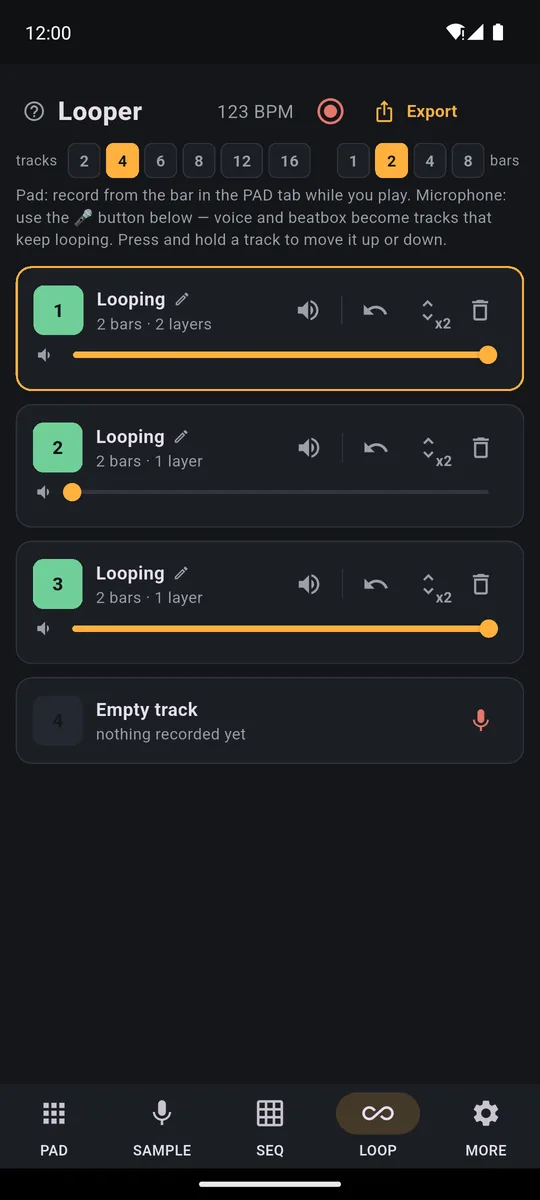
Each row is a track: name, bars and layers, volume, mute, undo, x2 and the bin. At the top you choose how many tracks to show and how long the loop is.
Transcript
- 0:00 Mix your loops in the LOOP tab
- 0:02 A House beat is playing
- 0:05 LOOP tab: one row per track, with volume, mute, undo, x2 and delete
- 0:08 Turn a track down while it plays...
- 0:12 ...and bring it back up
- 0:16 Mute the drums: it waits for the bar, so it is always in time
- 0:21 Tap again and they come back in
A track can hold pad hits or microphone audio: vocals, guitar, beatbox. See live looping with guitar and vocals for how it works, and the loop station with a pedal page if you want to run it all with your feet.
Start with drums and bass: they fit on the first two tracks, the ones already in the free version.
Not perfectly in time? The loop still comes out tight
By default pad hits snap to the nearest 16th note: you play "almost" in time and the loop comes out clean. You can change your mind afterwards, too: every hit remembers how you really played it, so if you switch the grid off or change it later, the hits move by themselves.
Want a looser groove? Add swing (every other note lands a touch late, so the beat sways): 50% is straight, 54-58% feels human, 66% is a full triplet feel.
Transcript
- 0:00 Swing: make the groove bounce
- 0:02 A House beat is playing, straight
- 0:05 In MORE, under the grid, there is Swing
- 0:08 More swing: the off-beat 16ths land later and the groove bounces
- 0:15 All the way left: straight again, tight
- 0:23 Change it whenever you like, even while it plays
The details, if you want them: pick the grid in MORE (8ths, 16ths, triplets, 1/32, or off). If the loop sounds different from how you played it, pick a finer grid: it moves your hits less. Swing works on 16th notes, so use it with the 16th grid. To fix one hit at a time there's the SEQ tab: switch steps on and off and set the strength of every hit.
Bring parts in and out live
Mute silences a track without erasing it: drop the drums out, then bring them back for the chorus. Tap the colored square with the track number on the left: it is big and far from the buttons that delete.
Your finger never hits the exact moment? In MORE, under Mute in time, choose when it fires: Now, 1 beat, 1 bar or End of loop. While it waits an hourglass shows (tap it to cancel); ■ fires it at once.
Change the tempo without redoing anything
Tap the BPM (beats per minute) in the top bar and change it with the slider or by tapping TAP. Tracks played on the pads follow the new tempo on their own.
Sampled a drum break from a file? Turn on the pencil (it edits the pads), tap the pad and switch on In time with the project. Enter the sample's BPM or tap Detect (if it comes out double or half, use ÷2 and ×2). The loop follows the project without changing pitch, and sounds best if you don't change the tempo by more than 30%.
From your phone to a file you can share
Export in the LOOP tab makes a clean MP3 or WAV with 1, 2 or 4 repeats of the loop. Separate tracks gives you one WAV per track in a zip, to finish the song on a computer. The level is what you hear in the app; muted tracks are left out.
Transcript
- 0:00 Export your track
- 0:02 Your track is ready (here a Funk Ready beat)
- 0:04 LOOP tab: your tracks, then Export
- 0:10 Pick the format: MP3, WAV or separate tracks
- 0:11 How many times to repeat the loop: 1, 2 or 4
- 0:13 Done: share the file or save it wherever you like
To capture everything you play live instead, mistakes and all, there's Record performance: up to 30 minutes, with or without the click.
Good to know
- Want the effects in the file? Export saves your loops clean, exactly as recorded: the hold-down effects on the bolt, the global effects in MORE and Loop-mode pads stay out. To keep them, use Record performance.
- Set the tempo before you sing. Once a track holds microphone audio, the BPM is locked and a padlock shows next to it.
- You can turn the confirmations off. The app asks before deleting; if that slows you down, switch off "Ask before deleting" in MORE.
Build a whole track layer by layer and save it as an MP3: export and all 16 tracks are included in the 7-day trial, then it's one purchase.On iPhone: in MORE tap the top row, then Start the free trial. It costs nothing and does not renew.
Get PadLoopLooper app questions
What is a looper app?
It is a recorder that repeats what you just played, over and over. You record one loop, it keeps playing, and you add more parts on top one at a time until you have a full track.
Is there a free looper app for Android?
PadLoop is a free download and two looper tracks stay free forever, microphone included. During the 7-day trial you get all 16; after that, a single purchase unlocks them for good, with no subscription and no ads.
Does it work on iPhone too?
Yes: Android 7 or newer and iPhone with iOS 15 or newer. The looper also works offline.
Can I use it as a looper for guitar or vocals?
Yes. Every empty track has a microphone button: sing or play and the recording becomes a loop in time with the rest. Use wired headphones for a clean result.
Can I control it with my feet, like a loop pedal?
Yes. Bluetooth page-turner pedals work right away: page down records, page up undoes the last layer. In MORE → MIDI → Foot switch & controller you can also map play/stop, track change and mute.
What if I mess up a layer?
Tap the ↶ arrow: it removes only the last layer of the selected track and the earlier layers stay. If you are still recording, it throws away just the recording in progress.
Does the looper fix my timing?
Yes. By default pad hits snap to the nearest 16th note. In MORE you can pick a different grid or turn it off, and you can change it even after recording.
Can I save my loop as an audio file?
Yes: export to MP3 or WAV, or one WAV per track to finish the song on a computer: export belongs to the full version; the 7-day trial includes it. Muted tracks are left out, so you can export just the parts you want.
Last updated:


