
How it works
How PadLoop works: tap, record, and the loop plays itself
You can make your first loop in five minutes without reading a thing. Below is the quick route, then, at your own pace, what every button does.
- Your first loop, the quick route
- The 5 tabs: PAD, SAMPLE, SEQ, LOOP, MORE
- Your project saves itself while you play
PadLoop works like this: you tap sixteen pads, each with a sound, hit REC, and what you play becomes a loop that repeats on its own, in time. Stack more layers on top, up to 16 tracks. Your first loop takes five minutes, and on first launch Guide me walks you there by lighting up the pads.
Watch the video on its own page →
Transcript
- 0:00 How PadLoop works
- 0:02 Pick a track, tap REC and play the pads
- 0:05 What you play becomes a loop…
- 0:08 …and it keeps repeating, in time
- 0:12 Add a new layer on track 2
- 0:16 Track 3: chords
- 0:20 Track 4: bass
- 0:24 Four layers, all in time. No editing.
Your first loop, the quick route
- Open the PAD tab and tap the pads of bank A: every square is a sound and you can use several fingers at once.
- Tap number 1 in the top bar to pick the track, then hit REC, the red dot.
- Wait for the GO 4, 3, 2, 1 count-in and play the pads: when the loop ends, recording closes and the loop starts again on its own.
- Tap number 2 and hit REC again: recording starts by itself at the top of the next loop and adds a second track.
- Open the LOOP tab and tap the colored square with a track's number to mute it, then tap it again to bring it back.
A layer came out wrong? ↶ removes only the last one. There's nothing to save: the project saves itself. And all of this works in the free version. The step-by-step video is in the PadLoop tutorial.
Make your first loop now: REC, a four-beat count-in and the loop plays by itself. You can do it in the free version too.On iPhone: in MORE tap the top row, then Start the free trial. It costs nothing and does not renew.
Get PadLoopWhat does the top bar do?
- REC, the red dot, records on the selected track. Press it while recording to keep layering on top; hold it to throw away the take in progress.
- ► starts playback, ■ stops it, and your recording stays.
- The numbers are the tracks: tap one to record on it.
- The bars show how long the loop is (a bar is four beats: 1, 2, 3, 4): tap the number to cycle through 1, 2, 4 and 8, or pick it in the LOOP tab.
- The BPM is the speed of the song, in beats per minute: change it with the slider or tap the beat on TAP.
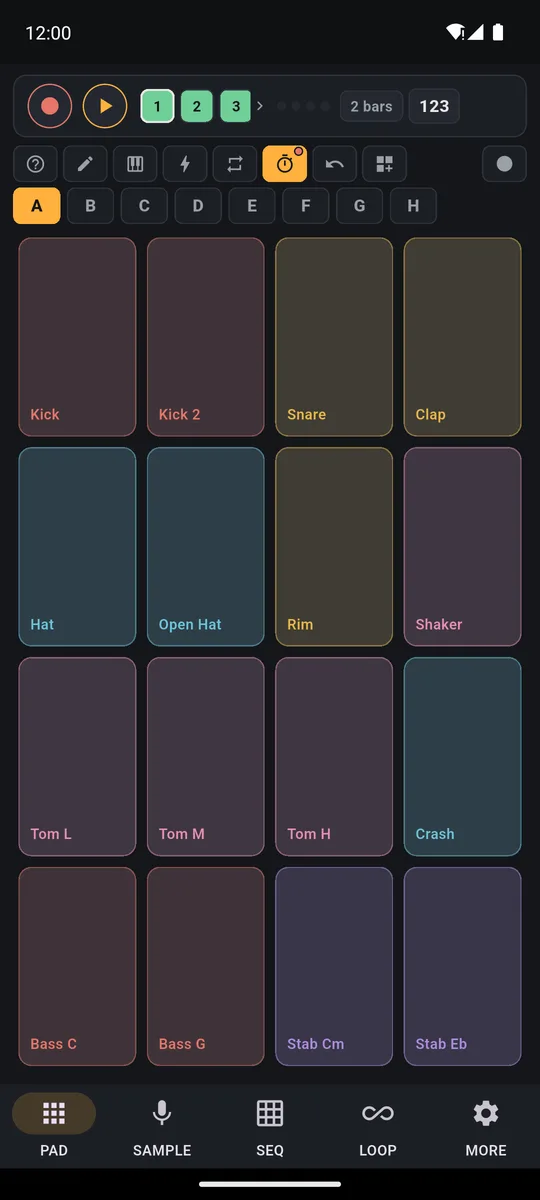
Top bar, button row, bank letters and the 16 pads.
What are the buttons above the pads for?
From left to right:
- ?: explains the buttons on the current screen and opens the full guide.
- Pencil: turn it on and tap a pad to change its sound: volume, pitch, reverse, filter, echo and the mode. One-shot plays the sound to the end, While held stops it when you lift your finger, Loop repeats it.
- Keyboard: one sound spread in a scale across all the pads, from low to high, or 16 levels: the same note from soft to loud, one pad per level.
- Bolt: the grid turns into eight hold-down effects, including filter, echo, reverb, lo-fi and robot.
- ⟳: hold a pad and the hit repeats on its own in time, from 1/4 to 1/32, plus an arpeggiator.
- Metronome: each tap switches between off, only while recording and always on.
- ↶: removes the selected track's last layer without stopping the loop.
- ⊞ Ready banks: 29 banks of 16 pads plus the plugin ones, and at the top the Ready beats, 24 ready-made grooves. Preview any of them with the ► next to its name before you load it (loading is part of the full version).
- On the far right, Record performance: captures everything you play, effects included, up to 30 minutes (full version, free during the trial).
Transcript
- 0:00 Shape the sound of every pad
- 0:02 The beat plays the pads of bank E
- 0:04 Pencil on: tap a pad and its panel opens
- 0:07 Echo on the chords pad: you hear it right away in the loop
- 0:09 Filter: the chords get darker
- 0:11 Snare: pitch up and a touch of Lo-fi
- 0:17 Volume, attack, release, mode, reverse: every pad is yours
Underneath are the bank letters, A to H: eight grids of 16 pads, 128 in all. Switch bank and the recorded loop keeps playing. A, B, C and D come full, and E–H are room for your own sounds. A and B are free forever; the other six banks come with the full version.
The five tabs: what you do in each
PAD: play with your fingers
Low on the pad gives a full hit, higher up plays softer (switch it off in MORE, Touch dynamics). Pad modes and effects are on the drum pad and sampler page.
SAMPLE: any sound becomes a pad
Your voice, a kitchen pan or a whole song: everything can end up under your fingers. The sampler is part of the full version, and you can use it freely during the 7-day trial.
- Record from the mic: voice, beatbox or any noise, up to 30 seconds.
- Import a file (WAV, MP3, M4A, FLAC, OGG) or take a Sound from a video in your gallery: the first 30 seconds.
- Split a song: vocals, drums, bass and the rest separated on the phone, with the Stem split plugin.
- Sound library: 558 built-in sounds, sorted by category.
- Resample the app: records what PadLoop is playing, up to 60 seconds.
- Sample from other apps: what the phone is playing, up to 2 minutes (Android 10 and up).
Then trim with the two handles and put the sound on a pad; Clean up noise removes steady hum and Split on hits chops a drum loop across several pads. Any sound is fine for practice; publishing needs the rights. More on how to sample your voice or any sound.
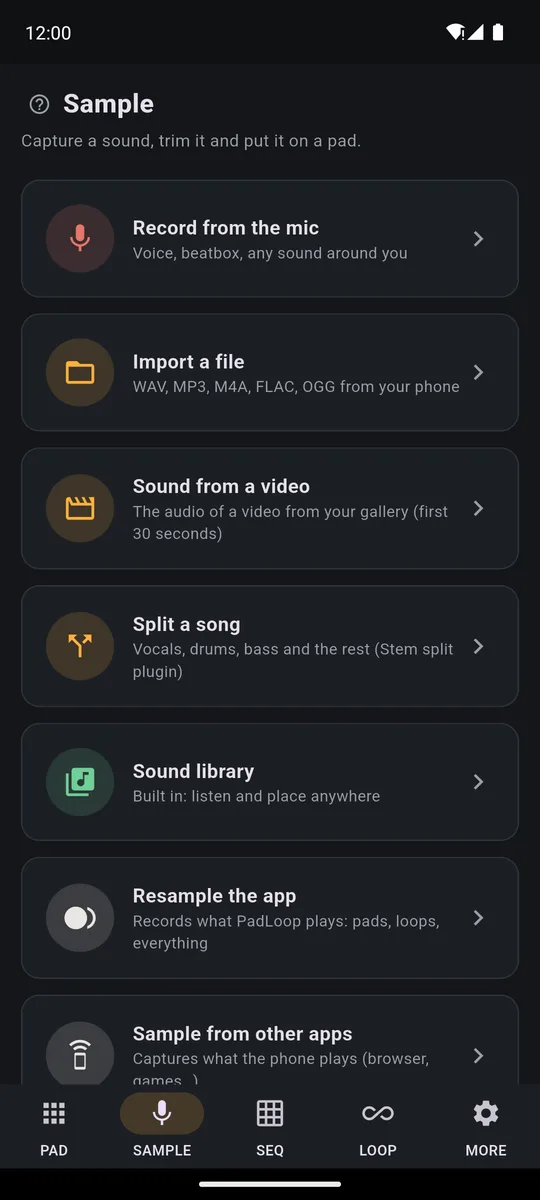
Every way to put a new sound on a pad.
SEQ: fix your hits on a grid
Each row is a sound, each column a moment in the loop. A tap adds or removes a hit; holding sets how hard it hits. Add pad brings a new sound into the grid, so you can build a beat without playing it. The two arrows undo and redo.
Transcript
- 0:00 Program a beat, cell by cell
- 0:02 SEQ tab: add a pad, for example the Kick
- 0:05 Tap the cells: here each cell is an eighth note
- 0:07 Add the Clap on beats 2 and 4
- 0:11 Press play: the loop starts
- 0:14 Add hi-hats while it plays: you hear every change at once
- 0:20 The bass follows the kick: a complete beat
LOOP: mix and perform your tracks
At the top you choose how many tracks to show (2 to 16) and how long the loop is. Each row is a track:
- tap the name to change it, and hold the row to move it
- the colored square with the number mutes it: instantly by default, in time if you set Mute in time in MORE
- the slider sets the volume, x2 doubles the loop, the bin clears the track
- the microphone button records vocals or guitar into that track
Export (a full-version feature, included in the trial) makes an MP3 or WAV file, or one WAV per track. The whole looper is on the looper app page.
Transcript
- 0:00 Mix your loops in the LOOP tab
- 0:02 A House beat is playing
- 0:05 LOOP tab: one row per track, with volume, mute, undo, x2 and delete
- 0:08 Turn a track down while it plays...
- 0:12 ...and bring it back up
- 0:16 Mute the drums: it waits for the bar, so it is always in time
- 0:21 Tap again and they come back in
MORE: settings, projects and plugins
At the top is the row for the trial and the full version, with Restore purchases for when you change phones. Below it:
- Projects: create, rename and back up your songs
- Plugins: the Stem split song splitter (79 MB), 6 sound kits and 4 instruments with real notes, downloaded only if you want them (plugins come with the full version)
- Metronome: click, count-in and Mute in time
- Loop recording: the grid that tidies up your hits, swing (every other hit lands a touch late and the groove sways) and the calibrations
- Master effects and MIDI, for controllers and foot switches
- language, the How to use it guide and Report a problem
Before you record for real: run Calibrate by tapping and Calibrate latency (click test) using the phone speaker. Two minutes in total, and your hits land where you played them.
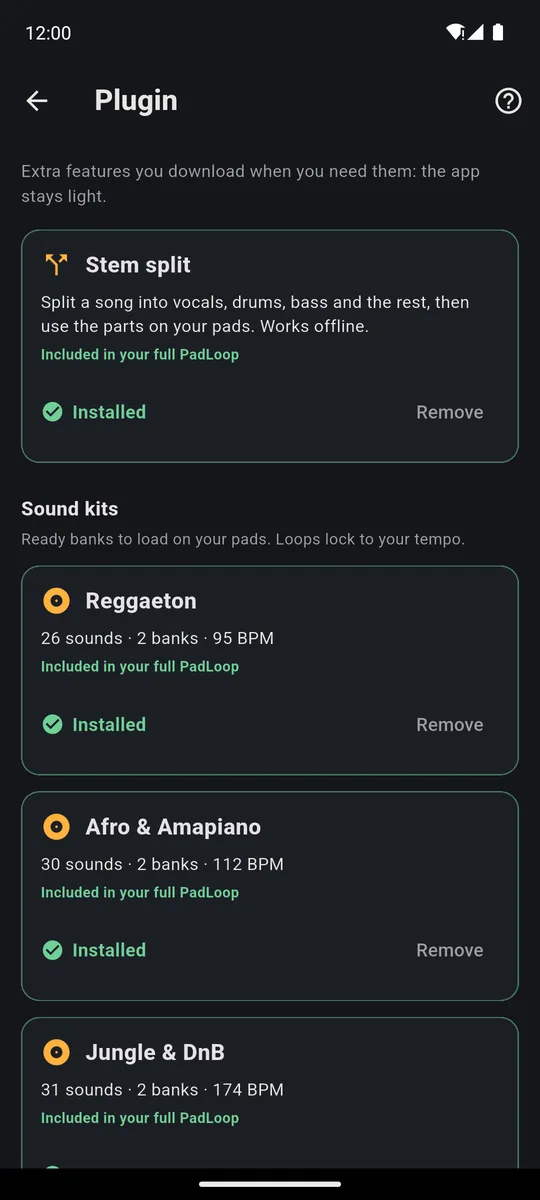
Stem split and the kits: download once, then they work offline.
Do I need to save? No, it's automatic
There is no Save button: PadLoop saves while you play, microphone loops included. In MORE → Projects you tap New for a new song. From each project's menu you rename, duplicate, delete or export it as a single backup file, sounds included, to open on a new phone with Import a backup. Banks are saved separately with Save the active bank, at the top of Ready banks. Backups and saved banks are part of the full version.
What's free and what the full version adds
For 7 days you can use everything, plugins included; the trial ends on its own and charges nothing. After that, PadLoop stays free forever with banks A and B, 2 looper tracks (microphone included), the Keyboard, the effects, ⟳ and one project. A single purchase opens everything else: the sampler, export, tracks 3 to 16, extra projects and duplicates, saved banks and backups, Ready beats and plugins. It's a one-time price, shown in your currency in the store (€9.99 in Europe). No ads, no subscription. Details on the price and FAQ page. Not sure what to make first? Try these cool things to do with PadLoop.
Good to know
- Want a different loop length? Change it before or after a track's first recording: while you record, the bars stay put.
- Set the BPM before you record vocals or guitar: once the loops hold microphone audio, the BPM stays fixed.
You've seen every button: now get them under your fingers, with 7 days where everything is unlocked.On iPhone: in MORE tap the top row, then Start the free trial. It costs nothing and does not renew.
Get PadLoopHow PadLoop works: common questions
How does PadLoop work, in a nutshell?
You tap sixteen pads, each holding a sound. Hit REC and what you play becomes a loop that repeats on its own, in time; you stack more layers on top, up to 16 tracks. The other tabs are for sampling new sounds, fixing hits and mixing.
Do I need to know how to play music?
No. Play roughly in time and the app snaps your hits into place, and with the Keyboard on the pentatonic scale there are no wrong notes. And in the full version, or during the 7-day trial, a Ready beat gives you a full groove to play over in one tap.
Does PadLoop make music with AI?
No: you make the music, on the pads. The only AI is in the Stem split plugin, a model that runs on your phone and splits a song into vocals, drums, bass and the rest.
Do I have to save before closing the app?
No, saving is automatic: close it halfway and everything is still there, microphone loops included. In MORE, under Projects, you create, rename and duplicate projects and export a backup file to move your songs to a new phone. Extra projects, duplicates and backups belong to the full version, included in the trial: one project for every idea.
What can I use for free?
For 7 days you get everything, plugins included. After that, banks A and B, 2 looper tracks (microphone included) and one project stay free forever. A single purchase unlocks the rest, with no subscription and no ads.
Does PadLoop work offline?
Yes: you play, record, sample and split songs without internet. You only need a connection to download the optional plugins and to reach the store when you buy or restore.
How do I get the first-launch guide back?
Tap the ? in the PAD tab and choose Replay the intro. The same ? sits on the main screens and explains only the buttons in front of you; the full guide is also in MORE, under How to use it.
Why do my recorded hits land a little late?
Every phone has its own delay. In MORE, run “Calibrate by tapping” for the pads and Calibrate latency (click test) for the microphone, using the phone speaker. And use wired headphones: Bluetooth ones add a delay that cannot be removed.
Last updated:


