
Make beats
Make a beat on your phone, from the first hit to the MP3
A beat is built in layers: drums first, then bass, then chords or a melody. In PadLoop every layer is a track that keeps looping on its own while you add the next one.
- Drums, bass and chords on separate tracks
- Step sequencer with per-step hit strength
- Export to MP3, WAV or separate stems
Transcript
- 0:00 Make a beat from zero
- 0:02 Pick track 1 and tap REC: a one-bar count-in starts
- 0:05 Play the kick on every beat and the clap on 2 and 4
- 0:08 The loop starts again by itself: listen before adding more
- 0:12 REC again on the same track: hi-hats layer on top
- 0:16 Track 2: chord stabs, two chords per loop
- 0:21 Track 3: the bassline follows the chords
- 0:25 Four layers, all in time. Now arrange it.
- 0:28 LOOP tab: mute the drums in time for a break
- 0:33 …then the bass: the tension builds
- 0:37 Drop: everything comes back in
- 0:40 Hold an effect while it plays: filter down, then echo
- 0:48 Note repeat on the hi-hat: rolls in time
- 0:52 The performance recording is ready to share or export
PadLoop is a beat maker app that builds your beat in three layers: drums, bass, chords. Each layer is a track that keeps looping while you record the next one. Ten minutes later your own beat is playing on repeat, ready to export as an MP3. Can't play an instrument? Switch on squares in the step sequencer, or use the Keyboard in a scale: no wrong notes.
Tempo, drums, bass, chords, file
- Tempo and length. Tap the BPM at the top, the tempo in beats per minute (40 to 220: hip hop sits around 90, trap around 140). At the top of the LOOP tab pick 1, 2, 4 or 8 bars (a bar is a group of four beats): to start, 2 or 4 is plenty.
- Drums. Tap number 1 at the top (the numbers are the tracks, the layers of your beat), press REC and after the count-in play kick and snare. Press REC again and add hi-hats.
- Bass. Switch to track 2, turn on the Keyboard (the piano button), pick a bass sound and a scale, then press REC and play.
- Chords or melody. On track 3, play chords on the Keyboard with several fingers.
- Export. In LOOP, tap Export and choose MP3, WAV or Separate tracks.
From the second track there is no count-in: if the loop is already playing, recording starts by itself at the top of the next loop. The track blinks, so you have time to get ready.
Drums and bass fit on the 2 tracks that stay free forever. The third track for chords and the export belong to the full version, the one-time purchase that gets your beat off the phone as an MP3 or WAV. Both are included in the 7-day trial, so you can finish your first beat before you decide.
Build your first beat in ten minutes: 7 days with 16 tracks and MP3 export included, then drums and bass stay free on 2 tracks.On iPhone: in MORE tap the top row, then Start the free trial. It costs nothing and does not renew.
Get PadLoopDrums with dynamics, not flat ones
- Soft and hard with your finger. Low on the pad is a full hit, higher up is soft. That is how a hi-hat stops sounding flat.
- Rolls with ⟳. Turn it on and hold a pad: the hit repeats in time. 1/16 and 1/32 are trap hi-hat rolls, 1/8T and 1/16T are triplets.
- Don't stress about timing. By default hits snap to the nearest 16th: you play "almost" in time and the loop comes out tight.
- Messed up a layer? The ↶ arrow removes only the last one, and the loop keeps playing.
Basslines with no wrong notes
Bank A already has two basses and bank B, four tuned 808s, all free. Want more? Tap ⊞ (the banks menu): the Ready banks, part of the full version, include one just for basses, Bass Lab. Turn on the Keyboard and the sound spreads across all the pads, low at the bottom left, high at the top right. Pick a scale (chromatic, minor pentatonic, major or minor) and every note fits.
With the Keyboard on, a single sound is spread over all the pads in a scale: low at the bottom, high at the top.
An electronic music trick: with ⟳ on, set Arpeggio to "Up" and hold three keys. You get a pulsing bassline that runs by itself.
Chords, melody, and your own voice too
On the Keyboard you play chords with several fingers, and each note stops when you lift its finger. Want richer sounds? The Ready banks hold a bank of ready-made chords, and the plugins add real-note instruments: grand piano, marimba & vibraphone, strings and winds. More on the Keyboard on the page about playing in key.
Play guitar or sing? The 🎤 button on a track records the microphone straight into the loop, in time with the beat.
No instrument? Draw the hits
The SEQ tab shows a track as a grid: each row is a sound, each column a moment in the loop. Tap a square to add a hit, tap again to remove it. Add pad brings a new sound into the grid, so you can build a loop from scratch.
The secret to a groove that feels human is hit strength: long-press a lit square to set how hard it hits. Soft notes look dimmer. That is how you program accents and ghost notes (very soft hits).
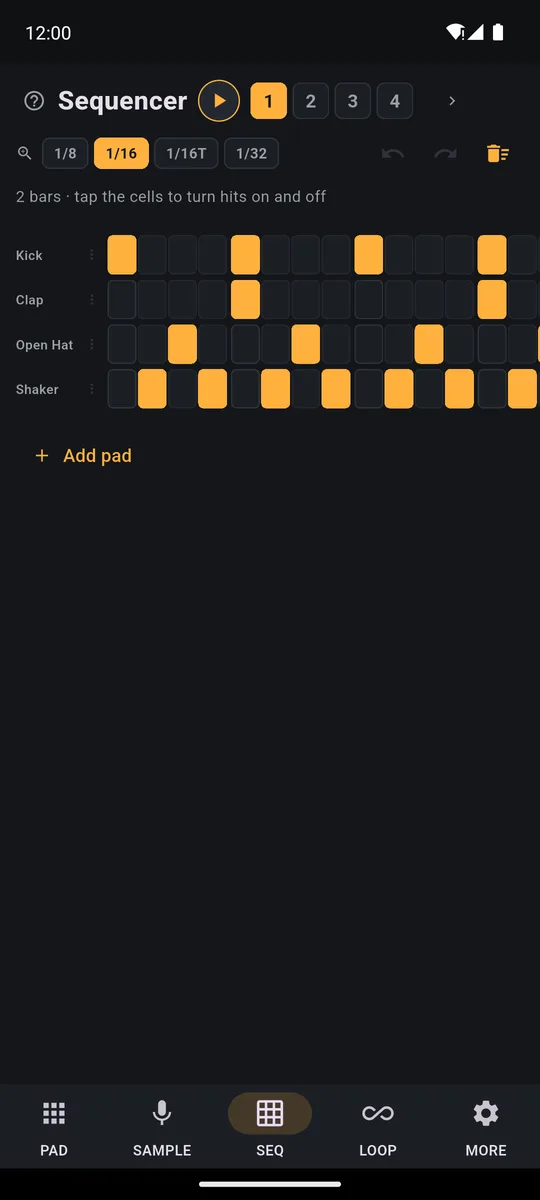
Each row is a pad, each column a moment in the loop. Dimmer squares are hits played softly.
With 1/8, 1/16, 1/16T and 1/32 you make the squares narrower or wider without changing what plays. Just watch one thing: a wide square can hold several hits, and switching it off removes them all. If you played in triplets, view the grid at 1/16T. The two arrows next to the zoom undo and redo.
From robot to groove: swing
In MORE you pick the grid that tightens your hits (8ths, 16ths, triplets, 1/32, or off), and you can change it after recording without redoing anything. Right below is swing: every other note lands a touch late, so the beat sways.
- 50%: straight, for techno and house
- 54-58%: a human groove, for hip hop, soul and lo-fi
- 66%: full triplet feel
Use a 16th grid for swing. With 8ths or triplets there are no offbeat 16ths to move, so the slider does nothing.
Which tempo to pick
Hip hop sits around 90 BPM, house around 120-128, trap around 140, drum and bass above 170. Tap the BPM and use the slider, or tap the beat on TAP. The stopwatch button switches the click: off, only while recording, always on.
Transcript
- 0:00 Change the tempo while the beat plays
- 0:02 A House beat is playing
- 0:05 Tap the tempo at the top: the slider opens
- 0:07 Drag left: slower, and the beat follows right away
- 0:13 To the right: faster
- 0:17 TAP: beat the tempo with your finger and the beat takes it
- 0:24 Your recorded pad loops follow the new tempo
From loop to track: bring parts in and out
Mute silences a track without erasing it: tap the colored square with the number on the left of the LOOP tab. With Mute in time on in MORE, the command fires on the beat, the bar or the end of the loop, even if you tap early.
- x2 doubles a loop so you can record a variation twice as long on top.
- The volume slider puts the bass where it belongs under the drums.
- Names and order: call a track "bass" or "vox" and drag it where you want, without stopping the loop.
To capture the arrangement as you play it, with mutes and effects, use Record performance, another full-version feature you can use during the trial: up to 30 minutes of your live take.
Export: MP3, WAV or separate stems
Export, in the LOOP tab, makes a clean MP3 or WAV with 1, 2 or 4 repeats. The level is what you hear in the app, and muted tracks are left out. Separate tracks gives you one WAV per track in a zip, ready to drag into your computer music program (DAW). A short MP3 export is also the easiest way to make music for TikTok and Reels that nobody else is using.
Good to know
- Run “Calibrate by tapping” once in MORE: tap along with the click for a few seconds and PadLoop learns your phone's delay. Then your hits land where you played them.
- Want the effects in the file? Export saves your loops clean: the global effects in MORE, the hold-down effects on the bolt and Loop-mode pads stay out. To keep them, use Record performance.
From the first kick to a file you can share: during the 7-day trial you also get Ready banks, real-note instruments and export, then it's one purchase.On iPhone: in MORE tap the top row, then Start the free trial. It costs nothing and does not renew.
Get PadLoopQuestions about making beats on a phone
Can you make beats on your phone?
Yes. In PadLoop you play drums on the pads, record in layers on up to 16 tracks, fix hits in the step sequencer and export the result as MP3 or WAV. To finish the track on a computer, you can export every track as its own WAV.
Is there a free beat maker app?
PadLoop is a free download and stays free forever with 2 banks, 2 looper tracks and one project. You get everything unlocked for the first 7 days, export included; after that, one purchase opens the rest, at a one-time price shown in your currency in the store (€9.99 in Europe). No ads, no subscription.
Do I need to know how to play an instrument?
No. In the step sequencer you switch squares on without playing anything, and the Keyboard puts any sound in a scale, so there are no wrong notes. Quantization tightens up hits you play almost in time.
Does PadLoop make the beat for me with AI?
No: you play the beat yourself, with the pads, the Keyboard and the sequencer, so it is really yours. If you want a head start, the 24 Ready beats come with drums, bass and chords already recorded for you to play over.
What BPM should I use?
It depends on the genre. As a guide, PadLoop's Ready beats put hip hop at 90 BPM, house at 122, trap at 140 and drum and bass at 172. The tempo slider goes from 40 to 220 BPM, or you can tap the beat on TAP.
How many tracks can I use for free?
In the free version you record on 2 looper tracks, microphone included. The one-time purchase gives you up to 16 tracks, room for a whole song, and they're included in the 7-day trial.
Can I export stems to mix on a computer?
Yes: Separate tracks gives you one WAV file per track, all in a zip, ready to drag into your computer music program. Export is part of the full version and is included in the 7-day trial.
Last updated:


