
Ideas to try
What can you do with PadLoop? 12 fun ideas to try
From one that takes thirty seconds to a whole evening of jamming. Pick one and try it: each leads to a step-by-step guide.
- Ideas for total beginners and for players
- Each one leads to a step-by-step guide
- Plenty of them work in the free version
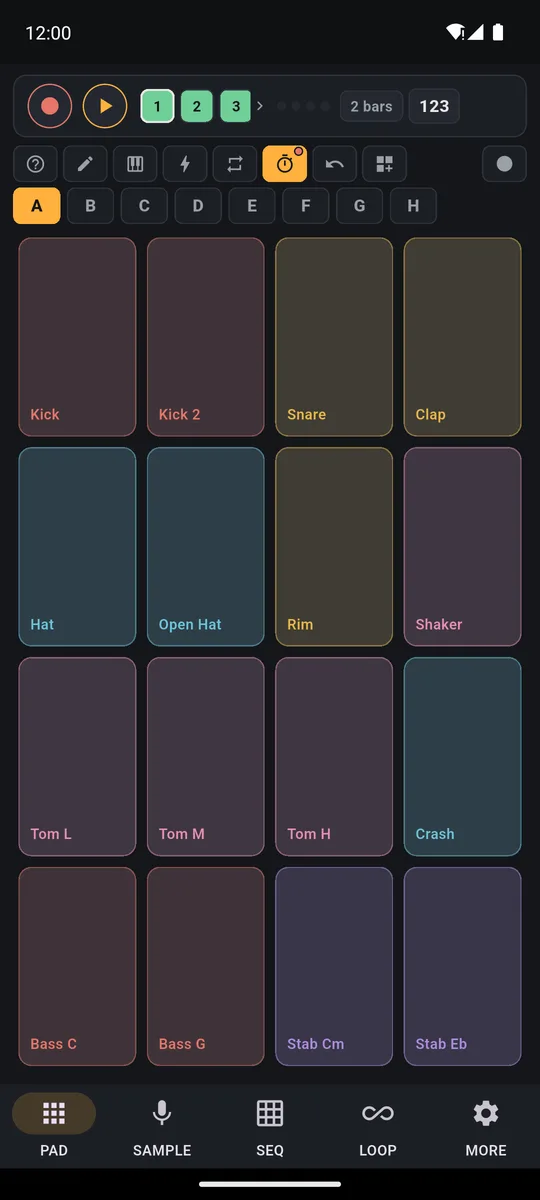
With PadLoop you can get a loop going on the pads in thirty seconds, jam over one of 24 Ready beats, strip the vocals from a song and sing over it, loop guitar and vocals, and put any sound on a pad. Then export the track as MP3 or WAV. Here are 12 cool things to try, each with its own guide.
Transcript
- 0:00 Make a beat from zero
- 0:02 Pick track 1 and tap REC: a one-bar count-in starts
- 0:05 Play the kick on every beat and the clap on 2 and 4
- 0:08 The loop starts again by itself: listen before adding more
- 0:12 REC again on the same track: hi-hats layer on top
- 0:16 Track 2: chord stabs, two chords per loop
- 0:21 Track 3: the bassline follows the chords
- 0:25 Four layers, all in time. Now arrange it.
- 0:28 LOOP tab: mute the drums in time for a break
- 0:33 …then the bass: the tension builds
- 0:37 Drop: everything comes back in
- 0:40 Hold an effect while it plays: filter down, then echo
- 0:48 Note repeat on the hi-hat: rolls in time
- 0:52 The performance recording is ready to share or export
Where to start: four ideas in ten minutes
- Tap track 1, hit REC and play a beat: the loop comes round on its own.
- Tap the piano button and play a melody on the Keyboard: it's in a scale, so no note sounds wrong.
- Tap ⊞ (the banks menu), load a Ready beat and play over it.
- In SAMPLE, record your voice and put it on a pad, then in LOOP tap Export and send the track to a friend.
The first two are free, forever: you can start right now, without spending a thing. Loading Ready beats, the sampler and export (ideas 3 and 4) are part of the full version, and you can try them during the 7-day trial.
Try all twelve during the 7 days when everything is unlocked, plugins included.On iPhone: in MORE tap the top row, then Start the free trial. It costs nothing and does not renew.
Get PadLoop1. Get your first loop going in thirty seconds
Hit REC on track 1 and play the kick: the loop starts over on its own. Then add snare and hi-hats, one layer at a time; if one comes out wrong, ↶ removes only the last. A full beat with bass and chords takes five minutes: follow your first beat in 5 minutes, then the guide to making beats on your phone.
2. Jam over a Ready beat
The Ready beats are 24 ready-made grooves, from lo-fi to drum and bass (82–172 BPM), with drums, bass and music already recorded. Tap ⊞, then Ready beats: you can preview them with ► for free, then load one with a tap (loading is part of the full version, included in the trial). In the 18 classic ones the melodic pads are tuned to the beat, so the notes fit. Hip hop, Soul, Trap and Drill also work as freestyle rap beats. They're all on the Ready beats page.
Transcript
- 0:00 A Funk beat on your phone
- 0:02 Tap ⊞ and open Ready beats
- 0:04 Pick Funk: bank, tempo and swing load by themselves
- 0:06 Press ►: drums, bass and chords are already recorded
- 0:10 Play the other pads on top: they are tuned to the beat
- 0:19 Like it? Tap REC on a free track and keep it
3. Turn any song into a karaoke track
In SAMPLE tap Split a song: PadLoop separates vocals, drums, bass and the rest right on your phone, and the song never leaves it. Mute the vocals and you're left with the real instrumental to sing over, in sections of up to 30 seconds. Mute everything else instead and you extract the acapella. Split a song comes with the full version and is included in the 7-day trial. Singing at home is fine; publishing a cover needs the rights. The steps are in the guide to a karaoke track from any song.
Watch the video on its own page →
Transcript
- 0:00 Pick any song from your phone
- 0:02 It is split right on the phone, offline
- 0:05 4 parts: vocals, drums, bass and the rest
- 0:10 Just the vocals
- 0:16 Or just the beat
- 0:21 Put the parts on your pads
- 0:24 …and remix the song live
4. Practice along to a song without your part
Play bass? Split the song and switch off just the bass: the band keeps playing and you take its place. Same for drums, guitar or vocals, and the tricky passage goes on a looping pad. Here's how to play along without your instrument.
5. Live-loop guitar and vocals
A track's 🎤 button records the mic straight into the loop: chords on track 1, vocals on 2, a harmony on 3. With wired headphones and the delay calibrated, every part lands in time. Two mic tracks are already in the free version. Tips in the guide to live looping guitar and vocals.
6. Sample your voice or something around the house
A pan hit with a spoon, a sung phrase: in SAMPLE tap Record from the mic (up to 30 seconds), keep the good bit with the handles and tap Assign to a pad. You can also sample the sound from a video in your gallery or, on Android 10 and later, from another app. The sampler is part of the full version, open during the trial; publishing someone else's music needs the rights. It's all on the page about how to sample your voice and any sound.
7. Beatbox on a loop
Tap the mic on a track, choose With the beat muted and lay down kick and snare with your mouth; then add hi-hats with the red mic (the same button, which now records a new layer on top). That works in the free version too. Want your sounds on the pads? Split on hits puts them one per pad, and there's a built-in Vocal Crew bank of beatbox hits and vocal chops (both are full-version features you can use during the trial). Both routes are on the beatbox looper page.
8. Program a beat in squares, drum machine style
No timing skills needed: in the SEQ tab bring a sound in with Add pad and light up squares. Long-press a square for Hit strength (5–100%): accents and ghost notes (very soft hits). It's one of the easiest ways to make music without playing an instrument. More on the drum machine app page.
Transcript
- 0:00 Program a beat, cell by cell
- 0:02 SEQ tab: add a pad, for example the Kick
- 0:05 Tap the cells: here each cell is an eighth note
- 0:07 Add the Clap on beats 2 and 4
- 0:11 Press play: the loop starts
- 0:14 Add hi-hats while it plays: you hear every change at once
- 0:20 The bass follows the kick: a complete beat
9. Record vocals over a beat
Build the beat, then tap the mic on an empty track and choose With the beat in the background: your voice becomes a loop in time with the beat. Stack doubles, harmonies and ad-libs on top, each on its own track. Wired headphones, always. The full guide shows how to record vocals over a beat.
10. Play together
With friends or family, one phone is enough. One person keeps the drums looping, another improvises on the Keyboard in minor pentatonic, where every note fits, and a third sings over it. No account, no ads, and it's an offline beat maker too: open it and you're off.
11. Play a MIDI controller or loop hands-free with a pedal
A MIDI controller over USB connects on its own while the app is open; over Bluetooth you'll find it in MORE → MIDI. How hard you press becomes the pad's dynamics. With a Bluetooth page turner, Page Down records and Page Up undoes the last layer. Details on the MIDI controller and loop station with pedal pages.
12. Export your track and share it
In the LOOP tab, Export makes an MP3 or WAV, or one WAV per track with Separate tracks. Record performance captures up to 30 minutes live, effects included, and opens the share sheet when you stop. Your own banks, up to 16, can be sent to friends as files too. A short MP3 is also the way to make music for TikTok and Reels. Export, Record performance and saved banks all come with the full version. See the looper app page.
What you can do for free
After the 7-day trial PadLoop stays free forever with 2 banks, 2 looper tracks (mic included) and one project: enough for your first beat, the sequencer, vocal loops and beatboxing on the looper. The full version, a single purchase with no subscription and no ads, adds Ready beats, the sampler, Split a song, export and saving banks: every idea can go from a sampled sound to a finished MP3. The full picture is on the price and FAQ page.
Which idea is yours? Start with a beat on the pads and a melody on the Keyboard: both work in the free version too.On iPhone: in MORE tap the top row, then Start the free trial. It costs nothing and does not renew.
Get PadLoopQuestions about what you can do with PadLoop
What can you do with a looper app?
Record a short phrase that repeats on its own and keep layering on top: drums, bass, chords, vocals. In PadLoop you get up to 16 tracks in sync, plus pads, a step sequencer and a sampler to make the sounds yourself.
What are some cool things to do with a looper?
Build a beat layer by layer, loop a chord progression and sing over it, beatbox a full groove, or strip the vocals from a song and use it as a backing track. Muting and unmuting tracks gives you breaks and drops live.
Do I need to know how to play an instrument?
No. In the sequencer you just light up squares, with the Keyboard in a scale every pad is a right note, and during the 7-day trial the Ready beats give you a full groove to play over.
What can I do for free?
Everything for the first 7 days. After that PadLoop stays free forever with 2 banks, 2 looper tracks (mic included) and one project: enough for beats, the sequencer and recording vocals. The rest unlocks with a single purchase.
Does PadLoop make music with AI?
No, you play the music. AI is only used to split songs: the Stem split plugin runs a model on your phone that separates vocals, drums, bass and the rest.
Can I use other people's songs?
For practice, study or karaoke at home, yes. To publish a track that uses parts of someone else's song, you need the rights to it.
Which phones does it run on?
Android 7 or later and iPhone on iOS 15 or later. Splitting a song needs at least 3 GB of RAM on Android and 4 GB on iPhone.
Last updated:


