
Tutorial
Learn PadLoop in two minutes, step by step
The video shows the app actually playing, from the first track to a song split into parts. Below, every chapter is written out with the real button names, so you can do the same on your phone.
- 5 chapters, from first loop to live remix
- Every step with the real button names
- First steps for opening the app the first time
In two minutes this tutorial takes you from an empty track to a real song: record a loop on the pads, play it live with mutes and effects, add the Keyboard and instruments, and take a song apart into pieces to remix. Watch it once all the way through, then redo each chapter below, with the real button names.
Transcript
- 0:00 How PadLoop works
- 0:02 Pick a track, tap REC and play the pads
- 0:05 What you play becomes a loop…
- 0:08 …and it keeps repeating, in time
- 0:12 Add a new layer on track 2
- 0:16 Track 3: chords
- 0:20 Track 4: bass
- 0:24 Four layers, all in time. No editing.
- 0:27 In the LOOP tab you mute tracks, in time
- 0:32 …the bass too
- 0:36 Drop!
- 0:39 Hold an effect while it plays: filter, echo…
- 0:47 Note repeat: hi-hat rolls, in time
- 0:51 Record everything you play and share it as audio
- 0:54 Turn any sound into a Keyboard, in a scale
- 0:57 Every key is in tune: chords with no music theory
- 1:02 Back to the pads for the drums
- 1:07 The bass on the Keyboard too
- 1:12 And it is already a track
- 1:16 Download instruments: piano, marimba, sax and more
- 1:19 Grand piano chords, recorded as a loop
- 1:25 Marimba on top, played live
- 1:30 Then an alto sax melody
- 1:35 Every pad is a real note, always in tune
- 1:40 Pick any song from your phone
- 1:42 It is split right on the phone, offline
- 1:45 4 parts: vocals, drums, bass and the rest
- 1:50 Just the vocals
- 1:56 Or just the beat
- 2:01 Put the parts on your pads
- 2:04 …and remix the song live
The first time you open PadLoop
You don't have to watch the video first. On first launch PadLoop asks Want a hand?:
- Example: a short beat plays on the bank A pads. Stop ends it.
- Guide me: you tap Kick and Snare when they light up, hit REC and record your first loop by following the lights.
- Just play: no guide, you start straight away.
Closed the guide too early? Tap the ? in the PAD tab and choose Replay the intro. That same ? explains the buttons on each screen, and Open the full guide takes you to the whole manual.
Your first loop
- In the PAD tab, tap the number 1 in the top bar: the numbers are the tracks, the layers of your song.
- Hit REC: the GO 4, 3, 2, 1 count-in starts.
- On GO, play the pads. At the end of the loop the recording closes and the loop keeps playing.
- Tap the number 2, hit REC again and stack a layer on top.
Done: you have a beat that plays on its own. The rest of the video starts from here.
Everything in the video is included in the 7-day trial. Banks A and B, the first two tracks, the Keyboard and the effects stay free forever; tracks from 3 up, the instruments, Split a song and Record performance belong to the full version.
Redo the video on your own phone, chapter by chapter: the 7-day trial gives you everything, instruments and Split a song included.On iPhone: in MORE tap the top row, then Start the free trial. It costs nothing and does not renew.
Get PadLoop0:00 Record a loop
The GO 4, 3, 2, 1 count-in is only there to get you ready: it records nothing. From the second track on there's no count-in: the track blinks and recording starts at the top of the loop, so it stays in time with the first one. In the video it carries on with tracks 3 and 4, chords and bass.
Play roughly in time and the app snaps your hits into place. Layer no good? ↶ removes it and the rest stays. You set the loop length in the LOOP tab: 1, 2, 4 or 8 bars (a bar is four beats, 1-2-3-4).
0:28 Play it live
The loop runs on its own: now play it the way you would on stage.
- In the LOOP tab, tap the colored square with a track's number to mute it, and tap again to bring it back. Nothing gets deleted.
- To make mutes land on the beat, MORE has Mute in time: the command waits for the beat, the bar or the end of the loop, showing an hourglass meanwhile.
- The drop in the video: mute drums and bass, let the rest play, then bring everything back at once.
- In PAD, tap the bolt: the grid turns into eight effects (Filter down, Filter up, Echo, Reverb, Pitch down, Lo-fi, Flanger, Robot). Hold one; let go and the sound is clean again.
- For hi-hat rolls, turn on ⟳, which repeats a hit in time, pick 1/16 or 1/32 and hold Hat.
- To keep it all, use Record performance: up to 30 minutes, effects and mistakes included. When you stop, the share sheet opens.
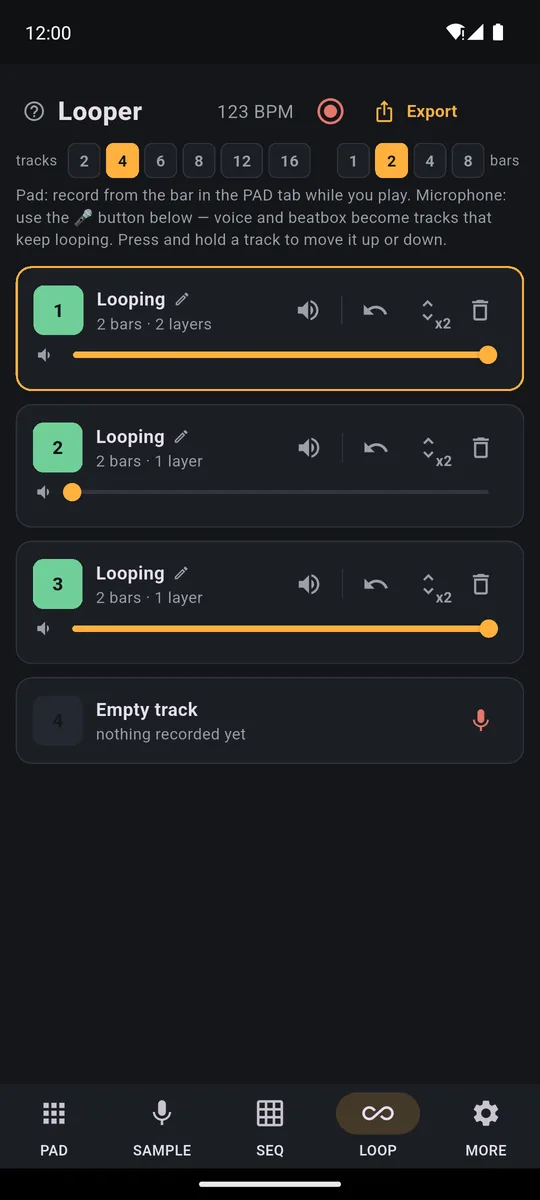
Each row is a track: the numbered square mutes it, the slider sets its volume, the arrow removes the last layer.
0:55 Keyboard
One sound laid out in a scale across all the pads: no wrong notes.
- In PAD, tap the piano button in the toolbar.
- When asked Which sound do you want to play in scale?, pick Stab Cm from bank A: a short C minor chord hit, in key with the other sounds in the bank.
- Above the grid, choose the Minor scale: every pad is a note of C minor, lowest at the bottom left.
- Tap track 1, hit REC and play chords with several fingers. In the major and minor scales one shape always works: one pad on, one off, three times.
- Tap the Keyboard button again to get your pads back, pick track 2 and record the drums.
- Open the Keyboard again, pick Bass C, move to track 3 and record the bass.
There are four scales: Chromatic, Min. pentatonic, Major and Minor. When in doubt, the minor pentatonic is where almost everything sounds right.
1:17 Instruments
The plugin instruments are real recorded notes: every pad is a note, always in tune, so your chords sound like the real thing.
- In MORE → Plugins, download the instruments you want: Grand Piano, Marimba & vibraphone, Strings, Winds (1 to 9 MB each).
- In PAD, tap ⊞ to open Ready banks; the instruments are marked "Plugin". Preview one with ►, then tap the name and pick a bank. During the trial they go on banks D to H, leaving A and B free for your own sounds.
- The pads are already named after their notes (Piano C3, Piano D3…), in a major scale.
- Pick a track, hit REC and play chords. In the video they're C, A minor, F and G: three or four pads at once per chord.
- Switch bank with the letters and the loop keeps going. In the video a marimba and an alto sax melody are played on top.
You can play the instruments with the Keyboard too: pick one of those pads as the starting sound and the keys show the real note names.
1:41 Split a song
The last chapter takes a song apart into pieces you can play.
- In the SAMPLE tab, tap Split a song. The first time, the app offers to download the Stem split plugin (79 MB); after that you don't need internet.
- Pick a track from your phone: MP3, WAV, M4A, FLAC or OGG, up to 6 minutes. The split happens on the phone and takes a few minutes: stay in PadLoop until it finishes.
- You get four rows: Vocals, Drums, Bass and Other, each with its own mute button.
- Mute everything except the vocals to hear just the singing; mute only the vocals and you have the backing track. Only need those two? Choose Vocals + beat.
- Drag the window onto the bit you like (up to 30 seconds), listen with Play section and tap Pad next to a part.
- Go back to PAD and remix live: the vocal comes in when you decide, over your own drums.
You need a phone with at least 3 GB of RAM on Android, 4 GB on iPhone. Any song is fine for practicing and playing along; to release a remix you need the rights to the original. All the details are on the split a song page.
Good to know
- To make your hits land where you play them, go to MORE and run Calibrate by tapping and Calibrate latency (click test) on the phone speaker: two minutes in all.
- Play with wired headphones or the speaker: Bluetooth headphones add a delay no app can remove.
Want a guided path to your first track? Follow your first beat in 5 minutes, or read how PadLoop works. Looking for ideas? Here are 12 things to do with PadLoop.
Your turn: record four layers, cut the drums and bring everything back for your first drop.On iPhone: in MORE tap the top row, then Start the free trial. It costs nothing and does not renew.
Get PadLoopTutorial questions
How do I record my first loop in PadLoop?
In the PAD tab, tap a track number in the top bar, hit REC and play the pads after the count-in. At the end of the loop the recording closes by itself and the loop keeps playing.
How do I use a looper if I've never done it?
Pick a track, hit REC and play: at the end of the loop what you played comes back on its own, in time. Then pick another track and stack a layer on top, just like a loop pedal.
Can I replay the guide that shows up on first launch?
Yes. Tap the ? in the PAD tab and choose Replay the intro: the guide comes back above the pads.
Is everything in the video free?
During the 7-day trial you can use all of it. After that, banks A and B, 2 looper tracks and one project stay free; the one-time purchase adds the third track onwards, the instruments, Split a song and Record performance, for whole songs with real instruments.
Does it work the same way on iPhone?
Yes, it is the same app on Android and iPhone and the buttons in the video are the same. Splitting a song needs at least 3 GB of RAM on Android and 4 GB on iPhone.
Why does the metronome stop after I record?
That is on purpose: by default the click plays during the count-in and while recording, then goes quiet so you can listen back. The stopwatch button sets it to always on or off.
Last updated:


