
Record vocals
Record your vocals over a beat, right on your phone
Set up the beat, tap the mic on an empty track and sing. Your vocal loops in time with the beat, and on top you add a second voice, harmonies and short answer lines (ad-libs).
- Vocals straight onto a looper track, in time with the beat
- Beat in your headphones or muted, your call on every take
- Mic delay measured for each output
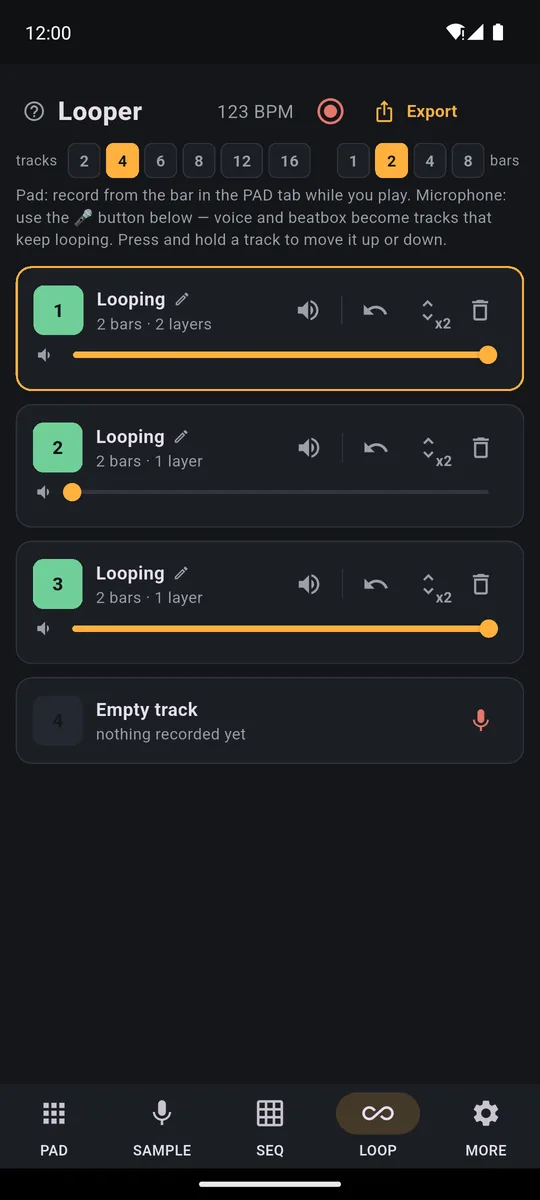
Recording vocals over a beat on your phone takes two taps in PadLoop: put the beat on a looper track, then tap the mic on an empty track. Sing, and your vocal becomes a loop locked to the beat: each take lasts as long as the loop, 8 bars at most (about 21 seconds at 90 BPM). Stack a second voice and harmonies on top. The beat and your voice fit on the 2 tracks that stay free forever.
Your vocal on the beat
- Set up the beat on the first looper tracks (the layers of your song: the numbers at the top), played on the pads or loaded from a Ready beat.
- Plug in wired headphones and, in the LOOP tab, tap the mic on an empty track.
- Check the mic. If the app offers the delay measurement, run it. Then speak or clap: the level bar should move.
- Sing. Pick With the beat in the background and go after the count-in: at the end of the loop your vocal plays back on its own.
- Double it. For a second voice tap the red mic on the same track (it records a new layer on top), or record a harmony on another track.
Record your first verse over a real beat: 7 days with Ready beats, 16 tracks and MP3 export unlocked.On iPhone: in MORE tap the top row, then Start the free trial. It costs nothing and does not renew.
Get PadLoopNo beat yet? Start from a Ready beat
Tap ⊞ (the menu for banks and Ready beats): at the top are the Ready beats, 24 grooves already recorded. With one of the 18 classic ones, a tap gives you drums on track 1, bass and chords on track 2, and your voice goes on track 3; the 6 complete ones put each instrument on its own track, so your voice goes on the first empty track after theirs. Loading Ready beats and the third track belong to the full version: a beat ready to sing over and a track of your own, both included in the 7-day trial. On the free version, put a drum loop on the pads on track 1 and your voice on track 2.
One tap loads a classic Ready beat, press ► and the groove starts: drums on track 1, bass and chords on track 2. Track 3 is where your vocal goes.
Prefer to play it yourself? Hit REC, play a drum loop on the pads and it plays back on its own: the 16-track looper page walks you through it. All the grooves are on the Ready beats page.
Two decisions to make before you sing:
- The tempo. As soon as a track holds microphone audio, the BPM (beats per minute) is locked (a padlock appears). Changing it later means clearing your vocal tracks.
- The loop length. At the top of the LOOP tab pick 1, 2, 4 or 8 bars (a bar is a group of four beats): that's also how long each take lasts. For a sung phrase, 4 or 8 bars is the sweet spot.
Take didn't work? Three moves
- ↶ while recording throws away only the take in progress; once the loop has closed it removes the last layer.
- REC while recording saves what you just sang and carries on from the next loop.
- ■ stops playback: your vocal is kept if you recorded at least half a loop.
By default the count-in is one bar, four clicks with the first one louder; in MORE make it two bars or turn it off.
Why your vocal lands in time
Every phone has a small delay between the sound going out and the sound coming into the mic. If PadLoop doesn't know it, your vocal gets recorded a hair behind the beat.
The first time you record with the mic, the app offers the measurement: about ten seconds of clicks, on the phone speaker with no headphones. Redo it any time in MORE with Calibrate latency (click test).
The delay is stored separately for speaker, headphones and Bluetooth. With headphones the click doesn't reach the mic: there you fine-tune it by hand with Latency tweak, headphones plugged in.
Wired headphones, speaker or Bluetooth?
In the How do you want to record? sheet you choose each time how to hear the beat:
- With the beat in the background: you hear the beat while you sing. With wired headphones the mic doesn't pick it up and your vocal comes out clean. On the speaker, the app warns you the beat will end up in the take.
- With the beat muted: the beat goes quiet and only the click remains. Fine on the speaker too, but the click's tick may get recorded.
Bluetooth headphones add 100-300 milliseconds of delay that can't be removed, and the sheet reminds you: you hear the beat late and your vocal can drift off time.
How do you make a vocal sound produced?
A single vocal sounds bare. The second voice is what makes the difference.
- Doubles on the same track. The red mic records again on top: sing the same line and the vocal thickens. If it comes out worse, ↶ removes just that layer.
- Harmonies on another track. The harmony gets its own volume and mute: tuck it under the lead, or bring it in only on the chorus.
- Ad-libs and responses. One track for short lines, brought in with Mute in time (in MORE) on the right loop.
Name your tracks by tapping the name: "lead", "double", "harmony". The mic records one track at a time: if it's busy, the app tells you.
Mix and save the track
Each track's slider sits your vocal on top of the beat. In MORE there are three effects on the whole mix: reverb, echo synced to the BPM, and a filter that rolls off the highs.
- Export in the LOOP tab makes a clean MP3 or WAV, with 1, 2 or 4 repeats of the loop. With Separate tracks you get one WAV per track, all in a zip, to finish on a computer.
- Record performance captures up to 30 minutes of what the app plays, effects included. Like export, it's part of the full version and open during the trial.
Want to sing over a real song with its vocals taken out? See the guide to a karaoke version of any song. And to sing with a guitar and a foot pedal, read the one on live looping with guitar and vocals.
Good to know
- Want the MORE effects in the file? Export saves the loops clean; to keep reverb and echo, use Record performance.
- Record performance doesn't switch the mic on: your voice is in it if it's already recorded on a track. Record first, then capture the performance.
- A long verse? Each take lasts 8 bars at most and all tracks loop together: the looper shines on hooks, doubles and repeating lines. Sing a long verse in 8-bar chunks.
Singing over a beat is free forever on the 2 free tracks. For 16 tracks, Ready beats and export: a 7-day trial, then a single purchase.On iPhone: in MORE tap the top row, then Start the free trial. It costs nothing and does not renew.
Get PadLoopVocal recording questions
Is there an app to record my voice over a beat?
Yes. PadLoop, for Android and iPhone, records your voice from the phone's microphone straight onto a looper track, in time with the beat on the other tracks. No computer needed.
Does PadLoop have autotune?
No, PadLoop doesn't correct pitch: your voice stays yours. The whole mix has reverb, tempo-synced echo and a filter, and each track has its own volume slider.
How do I keep the beat out of my vocal recording?
Wear wired headphones and pick With the beat in the background: you hear the beat, but the mic only picks up your voice. On the speaker pick With the beat muted, knowing the click may still bleed in.
Why is my recorded vocal late?
Every phone has its own delay between sound and microphone. Run Calibrate latency (click test) in MORE on the phone speaker; for headphones or Bluetooth you fine-tune the value by hand with Latency tweak.
How long can a vocal take be?
As long as the loop: 1, 2, 4 or 8 bars. At 90 BPM, 8 bars last about 21 seconds. For a full verse, split it across several tracks.
Can I use Bluetooth headphones?
You can, but they add 100 to 300 milliseconds of delay that can't be removed, and the app reminds you. For singing in time, wired headphones are much better.
Is vocal recording free?
Yes: the 2 free looper tracks record from the microphone too, forever. One for the beat and one for your voice is enough; a single purchase adds 16 tracks, export and Ready beats, for harmonies, a finished MP3 and a beat ready to sing over.
How do I save the finished song?
With the Export button in the LOOP tab: an MP3 or WAV of the loops, or one WAV per track to mix on a computer. Export comes with the full version, and you can use it free for 7 days.
Last updated:


