
Free beat maker
A free beat maker app: what you get without paying
Drums, bass and chords on 32 pads, a 2-track looper, an in-key Keyboard and live effects. They stay free forever, with no ads and no expiry date. And here's what isn't free, spelled out up front.
- Banks A and B, 2 looper tracks and one project, forever
- No ads, not even in the free version
- 7 days with everything unlocked, then one purchase if you want it
Yes, PadLoop is a free beat maker app for your phone: banks A and B (32 pads with drums, bass and chords), 2 looper tracks and one project are yours forever, with no ads. In ten minutes you have a drum and bass loop playing on its own. The one limit to know right away: in the free version your beat stays inside the app, because export to MP3 or WAV is part of the full version.
Your first free beat in five steps
Bank A (a bank is a page of 16 pads: the letters at the top) is already loaded the first time you open the app: Kick, Snare, Clap, Hat, Open Hat, toms, crash, two basses and two chords.
- Open PadLoop, tap the BPM in the top bar and drag the slider to 90. BPM is the tempo, in beats per minute.
- On bank A, press REC, wait for the count-in and play Kick and Snare: the loop closes and restarts on its own on track 1 (each track is one layer of the song: the numbers at the top).
- Press REC again and play Hat on top: from the next loop the new hits add to the old ones.
- Tap track 2 in the top bar, press REC and play Bass C and Bass G under the drums.
- Open the SEQ tab to move or remove hits, then hold a bolt effect while the beat plays.
Everything you just used is free forever, even after the trial.
Make your first beat on bank A, free forever. For the first 7 days you also get Ready beats, 16 tracks and export; after that you keep the free part.On iPhone: in MORE tap the top row, then Start the free trial. It costs nothing and does not renew.
Get PadLoopFree forever, during the trial, and the full version
When you install the app you get 7 days with everything unlocked, plugins included. On Android the trial starts by itself; on iPhone you start it from MORE: tap the top row, then Start the free trial. When the 7 days are up you pay nothing and lose nothing: you simply move to the left column.
| Free forever | During the 7-day trial | Full version | |
|---|---|---|---|
| Playable banks | A and B (32 pads) | all 8 (128 pads) | all 8 (128 pads) |
| Looper tracks | 2, microphone included | up to 16 | up to 16 |
| Keyboard, bolt effects, ⟳ | yes | yes | yes |
| SEQ, the step sequencer | tracks 1 and 2 | all | all |
| MIDI controller and pedal | yes | yes | yes |
| Projects | 1 | unlimited | unlimited |
| Ready beats | listen | load | load |
| Ready banks | Factory A and B | 29 | 29 |
| Sampler and Sound library | no | yes | yes |
| Split a song and plugins | no | yes | yes |
| Export MP3 / WAV, Record performance | no | yes | yes |
| Backup and saved banks | no | yes | yes |
| Ads | never | never | never |
| Cost | zero | zero | €9.99 once (Europe) |
Every line of this table is explained on the price and FAQ page.
Are 2 tracks enough for a beat?
Yes, if you use them well. A track isn't just one sound: every time you record over it, the new hits add to the ones already there. Put kick, snare, hi-hat and crash on track 1, one pass at a time. Bass and chords go on track 2.
- Hit a wrong note? Tap ↶: only the last layer disappears, the rest stays.
- Loop too short? The x2 button on the track row doubles it, up to 16 bars (a bar is a group of four beats: 1, 2, 3, 4). Then record a variation on top.
- One hit out of place? In the SEQ tab, turn steps on and off; press and hold a step to change how hard it hits.
- Want more swing? MORE has a swing slider: every other hit lands a touch late and the groove starts to sway.
Bank B (Trap) adds a second drum kit and four tuned 808s (808 C, 808 Eb, 808 F, 808 G), and it's free forever too. With the pencil (the button that edits pads) you change the volume, pitch and echo of every pad on banks A and B. Went too far? Factory A and Factory B, in Ready banks, bring them back to day one.
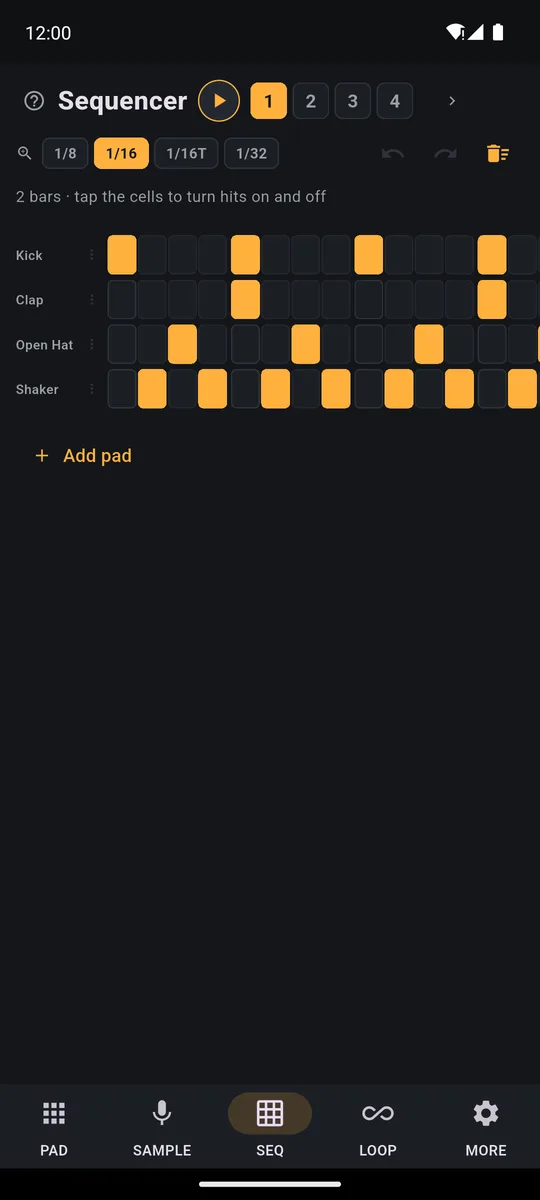
Each step is a hit: turn it on, off, or change how hard it plays. On tracks 1 and 2 it's free forever.
Melodies with no wrong notes, for free
Turn on the Keyboard (the piano button). When it asks Which sound do you want to play in scale?, pick Bass C from bank A and the Min. pentatonic scale: the bass spreads across all the pads, low at the bottom and high at the top, and every pad fits. The same works with Stab Cm, a short chord hit.
The ⟳ repeats a hit in time for as long as you hold it: it makes hi-hat rolls and, on the Keyboard, becomes an arpeggiator. The bolt effects (filter, echo, reverb, lo-fi, flanger, robot) only work while you hold them: a filter sweep into the drop, an echo at the end of the loop. More tricks are in the guide to making beats on your phone.
Why there are no ads
PadLoop shows no ads: not in the free version, not during the trial, not after you buy. It's paid for with a one-time purchase by people who want everything, not with banners.
If you play music, that makes a practical difference. A banner above the pads steals room from your fingers, and a video between two takes breaks the loop you had in your head. Here there's nothing between you and the pads. You don't even need an account: no email, no sign-up. The rest is on the page about our music app with no subscription.
When it's worth buying
The free version is for playing and sketching ideas. The full version is for finishing and sharing. It's worth it when you find yourself wanting to:
- send your beat to someone: export to MP3 or WAV, or separate tracks for a computer
- build a whole song, with verse, chorus, vocals, doubles and harmonies: up to 16 tracks
- start from a real groove: the 24 Ready beats load in one tap
- use your own sounds: the sampler, 558 sounds in the Sound library, the plugins
- keep several projects, each one backed up to a file
It's €9.99 in Europe, paid once, and the store shows the price for your country. Our advice: use the 7 days to find out which features you can't live without. If 32 pads and 2 tracks turn out to be enough, stay free. That's fine too.
Good to know
- A free beat stays in the app. To get a file you can send, you need export or Record performance, both open during the 7-day trial and then in the full version.
- What you make during the trial doesn't disappear. Loops on tracks 3 and up keep playing and can be muted; you can record again on tracks 1 and 2.
- Hits where you played them. Run Calibrate by tapping in MORE once, using the speaker: recorded hits land where you played them.
- Wired headphones or the speaker. Bluetooth headphones add a delay between your tap and the sound.
Try finishing a whole track, with verse, chorus and an MP3: 7 days with everything unlocked, then see if the free version is enough for you.On iPhone: in MORE tap the top row, then Start the free trial. It costs nothing and does not renew.
Get PadLoopQuestions about free beat maker apps
Is there a free beat maker app with no ads?
Yes. PadLoop has no ads, not even in the free version. After the 7-day trial it stays free forever with banks A and B, 2 looper tracks and one project.
What can I do for free in PadLoop?
Play 32 velocity-sensitive pads, record in layers on 2 tracks (microphone included), and use the Keyboard, the bolt effects, the ⟳, the SEQ on tracks 1 and 2, and a MIDI controller or pedal. Your project stays saved on the phone.
Can I export my beat as an MP3 in the free version?
No. Export to MP3 or WAV and Record performance are part of the full version. During the 7-day trial you can use them for free; after that your beat stays in the app and keeps playing.
Does the free version expire?
No. The 7-day trial ends on its own and charges nothing; the free part stays forever, and everything you made keeps playing.
How much is the full version?
€9.99 in Europe, paid once; the store shows the price for your country. No subscription: you pay once and keep it.
Does it work on Android and iPhone?
Yes, on Android 7 or later and on iPhone with iOS 15 or later. On Android the trial starts by itself the first time you open the app; on iPhone, go to MORE, tap the top row, then Start the free trial.
Do I need an account or a credit card?
No. PadLoop has no accounts and the trial doesn't ask for payment details. If you buy one day, it goes through Google Play or the App Store like any other app.
Last updated:


