
Drum beats for practice
Drum beats for practice: pick the style, you set the tempo
A real drum groove that never gets tired and never rushes. Load a style, mute the rest of the band, and slow it down until the tricky part comes out clean.
- 18 classic styles, from lo-fi at 82 BPM to drum and bass at 172
- Tempo from 40 to 220 BPM, the drums stay in time
- Metronome and drums you play yourself, free forever
To practice guitar, bass or vocals with PadLoop, load a Ready beat, mute the bass and chords, and you're left with just the drums: they loop for as long as you want, at any tempo from 40 to 220 BPM (beats per minute). Loading Ready beats is part of the full version, unlocked during the 7-day trial. The metronome and drums you play yourself stay free forever.
Just the drums, in six taps
- In the PAD tab, tap ⊞ (the menu for banks and Ready beats) and open Ready beats: preview the styles with the ► next to each name.
- Tap the name of the beat you want, for example Funk (105 BPM): sounds, tempo and swing load together.
- In the LOOP tab, tap the colored square of track 2: bass and chords go silent and the drums stay.
- Tap the BPM in the top bar and set the tempo with the slider, from 40 to 220, or tap it in with your finger on TAP.
- Press ► at the top and play along on guitar, bass or vocals; ■ stops everything.
- To record your part, tap the 🎤 on track 3 and choose With the beat in the background, wearing wired headphones.
In the 18 classic beats the drums sit alone on track 1 (a track is one layer of the song: the numbers at the top), with bass and chords on track 2. In the 6 complete beats every instrument has its own track: mute everything that isn't drums.
Load the Funk beat, mute bass and chords, and play your rhythm part over it: all 24 Ready beats are unlocked during the 7-day trial.On iPhone: in MORE tap the top row, then Start the free trial. It costs nothing and does not renew.
Get PadLoopWhich style for which practice?
Each beat comes with its own tempo and swing (every other hit lands a touch late, so the groove sways). You can change the tempo any time; the style stays the same.
| Beat | BPM | Swing | Good for practicing |
|---|---|---|---|
| Lo-fi | 82 | 60% | slow chords, vocals, lots of space between hits |
| Hip hop | 90 | 58% | laid-back groove, bass lines, rapping |
| Soul | 92 | 58% | comping, singing |
| Funk | 105 | 54% | 16th-note rhythm guitar, muted strums |
| Disco | 120 | 50% | kick on every beat, steady strumming |
| House | 122 | 52% | stamina: the same groove for a long time |
| Breakbeat | 130 | 50% | broken rhythms, tight attacks |
| Drum and bass | 172 | 50% | speed, fast picking |
The other styles (World percussion, Islands, Techno, Trap, Drill and the rest) are all listed with their tempos on the Ready beats page. There's no beat called "rock": for a straight beat, kick on 1 and 3 and snare on 2 and 4, you can play one yourself in a minute (see below).
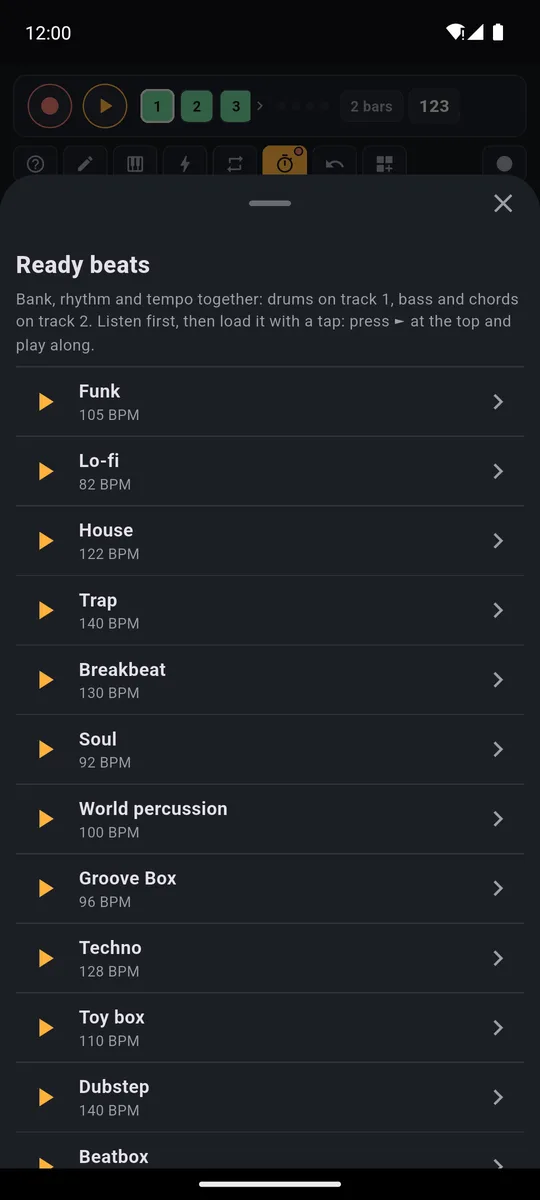
Each row shows the tempo and has its own ► to preview it before loading.
Slow it down to learn, then get back up to speed
A passage that falls apart at 105 often comes out clean at 70. The method is simple:
- Start slow. Tap the BPM and drag the slider well below the beat's tempo. The drums stay in time; only the speed changes.
- Go up in small steps. When you can play the passage three times in a row with no mistakes, add a few BPM.
- Get back to the real tempo. The beat's original tempo is shown in the Ready beats list.
- Tap in the tempo. Got a song's speed in your head? Tap TAP along with your finger and the BPM follows.
A classic beat loops every 2 bars (a bar is a group of four beats: 1, 2, 3, 4), a complete one every 4. It restarts with no gap, so you can repeat the same passage a hundred times.
Rehearsal-room tip: change the tempo before you record yourself. As soon as a track holds microphone audio, the BPM stays locked until you clear it.
Free: the metronome or your own drums
Don't want to load a beat? Two options stay free forever.
The metronome. The stopwatch button in the PAD tab, next to the ⟳, changes the click each time you tap it: off, only while recording, always on. Set it to always on, choose the BPM and press ►. The click volume is in MORE.
Drums you play yourself. Bank A (a bank is a page of 16 pads) already has Kick, Snare, Hat, Open Hat, toms and crash.
- Press REC, wait for the count-in and play Kick on 1 and 3, Snare on 2 and 4. The loop restarts on its own on track 1.
- Press REC again and add hi-hats: turn on the ⟳ (it repeats a hit in time) at 1/8 and hold Hat.
- Track 2 stays free for recording your guitar with the 🎤.
For ideas on playing over a real song instead of a drum loop, see play along without your instrument.
Record your part and listen back
Listening back is the fastest way to hear where you rush and where you drag. Tap the 🎤 on an empty track: track 3 with a classic beat, track 2 if you played the drums yourself.
- In the How do you want to record? window, choose With the beat in the background. With wired headphones the mic only picks up your instrument.
- The first time, the app offers to measure the microphone delay: about ten seconds of clicks, using the speaker.
- Each recording lasts as long as the loop: 1, 2, 4 or 8 bars, set at the top of the LOOP tab.
- Don't like it? ↶ removes the last recording and you try again. Like it? Mute it whenever you want to play over the drums alone again.
Tracks 3 and up and Record performance, which captures up to 30 minutes of your session, are part of the full version and unlocked during the 7-day trial. For guitar, vocals and a foot pedal, there's the guide to live looping.
Good to know
- Four-four time. The beats and the metronome always have four beats to the bar: there's no Ready beat for a waltz in 3/4.
- Wired headphones or the speaker. Bluetooth headphones add 100-300 ms of delay: you hear the drums late and end up playing behind the beat.
- Pad hits in the right place. If you play the pads too, run Calibrate by tapping in MORE once.
- Loading a classic beat replaces only tracks 1 and 2 and the sounds on the bank it uses. If there's anything to lose, PadLoop asks first.
Slow the drums down, play, record your part and listen back: everything is unlocked for 7 days, then it's one purchase or the free version.On iPhone: in MORE tap the top row, then Start the free trial. It costs nothing and does not renew.
Get PadLoopQuestions about drum beats for practice
Where can I find drum beats for guitar practice?
PadLoop has 24 Ready beats. In the 18 classic ones the drums sit alone on track 1, so you mute track 2 and only the rhythm is left. It loops for as long as you want, at the tempo you choose.
Can I slow down the drum beat?
Yes. Tap the BPM in the top bar and pick anything from 40 to 220 with the slider: the drums stay in time. The tempo only locks if a track already holds audio recorded from the microphone.
Are the drum beats free?
Listening to them is always free. Loading them is part of the full version, which is unlocked during the 7-day trial. The metronome and drums you play yourself on banks A and B, with 2 looper tracks, stay free forever.
What styles are there?
The classic beats are Lo-fi, Hip hop, Soul, Beatbox, Groove Box, World percussion, Funk, Islands, Toy box, Disco, House, Techno, Breakbeat, Trap, Dubstep, Drill, 8-bit and Drum and bass. There are also 6 complete beats with one track per instrument.
Can I record myself while I play over the drums?
Yes: the 🎤 button on a track records the microphone in time with the loop, up to 8 bars at a time. With a classic beat loaded you use track 3; in the free version you play the drums yourself on track 1 and record yourself on track 2.
Is there a metronome?
Yes, and it's free: the stopwatch button in the PAD tab, next to the ⟳, switches from off, to only while recording, to always on. The click volume is in MORE.
Are there beats in 3/4?
No: PadLoop's Ready beats and metronome are in 4/4, four beats to the bar.
Last updated:


