
Trap beats
How to make trap beats on your phone, from 808s to hi-hat rolls
A long 808 doing the bass, busy hi-hats with rolls, a heavy snare on beat three. PadLoop puts all of it under your fingers, plus a Trap beat that starts with one tap.
- Bank B (Trap), in the free version: four tuned 808s
- Hi-hat rolls at 1/16, 1/32 and triplets with ⟳
- Ready-made Trap beat at 140 BPM, drums and 808 already recorded
Transcript
- 0:00 A Trap beat on your phone
- 0:02 Tap ⊞ and open Ready beats
- 0:04 Pick Trap: bank, tempo and swing load by themselves
- 0:06 Press ►: drums, bass and chords are already recorded
- 0:09 Play the other pads on top: they are tuned to the beat
- 0:16 Like it? Tap REC on a free track and keep it
A trap beat on your phone needs two things: a long 808 doing the bass and busy hi-hats with rolls. In PadLoop both are on bank B (a page of 16 pads): in fifteen minutes you've got your own loop at 140 BPM (beats per minute). Want a ready-made beat instead? The Trap Ready beat loads with one tap, and you play your own 808s over it.
The Trap Ready beat, loaded and playing
- In the PAD tab tap ⊞ (the menu for banks and Ready beats) and open Ready beats.
- Preview Trap with the ► next to its name, then tap the name: bank and tempo load by themselves.
- Press ► at the top: drums, 808 and piano are already playing, in a 2-bar loop (a bar is a group of four beats: 1, 2, 3, 4).
- Play the other pads on top: they're tuned to the beat, so your notes fit.
- Got an idea? Tap track 3 in the top bar (each number is a layer of your song), hit REC and play it again on the pads: it stays in the loop.
Loading the Trap beat and track 3 belong to the full version, and both are included in the 7-day trial.
Load the Trap beat and play your own 808s over it: every Ready beat is included in the 7-day trial.On iPhone: in MORE tap the top row, then Start the free trial. It costs nothing and does not renew.
Get PadLoopFrom scratch on bank B, for free
Bank B (Trap) and the first two looper tracks are already in the free version. That's enough for a full trap beat:
- Tap the BPM in the top bar and set it to 140.
- Switch to bank B (Trap): it has Kick, Snare, Clap, Hat, Open Hat and four tuned 808s (808 C, 808 Eb, 808 F, 808 G).
- Record the drums on track 1: press REC, count 1-2-3-4 with the click and play Kick on 1 and Snare on 3. The loop starts over by itself.
- Add the hi-hats: press REC again, turn on ⟳ at 1/16 or 1/32 and hold Hat wherever you want a roll.
- Record the 808 on track 2: tap 2, press REC and play the four 808 pads under the drums.
- Tidy up the hits in the SEQ tab: hold a step to change how hard it hits.
⟳ is the button that repeats a hit in time; SEQ is the step grid where you see every hit. When you like the loop, the project keeps it saved; to turn it into an MP3 or WAV there's Export in the LOOP tab, part of the full version and included in the 7-day trial.
Watch the video on its own page →
Transcript
- 0:00 Make a trap beat from scratch
- 0:02 Pick track 1 and tap REC: a one-bar count-in starts
- 0:04 Kick, with the clap on beat 3: the half-time feel
- 0:08 The loop starts again by itself: listen before adding more
- 0:11 REC again on track 1: hi-hats in 8ths with 16th rolls
- 0:15 Track 2: the 808 bass
- 0:19 Track 3: the chords
- 0:23 All the layers, in time. Now arrange it.
- 0:26 LOOP tab: mute the drums in time for a break
- 0:30 …then the bass: the tension builds
- 0:33 Drop: everything comes back in
- 0:36 Hold an effect while it plays: filter down, then echo
- 0:43 Note repeat on the hi-hat: rolls in time
- 0:46 The performance recording is ready to share or export
Why trap feels slow even at 140 BPM
Because the snare lands on beat three, once per bar: your ear hears a slow, half-time step. Meanwhile the hi-hats run twice as fast and now and then burst into a 1/32 roll. Underneath sits the 808: a long, deep bass that plays the notes of the loop and doubles as a second kick. On top, a dark piano, a minor chord and a few "hey" shots are plenty. The tempo usually sits between 130 and 150 BPM.
In practice, two things do most of the work: the tuned 808 and the hi-hat rolls. Here's how to get them right.
Tuned 808s: a bassline that can't go wrong
The four 808s in bank B play C, E♭, F and G, notes of the C minor scale. Write a trap bassline on those four pads and no note will clash.
Need more notes? Turn on the Keyboard (the piano button) and pick 808 C: the sound spreads across all the pads, low at the bottom, high at the top. With the Minor or Min. pentatonic scale every pad is a right note. Hold a key with ⟳ on and the 808 repeats in time, in tune: that's the 808 roll on so many trap tracks. The Keyboard page covers the rest.
Two 808s ringing together turn the low end to mush. The fix: tap the pencil (the button that edits pads), open each 808 pad and give them all the same Choke group, different from the hi-hats'. From then on every new 808 cuts the one before, like a bass player changing notes. The same panel has Pitch, up to 12 semitones either way.
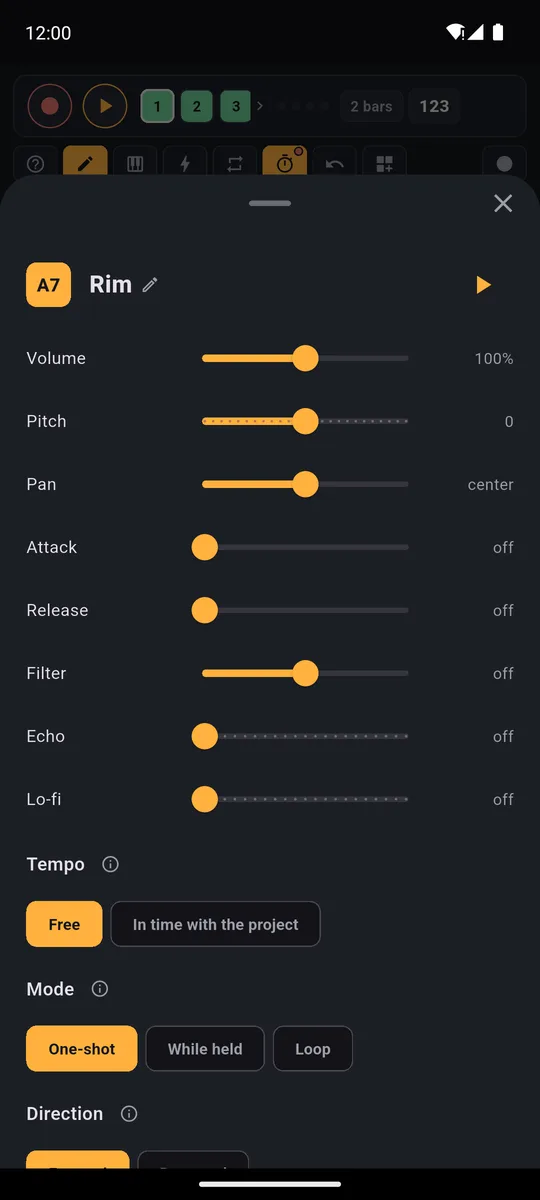
Volume, pitch, mode and choke group: in the same group, a new 808 cuts off the previous one.
Hi-hat rolls: ⟳ plays them, you pick where
Turn on ⟳, pick a rate and hold Hat: the hit repeats on its own, in time, and if you're recording it goes into the loop.
- 1/16: the bed that runs under everything
- 1/32: the fast roll before the snare or at the end of the bar
- 1/8T and 1/16T: triplets, to break the step now and then
For the roll that climbs before the drop, turn on the Keyboard on the Hat pad and choose 16 levels (the same hit, soft at the bottom, loud at the top): with ⟳ on, slide your finger upwards. Bank B's Open Hat cuts off as soon as you hit Hat, like a real hi-hat. In SEQ, turn a few hits down and the hats stop sounding like a machine.
Inside the Trap beat
The Ready beat loads the Trap & Drill bank onto the first free bank and records two bars on tracks 1 and 2:
- track 1, drums: snare on beat three, broken-up kick, hi-hats with 1/32 rolls and an open hat
- track 2, bass and chords: the Sub pad plays the 808 part under the Dark piano, and a Hey closes the loop
Mute track 1 by tapping its square in the LOOP tab and redo the drums your way, or add layers from track 3. Want more? In the full version there's another 808 in the Bass Lab Ready bank, the Dark 1-4 chords in the Chords bank and trap drum loops in the Sound library, under Grooves.
All 24 styles are on the Ready beats page. Among the complete ones there's also Trap soul (130 BPM): piano, drums, 808 and violin on four tracks, with sounds from the Grand Piano and Strings plugins. If trap is your thing, check out drill beats and phonk beats too.
A trap beat for free
Bank B, 2 looper tracks (microphone included) and one project stay free forever: drums, rolls and 808s cost you nothing. A single purchase, €9.99 in Europe, adds the Trap beat, the Trap & Drill bank, up to 16 tracks and export: a full trap groove in one tap and your track as an MP3. For arranging the track, read the guide to making beats on your phone.
Good to know
- Hits in the right place. Before recording, run Calibrate by tapping once in MORE, using the speaker: tap along with the click for a few seconds and your hits land where you played them. At 140 BPM you can hear it.
- Vocals on time. To rap over it with the 🎤, use wired headphones: with Bluetooth ones your voice arrives a touch late. Just rapping off the top of your head? The Trap beat is one of the freestyle rap beats ready in the app.
Make your first hi-hat roll on bank B, already in the free version; export and 16 tracks come with a single purchase.On iPhone: in MORE tap the top row, then Start the free trial. It costs nothing and does not renew.
Get PadLoopQuestions about making trap beats on a phone
How do you make trap beats on your phone?
You play kick, snare, hi-hats and 808 on bank B's pads, record in layers on the looper and fix hits in the step sequencer. To start right away, load the ready-made Trap beat at 140 BPM and play over it.
What BPM is trap?
Usually 130 to 150 BPM, with the snare on beat three so it feels half-time. PadLoop's Trap beat runs at 140 BPM, and the tempo slider goes from 40 to 220.
Is there a free trap beat maker app?
PadLoop's bank B (Trap), 2 looper tracks and one project stay free forever. The full version adds Ready beats, the Trap & Drill bank, export and the extra tracks, and all of them are included in the 7-day trial.
Can I make trap beats without a computer?
Yes: with PadLoop you make them on your phone, Android or iPhone. Install the app once and play even without internet, with pads under your fingers instead of a mouse.
Does PadLoop make trap beats with AI?
No. You play and record the beat yourself. The only AI in PadLoop is the optional plugin that splits a song into vocals, drums, bass and the rest, right on your phone.
Where are the 808s in PadLoop?
In bank B (Trap), included in the free version: 808 C, 808 Eb, 808 F and 808 G, already in tune with each other. There are more 808s in the Bass Lab Ready bank, the Sound library and the Phonk kit.
How do you do hi-hat rolls on a phone?
Turn on the ⟳ button, pick the rate (1/16, 1/32 or the triplets 1/8T and 1/16T) and hold the hi-hat pad. The hit repeats in time, and if you're recording it goes into the loop.
Can I record vocals over my trap beat?
Yes. A track's 🎤 button records the microphone in time with the loop, up to 8 bars per take. Wired headphones work best.
Last updated:


