
Play along with songs
Take your instrument out of the song and play along
Split the track into vocals, drums, bass and other, mute what you play and step into the gap. It's like having the band on call, inside your phone.
- Remove vocals, drums, bass or other from a song
- Practice a section up to 30 seconds, one part at a time
- Everything on the phone, no internet needed
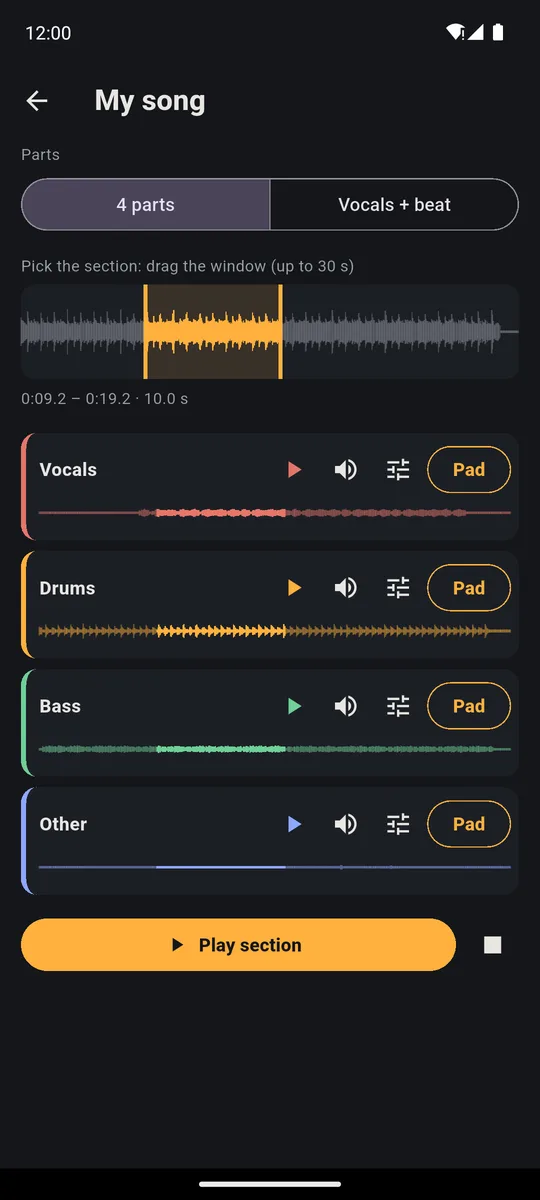
To play along with a song without your instrument, split the track in PadLoop into vocals, drums, bass and other, then mute the part you play. The real band stays, waiting for you. A few minutes later you have your own minus-one track, on your phone and even offline. Guitar sits in Other along with keys and synths. Split a song is part of the full version, and you can try it free for 7 days.
Watch the video on its own page →
Transcript
- 0:00 Pick any song from your phone
- 0:02 It is split right on the phone, offline
- 0:05 4 parts: vocals, drums, bass and the rest
- 0:10 Just the vocals
- 0:16 Or just the beat
- 0:21 Put the parts on your pads
- 0:24 …and remix the song live
Your minus-one track
- In the SAMPLE tab tap Split a song and pick a track from your phone (MP3, WAV, M4A, FLAC or OGG, up to 6 minutes).
- The first time, download the Stem split plugin, then stay in PadLoop until the song is split.
- Open the song from the Your split songs list and leave the choice on 4 parts.
- Tap the speaker next to the part you play: Vocals, Drums, Bass or Other.
- Drag the window onto the section you want to practice, up to 30 seconds, tap Play section and play along.
Want it again? Tap Play section once more. The split only happens once: the song stays in the list and opens instantly next time.
Jam with the band from your favorite track in place of your own instrument: 7 days with everything unlocked, Split a song included.On iPhone: in MORE tap the top row, then Start the free trial. It costs nothing and does not renew.
Get PadLoopWhich part should you mute?
- Singer? Mute Vocals. Or switch to Vocals + beat: you get two parts, the quickest way to a full instrumental.
- Bass player? Mute Bass and keep vocals, drums and the rest of the band. There's a whole page on how to remove the bass from a song.
- Drummer? Mute Drums: you hear the bass and chords to lock your groove to. More tricks on the remove drums from a song page.
- Guitar or keys? Mute Other. Guitars, keys, synths and strings all live in the same part, so muting it removes all of them together. You're left with vocals, drums and bass: exactly the band you need to practice with.
You can mute two parts too. Drop bass and drums and play the rhythm section with a friend; drop everything except the drums and you've got a click track that grooves like a real drummer.
How do you nail a tricky passage?
The window above the parts picks the slice you're working on. It opens at 10 seconds; drag it anywhere and stretch it up to 30.
Each part has its own ► to hear it solo. It's the fastest way to work out what the bass is doing in a passage, note by note, with nothing on top. A method that works:
- Listen to your part on its own, two or three times, with its ►.
- Play the whole section with your part on and play along with it.
- Mute it and play the part yourself.
Tap a speaker while the section plays? It restarts right away from the top of the window with the new mix. You flip between the original and your version without losing your place.
Jam for longer: the part on a pad
To stay on the same section, move the part onto a pad. The Pad button next to each part puts it on the pad you choose (an occupied pad gets replaced). Then in the PAD tab turn on the pencil (it edits the pads), tap that pad and under Mode pick Loop: tap it and it plays forever, tap again and it stops.
To keep the loop from limping, start and end the window on the first beat of a bar. For a precise cut, Edit next to the part opens the editor, with the two handles and the magnifier.
Drummer with no kit? Use the pads
Bank A, the first page of 16 pads, already has the lot: Kick, Kick 2, Snare, Clap, Hat, Open Hat, Rim, Shaker, three toms and a Crash. The last four pads are two basses and two chords.
- Put the Bass part (or Other) on one of the last four pads of bank A.
- Set it to Loop and start it.
- Play drums on the other pads: low on the pad hits hard, higher up plays soft.
For fast hi-hats turn on ⟳ and hold Hat: the hit repeats in time on its own. When you're done, Factory A in Ready banks (the ⊞ button, the banks menu) puts bank A back as it was, free for everyone.
Tips for better practice
- Start from a good file. A low-quality MP3 or a live recording drenched in reverb separates worse, and a faint trace of the original stays in the muted part.
- Use wired headphones for the pads. Bluetooth adds 100 to 300 milliseconds: you hear the hit after you tap.
- No song at hand? The Ready beats are 24 full grooves you can play over straight away (listening is free; loading them comes with the full version).
Any song is fine for study and practice. Posting a video of yourself playing over someone else's song needs the rights: for that, use your own tracks, free ones or licensed ones. How the splitting works is all on the split a song page.
Good to know
- The Stem split plugin downloads once (79 MB): the app offers it the first time, or find it in MORE → Plugins.
- Memory: at least 3 GB of RAM on Android, 4 GB on iPhone, plus 300 MB free.
- The song has to be saved on your phone: MP3, WAV, M4A, FLAC or OGG, up to 6 minutes.
- Splitting takes a few minutes and the app shows where it's at. Stay in PadLoop: if you leave, the phone may stop the job.
- Want to record yourself playing along? Use a looper track with the mic: the Loop-mode pad is for practice and doesn't go into the loops or the export.
That passage you keep fluffing, with the real band behind you: try it for 7 days with everything open, then one purchase if it helps.On iPhone: in MORE tap the top row, then Start the free trial. It costs nothing and does not renew.
Get PadLoopPlay-along questions
How do I remove an instrument from a song on my phone?
In PadLoop open SAMPLE, tap Split a song and pick the track. The phone separates it into vocals, drums, bass and other; then you mute the part you want to play and hear the rest of the band.
Can I remove just the guitar?
Not on its own. Guitar ends up in the Other part together with keys, synths and strings, so muting Other removes all of those at once and leaves vocals, drums and bass.
Does it use AI? Do I need internet?
The Stem split plugin uses an AI model that runs on your phone. You need a connection only once, to download it; after that splitting works even in a rehearsal room with no signal, and the song never leaves your device.
Can I remove instruments free online?
You do it on your phone, with the app for Android and iPhone, and the song isn't uploaded anywhere. Split a song is included in the 7-day trial, with no limits; after that it's part of the full version, a single one-time purchase that covers all the other plugins too, so every song can become your backing band, in sections of up to 30 seconds. No subscription.
How do I make a minus-one track?
Split the song, mute your part and keep the rest: that's your minus-one. Practice it in 30-second sections, or put it on a pad in Loop mode to keep it going.
Which phones does it work on?
Android phones with at least 3 GB of RAM and iPhones with at least 4 GB, with 300 MB of free space. On phones with less memory the plugin stays off.
Can I play drums on the pads over the song?
Yes: put the bass or the other part on a pad in Loop mode and play drums on the other pads of the bank. If you have a real kit, just mute the Drums part and play.
Can I use any song?
For practice and study at home, yes. Publishing yourself playing over someone else's song needs the rights, so for public videos use your own tracks, free ones or licensed ones.
Last updated:


