
Social video
Turn your beat into a video with the pads lighting up in time
Tap Video in the LOOP tab and PadLoop draws a vertical video of your beat, a song or a live jam. It's ready to post on TikTok, Reels and Shorts, no editing needed.
- Vertical MP4, 1080×1920, ready for TikTok, Reels and Shorts
- 15-second clip, free forever
- Made entirely on your phone, even offline
Watch the video on its own page →
Transcript
- 0:00 Your beat as a vertical video, ready to post
- 0:06 Social clip: 30 seconds (15 in the free version)
- 0:10 Made right on the phone, even offline
- 0:13 Share it or save it to the gallery
- 0:15 The pads light up in time with the music
PadLoop turns your beat into a vertical video for TikTok, Reels and Shorts. In the LOOP tab tap Video, choose Social clip and your phone renders a 1080×1920 MP4 where the pads light up on every hit. No editing app, no internet. The 15-second clip is free forever; the 30-second clip and the full video come with full PadLoop. Every video carries a "Made with PadLoop" mark.
From beat to video in five steps
- Get a beat going. Record it with the pads on a looper track (one layer of the piece: the numbers at the top), or load a Ready beat, a Ready song or a Random Beat (those during the 7-day trial or with full PadLoop).
- In the LOOP tab tap Video, the button with the movie camera in the top row, next to ● LIVE and Export.
- Choose Social clip (30 seconds, 15 in the free version) or Full video.
- Wait for the percentage to reach the end: on Android you can leave the app after a few seconds, on iPhone keep PadLoop open.
- When Video ready appears, tap Share and pick the app you post on, or Save to gallery (Save to Photos on iPhone).
Looper still empty? The Social video sheet says so and points you the right way: to the pads, or, during the trial, to Random Beat and the Ready beats.
Turn your beat into a clip you can post today: 15 seconds free forever, plus the 30-second clip and the full video during the 7-day trial.On iPhone: in MORE tap the top row, then Start the free trial. It costs nothing and does not renew.
Get PadLoopThe 15-second clip is free, for good
The 15-second Social clip doesn't expire when the 7-day trial does. In the free version you record a beat on tracks 1 and 2 with banks A and B (a bank is a page of 16 pads), tap Video and get your clip, as often as you like.
In this clip the "Made with PadLoop" mark is large and amber, and the end screen stays up a little longer. Full PadLoop, a one-time purchase (€9.99 in Europe), adds the 30-second clip and the full video: the mark is still there, just small and grey.
What's on screen
- at the top, the PADLOOP logo, the title and the tempo in BPM (beats per minute); a ● LIVE jam shows LIVE and its length instead
- in the middle, the 16 pads of the busiest bank, lighting up on the hits in their own colors, with their names
- the letters of the banks in use, glowing when they play
- the name of the song part, if there is one, and a bar that fills as the video runs
- at the bottom, "Made with PadLoop"
It closes with an end screen: logo, "Beat maker · Looper · Sampler" and padloop.net. The fixed text in the video is always in English, whatever language the app is set to, so it reads the same in any feed.
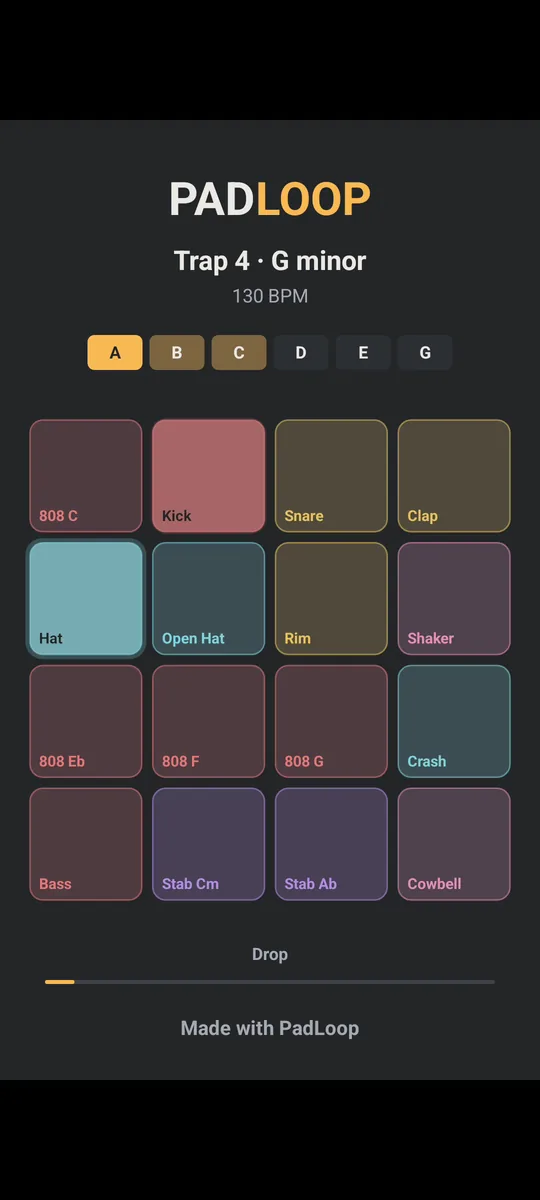
The beat's name and BPM at the top, the 16 pads lit in time in the middle, the song part below and "Made with PadLoop" at the bottom.
Name your project before you render: that name is the title at the top of the video. In MORE tap the open project and choose Rename from its menu. Leave the automatic name ("Project 1") and the video shows the loaded beat or song name instead, or "My beat".
A 30-second clip or the whole track?
| Social clip | Full video | |
|---|---|---|
| Looper beat | 30 seconds (15 free) | 4 loops of the beat, 30 seconds to 3 minutes |
| Ready song or Your song | 30 seconds from the Drop (15 free) | every part in order, up to 10 minutes |
| ● LIVE jam | the 30 seconds with the most hits (15 free) | the whole jam, up to 10 minutes |
A loop here is the stretch the looper repeats. An 8-bar loop (a bar is a group of four beats: 1, 2, 3, 4) at 120 BPM lasts 16 seconds, so the full video of that beat runs just over a minute. The clip is made for scrolling feeds; the full video lets people hear the whole thing.
A whole song, part by part
With Ready songs the full video lines up every part, from Intro to Outro, one loop each. The clip starts at the first Drop, the strongest moment. While it plays, the part name shows on screen.
Recorded the tracks yourself? Once 2 tracks have something on them, Make your song appears in LOOP. Each part remembers which tracks are on and how many loops it lasts (1, 2, 4 or 8), up to 8 parts, and the full video plays them in that order. The clip starts from the part you named Drop or, if there isn't one, the fullest. Your song stays free after the trial; the full video is part of full PadLoop.
No beat yet? Random Beat makes a new one in one of 13 genres with a single tap, and you can take it straight to Video. Random Beat and Ready songs are open during the 7-day trial or with full PadLoop.
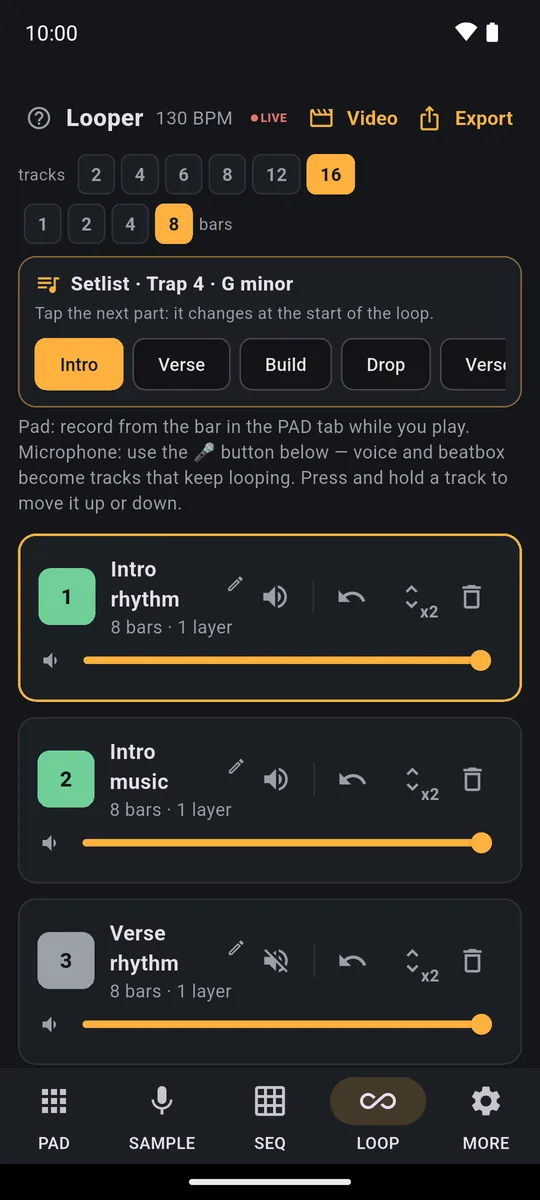
The Setlist with Intro, Verse, Build and Drop above the song's tracks: the full video plays the parts in exactly this order.
A video of what you play live
● LIVE records everything the app plays while you perform, like a gig: loops, pads and effects, up to 30 minutes. When you stop it, PadLoop offers Share the audio or Make the video, and in that video the pads light up exactly as you played them.
This video also picks up what the beat video leaves out: reverb, echo and filter from MORE, the bolt effects (the ones you hold down) and pads cycling on their own in Loop mode.
Jams you haven't shared yet stay in MORE → My jams. Tap Video there to make one whenever you want, clip or full video. Recording with ● LIVE is a full PadLoop feature; jams you made during the trial stay in My jams afterwards, and the 15-second clip from them is free.
Saving and posting on Android and iPhone
- Android: after a few seconds of preparation you can leave the app. A notification tracks the progress, with Cancel, and tells you when the video is ready. On Android 13 and later PadLoop asks for notification permission: say no and the video is still made, waiting for you when you reopen Video.
- Save to gallery puts the video in a PadLoop folder, on Android 10 and later. On Android 7, 8 and 9 there's only Share: use it to send or save the file wherever you like.
- iPhone: keep PadLoop open until the video is ready; the screen stays on by itself. Save to Photos only asks permission to add photos.
Watch plays it in your phone's video player before you post. Just need a track to put under footage you shot yourself? Then follow the guide on making music for TikTok and Reels.
Good to know
- Effects from MORE. The beat video doesn't include reverb, echo and filter from MORE, and the sheet reminds you. To keep them, use ● LIVE, then Make the video.
- Muted tracks. Tracks you've muted stay out of the beat video.
- One video at a time. Let the first one finish before starting another. Make another video replaces the one you haven't saved, so save or share it first.
- Stop ● LIVE first. A video won't start while a ● LIVE recording is running.
- Phone storage. If space runs short, PadLoop tells you how many MB to free up.
- Older phones. If 1080×1920 is too much, the video comes out at a lower resolution, still vertical.
- Mic-only jams. A ● LIVE with no pad hits becomes a video where the pads stay still: you hear everything, but nothing lights up.
- Rights. If your beat contains pieces of other people's songs, sampled or split, that's fine for practice; to publish it you need the rights to the track.
Roll a Random Beat or load a Ready song and make a video of it right away: everything is open for 7 days, then it's one purchase, no subscription.On iPhone: in MORE tap the top row, then Start the free trial. It costs nothing and does not renew.
Get PadLoopQuestions about beat videos
How do I make a beat video for TikTok?
In PadLoop, tap Video in the LOOP tab and choose Social clip: your phone creates a vertical 1080×1920 video with the pads lighting up on every hit. Then tap Share to send it to TikTok, or save it to your gallery.
Does the video have a watermark?
Yes, the words Made with PadLoop are in every video. In the free 15-second clip they're large and amber; with full PadLoop they're small and grey.
Is making the video free?
The 15-second Social clip is, forever, even after the trial ends. The 30-second clip and the full video come with full PadLoop: free during the 7-day trial, then a single purchase with no subscription.
What format and resolution is the video?
A vertical MP4, 1080×1920 at 30 frames per second, the upright format TikTok, Reels and Shorts use. Phones that can't handle that size get a lower resolution, still vertical.
How long can the video be?
The clip is 30 seconds (15 in the free version). A full video of a beat plays 4 loops, from 30 seconds to 3 minutes; a song or a ● LIVE jam can run up to 10 minutes.
Is PadLoop a beat visualizer app?
In a way: the video shows PadLoop's own pads lighting up as they play, so it comes from a beat, a Ready song or a ● LIVE jam made in the app. It doesn't turn a finished MP3 into a visualizer video.
Do I need internet to make the video?
No. Your phone draws the video itself: nothing is uploaded anywhere, and it works in airplane mode.
Does it work on iPhone?
Yes. On iPhone keep PadLoop open until the video is ready, then tap Save to Photos or Share. On Android you can leave the app: a notification tells you when it's done.
Last updated:


