
Random Beat
A new beat every time you tap, ready to play over
Pick a genre, tap one button and PadLoop hands you a complete beat that's already looping: drums, bass and chords or melody, each on its own track. Not feeling it? Tap again.
- 13 genres: Trap, Drill, Lo-fi, House, Afrobeats…
- 112 beats built in, almost 2,000 with the plugin
- Every instrument on its own track, all editable
Watch the video on its own page →
Transcript
- 0:00 Random Beat: a new beat with one tap
- 0:02 It plays right away: drums, bass and chords, each on its own track
- 0:13 Pick a genre, Trap, and tap again: another beat
- 0:13 It plays right away: drums, bass and chords, each on its own track
- 0:14 Pick a genre, Trap, and tap again: another beat
- 0:24 13 genres: here Drill
- 0:32 Close the sheet and play the pads over it
PadLoop's random beat generator works with one tap: a complete beat starts playing, with drums, bass and chords or melody, each on its own track, at its own tempo and swing. Choose from 13 genres, from trap to drum & bass, and tap again if it doesn't land. Random Beat comes with the 7-day trial or the full version, and every new beat replaces what's in the looper.
Five taps to your first beat
- Open the LOOP tab and tap Random Beat in the Start here box: a beat starts playing right away.
- In the sheet that stays open, pick a genre from the row, such as Trap or Lo-fi, or leave it on All.
- Tap Another Random Beat: a new beat in that genre arrives, with its name and its BPM (the tempo, in beats per minute).
- Keep tapping until one clicks, then close the sheet: the beat keeps looping.
- Play over it on the pads in the PAD tab, or record your vocals with 🎤 on an empty track.
Once the looper has tracks in it, the Random Beat button moves to a smaller spot below them. It's also in Ready beats and songs, at the top of the Ready beats list.
Fire off ten trap beats in a row and keep the one that makes your head nod: Random Beat is open for the whole 7-day trial.On iPhone: in MORE tap the top row, then Start the free trial. It costs nothing and does not renew.
Get PadLoopWhat lands with every tap
You don't just get a drum pattern. Each tap loads a whole beat, ready to play:
- sounds on the banks (pages of 16 pads, lettered A–H): always on A, nearly always on B and C too
- notes on the looper tracks (the layers of the song), 3 to 5 of them: always Drums and Bass, then Chords, Melody or both, sometimes FX
- tempo: from 70 to 176 BPM, depending on the genre
- swing (every other hit lands a touch late, so the groove sways): from 50, which is straight, up to 64
- loop length: 4 or 8 bars (a bar is a group of four beats: 1, 2, 3, 4)
Every beat is named after its genre and key, like "Trap · F minor". When it starts, a message at the bottom shows the name and the BPM.
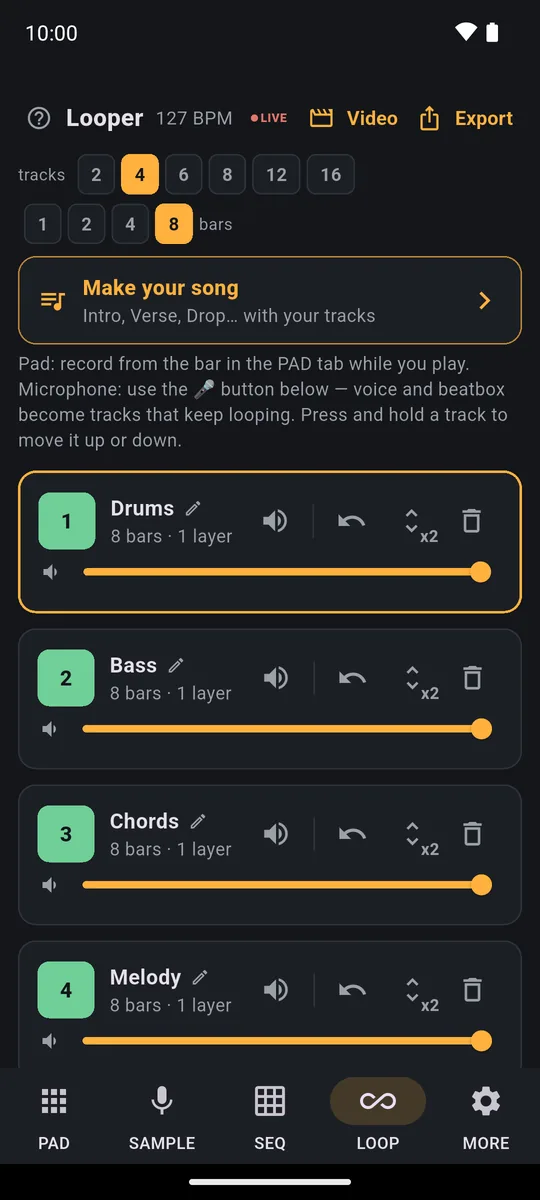
Drums, Bass, Chords and Melody, each on its own looper row: mute it, replay it or leave it alone.
13 genres, almost 2,000 beats
Here's the genre row: Trap, Drill, Phonk, Lo-fi, Boom bap, House, Techno, Disco, Breakbeat, Drum & bass, Afrobeats, Amapiano and Reggaeton.
- 112 beats are already inside the app and play without downloading anything. They cover 10 genres; Phonk, Amapiano and Reggaeton come with the plugin.
- The Random Beat plugin takes you to almost 2,000. It weighs about 1.2 MB and downloads inside the app: from MORE → Plugins, or right in the sheet when the built-in beats for a genre run out and PadLoop offers it.
- Many plugin beats also want a sound kit, such as piano, strings or winds. When one comes up, the app offers to download whatever is missing. It picks beats that play with the kits you already have first.
The last 300 beats you've used don't come back right away, and you never get the same one twice in a row, so you can tap for a long time before hearing a repeat.
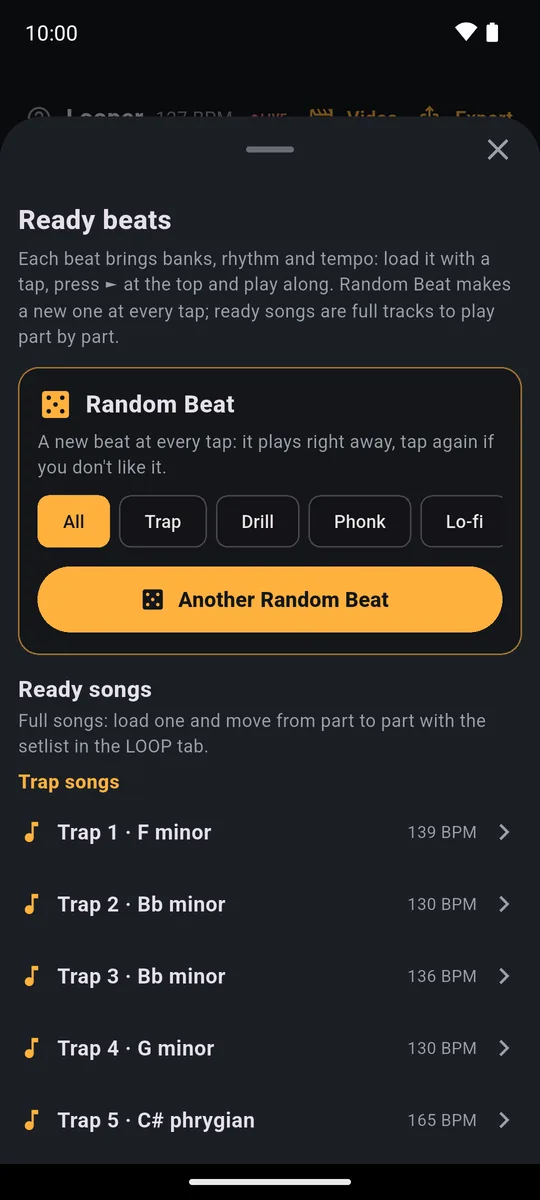
At the top of Ready beats: the genre row and the button that makes a new beat.
Rules, not AI: a beat you can take apart
Random Beat is a program that builds beats with musical rules, not an AI that hands you a finished audio file. Each beat has its own key and tempo, and it arrives as notes and pad hits. You feel the difference straight away.
- Every instrument is a track. Mute the drums and play them yourself on the pads; keep only bass and chords as a bed to sing over.
- The tempo moves. Change the BPM in the top bar and the hits stay in time.
- The sounds swap. With the pencil (it edits the pads), tap a pad and use Change to put another sound from the Sound library on it.
How to keep the beat you like
Each tap loads a new beat in place of the looper recordings. While you're browsing, that's handy: tap, listen, tap again. When you find the one, stop and close the sheet: the beat stays in the project.
To keep hunting without losing it, open the sheet again and tap the button. PadLoop asks what to do, and the main choice is In a new project: the previous beat stays saved in Projects. It also asks if you've recorded something on top in the meantime.
Before you skip a beat: if you love the rhythm but not one sound, don't tap again. Keep the beat and swap just that sound with the pencil; the rest of the loop stays put.
Now what? Four things to do with your beat
- Play over it. The beat's sounds are on the pads in the PAD tab: add hits, rolls and breaks in time. The full version gives you up to 16 tracks for extra layers.
- Record vocals. Rap or sing with 🎤 on an empty track; the steps are in the guide to recording vocals over a beat. If every track is taken, raise the number in the tracks row in LOOP.
- Swap its sounds. A different kick, a different bass, same groove: the pencil and Change are all it takes.
- Make a video. In LOOP, the Video button makes a vertical video with the pads lighting up in time, ready for TikTok and Reels: here's how.
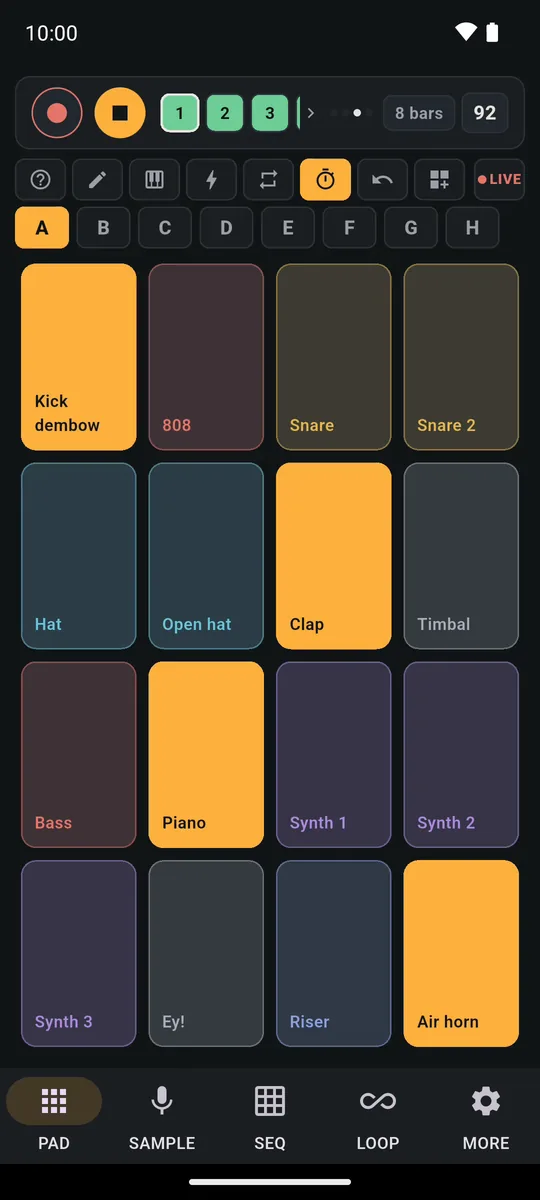
The PAD tab with the loaded beat's sounds: tap the pads and play over it in time.
Prefer to pick a fixed beat from a list? There are 24 Ready beats, each with its own name, and you can listen to them before loading.
Try it for 7 days, then decide
Random Beat is part of the full version and has no listening preview: you use it for real, with every genre and the plugin, during the 7-day trial with everything unlocked. On Android the trial starts by itself on first launch.
After that, a single purchase unlocks it for good (€9.99 in Europe; the store shows the price in your currency). No subscription, no ads. If you don't buy, PadLoop stays free with 2 banks, 2 looper tracks and one project.
Good to know
- To keep a beat exactly as it is after the trial, export it during the trial. Export in LOOP saves it as an MP3 or WAV. When the trial ends your recordings stay, but banks A and B go back to the standard sounds; if you unlock later, bring them back from MORE → Put back the trial sounds.
- Finish recording first. If you're in the middle of recording a loop, PadLoop asks you to finish it before loading a beat.
- On iPhone, plugins live in the app's cache. If iOS clears it, download the plugin again from MORE → Plugins; the 112 built-in beats keep working in the meantime.
Find your beat, rap or sing over it, then turn it into a video: the 7-day trial unlocks everything, then a single purchase keeps it.On iPhone: in MORE tap the top row, then Start the free trial. It costs nothing and does not renew.
Get PadLoopQuestions about the random beat generator
How does a random beat generator work?
In PadLoop you tap Random Beat and the app picks a beat in the genre you chose: it loads the sounds onto the banks, the notes onto the looper tracks, the tempo and the swing, then starts it. Every tap brings a new one.
Is it an AI beat generator?
No. The beats are built by a program that follows musical rules, and some rhythms are derived from Google's Groove MIDI Dataset (CC BY 4.0 license). That's why each instrument sits on its own track that you can mute or replay.
Is the beat generator free?
Random Beat is part of the full version: you use it during the 7-day trial with everything unlocked, then keep it with a one-time purchase (€9.99 in Europe), no subscription. There's no preview to listen to first. After the trial, banks A and B, 2 looper tracks and one project stay free.
Can it work as a drum beat generator?
Yes. Every beat puts the drums on their own track, so mute bass, chords and melody and you're left with a drum loop in the genre you picked. Change the BPM in the top bar and the hits stay in time.
Can I make rap beats with it?
Yes: the genres include Trap, Drill, Boom bap and Phonk. Pick one in the row before you tap, and every new beat stays in that style. Then record your verse on an empty track.
How many beats are there?
112 come inside the app, across 10 genres. The Random Beat plugin, downloaded inside the app (about 1.2 MB), takes you to almost 2,000 in 13 genres. Many of those also use a sound kit, and the app offers to download it.
Will a new beat erase what I recorded?
Yes, each beat replaces the looper recordings. If there's anything to lose, PadLoop asks you first, and the main choice is In a new project: your current project stays in Projects.
Last updated:


