
Ready songs
60 ready-made songs to play live, one part at a time
Load a song, press ► and you're in charge: Intro, Verse, Build, Drop. Each part comes in when you tap it, right on the next loop, and you play the pads on top.
- 60 songs in 6 packs, from lo-fi to drum & bass
- 9 parts: the next one starts only when you tap it
- Capture it with ● LIVE or turn it into a full video
Watch the video on its own page →
Transcript
- 0:00 Ready songs: 60 full songs to play
- 0:11 The Setlist: Intro, Verse, Build, Drop…
- 0:14 Press ► in the PAD tab: the Intro starts
- 0:21 Tap the next part: it changes at the end of the loop
- 0:29 Verse: at the end of the loop new tracks come in
- 0:39 Drop: you decide when
PadLoop lets you play a whole song live, one part at a time. Load one of the 60 Ready songs, press ► and use the Setlist to go from Intro to Verse to Drop when you decide. The part changes at the start of the next loop and never moves on by itself. On top you add pads, vocals and effects. Ready songs come with the 7-day trial or full PadLoop.
From the list to the Drop in five taps
- In the LOOP tab, tap Ready beats and songs and scroll down to Ready songs.
- Tap Download next to a pack, for example Trap songs.
- Tap a song, for example Trap 4 · G minor. If it needs a sound kit you don't have, PadLoop offers to download it.
- Press ► in the top bar of the PAD tab: the Intro starts. In the LOOP tab you'll find the Setlist, with the parts in a row.
- Tap the next part, for example Verse: it changes at the start of the next loop. Keep going to the Drop and the Outro, whenever you choose.
The loop is the bit that repeats: in Ready songs it's 8 bars long (a bar is a group of four beats: 1, 2, 3, 4). At first only the Intro tracks play; the other parts wait, switched off.
Take a trap song from Intro to Drop with your own fingers: all 60 Ready songs are open during the 7-day trial.On iPhone: in MORE tap the top row, then Start the free trial. It costs nothing and does not renew.
Get PadLoopSong structure, part by part
Every Ready song is built like a real track, with nine parts in this order. Only one song has eight, and it starts straight from the Verse.
| Part | What it usually does |
|---|---|
| Intro | opens the track |
| Verse | tells the story: this is where vocals usually come in |
| Build | raises the tension before the Drop |
| Drop | the fullest moment, the one everybody waits for |
| Verse 2 | a fresh start, with tracks of its own |
| Break | a pause that lets the song breathe |
| Build 2 | brings the tension back |
| Drop 2 | the Drop returns, with the same tracks |
| Outro | ends the song |
Behind each part are its own tracks (the layers of the song, the numbered rows in the looper), usually one for rhythm and one for music: 12 to 16 tracks per song. When you change parts, PadLoop switches on the new part's tracks and mutes the rest, all at once. It's what a musician would do with the mute buttons, in a single tap.
Six packs, 60 songs
The songs come in six packs that you download once. Each weighs 20 to 60 kB, because it only holds the notes: the sounds are the app's and the kits'.
| Pack | Songs | Genres | BPM |
|---|---|---|---|
| Trap songs | 8 | Trap | 130–165 |
| Drill & Phonk songs | 12 | Phonk 7, Drill 5 | 130–156 |
| Lo-fi & Boom bap songs | 6 | Boom bap 3, Lo-fi 3 | 74–88 |
| House & Disco songs | 11 | House 9, Disco 2 | 118–125 |
| Techno & DnB songs | 9 | Techno 4, Drum & bass 3, Breakbeat 2 | 126–176 |
| Afro & Amapiano songs | 14 | Afrobeats 7, Amapiano 4, Reggaeton 3 | 95–115 |
BPM is the tempo, in beats per minute. Each song's name gives the genre, a number and the key: "Trap 4 · G minor" is the fourth trap song, in G minor. They aren't covers of famous songs: they're tracks written for PadLoop by a program that follows musical rules, with no AI involved.
You call the changes
The Setlist is never in a hurry. A part only changes when you tap it, and it lands at the start of the next loop, on time.
- The Drop lasts as long as you want. Don't tap anything and it keeps looping. Same goes for the Verse you're rapping over.
- Tap a little early. An 8-bar loop lasts about 15 seconds at 130 BPM and about 26 at 74 BPM. While the change is waiting, the new part shows "…".
- Any order. Go back to the Verse after the Drop or skip the Break: every part can be tapped at any time.
- From the pads too. In the PAD tab, in place of the beat dots, a small button shows the part that's playing. Tap it and pick the next one without leaving the pads.
- It stays saved. The chosen part is saved with the project and is still there when you reopen it.
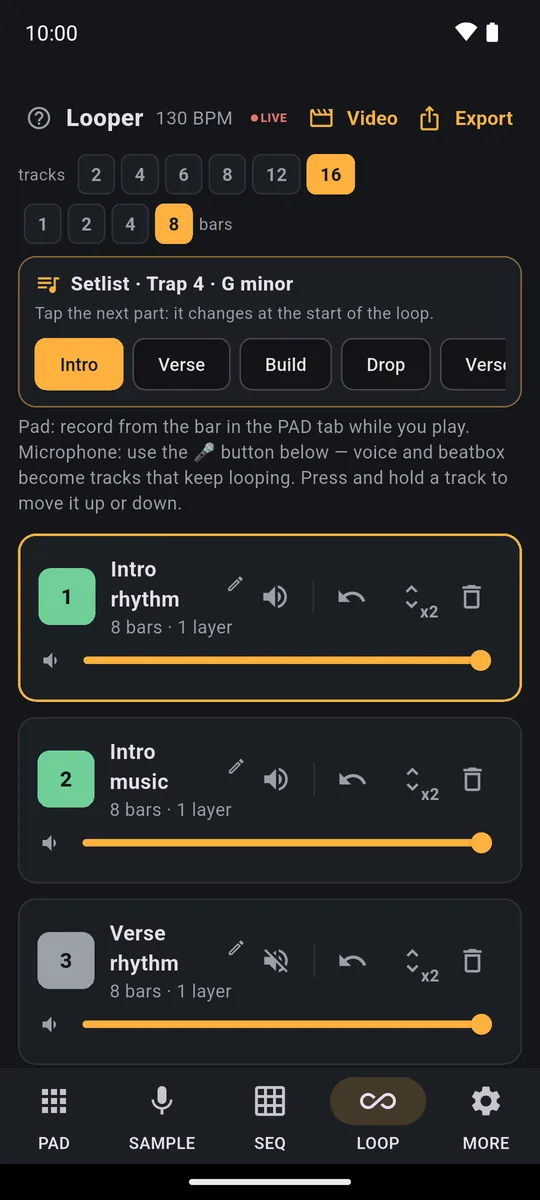
The parts in a row, from Intro to Drop: tap the next one and the song's tracks switch on and off on the next loop.
Timing tip: tap the new part while the last loop of the old one is playing. Don't wait for the final hit: a tap right on the boundary slips to the loop after.
What you play on top
The song runs by itself, but the show is yours.
- Pads. The song loads its sounds onto the banks (a bank is a page of 16 pads, the letters A–H): add hits and fills wherever you like.
- Bolt effects. These are hold-down effects (filter, echo, reverb, lo-fi, flanger, robot): use them to push a Build or strip a Break bare.
- Vocals. Rap or sing over it, live. The Verse waits until you're ready for the Drop; if you're after beats to rap on, see the freestyle rap beats too.
- ● LIVE. It records everything the app plays (song, pads and effects) for up to 30 minutes, as a WAV, with the parts in the order you played them. When you stop, choose Share the audio or Make the video, up to 10 minutes.
- Full video. In LOOP tap Video, then Full video: every part in order, one loop each. Trap 4, at 130 BPM, runs just over 2 minutes. The Social clip lasts 30 seconds instead and starts from the first Drop.
● LIVE, the full video and the 30-second clip are also open during the trial or with full PadLoop. Videos are vertical MP4s at 1080×1920, with the pads lighting up on the hits, the part name, and "Made with PadLoop" at the bottom, which appears in every video. How to make and share one is on the page about beat videos for TikTok and Reels.
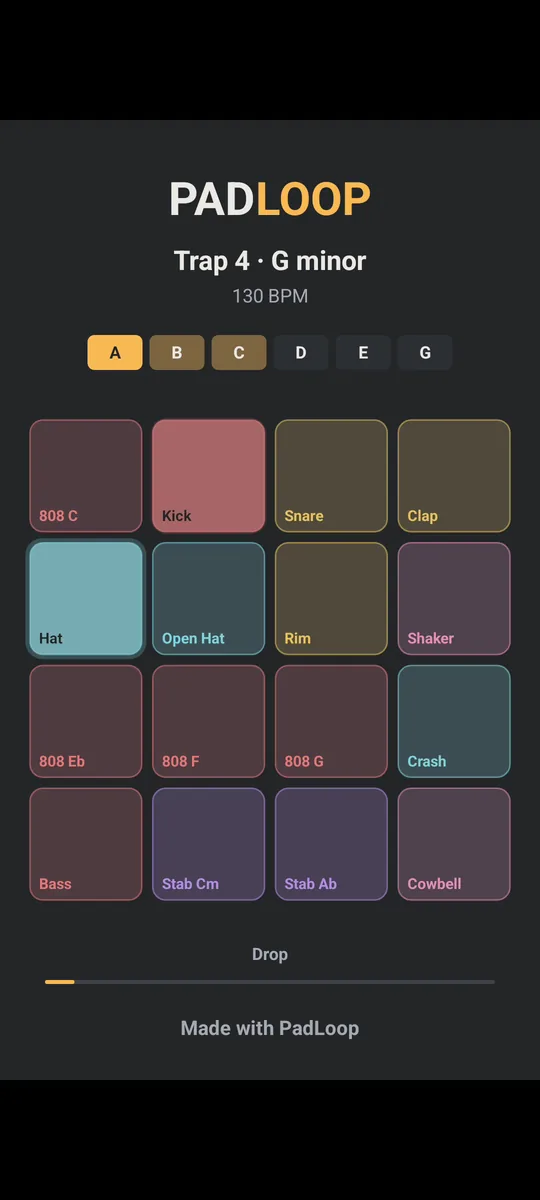
The title, the BPM, the 16 pads lighting up in time and the part that's playing.
The same thing with your own tracks: Your song
Like the idea but want to play your own material? In a project with no Ready song loaded, as soon as you've recorded at least 2 tracks, Make your song appears in the LOOP tab.
- Turn off the tracks you don't want in the first part with the speaker button.
- Tap + Part and name it: PadLoop suggests a few (Intro, Verse, Chorus, Drop, Break, Outro).
- Turn on other tracks and make the next part, up to 8 parts.
- While it plays, tap a part: the change comes at the end of the loop, just like in Ready songs. The small button in the PAD bar works too.
Each part lasts 1, 2, 4 or 8 loops, which counts for the full video that plays them in order. Your song is free even after the trial. With the 2 tracks of the free version (mic included) you can already make a Verse with just the beat and a Chorus with beat and vocals. The full video needs full PadLoop, while the 15-second Social clip, with the large PadLoop logo, is free. The whole path, from beat to vocals, is in the guide on how to make a song on your phone.
Can you try them for free?
Yes, during the 7-day trial: you load and download all 60 songs, kits included. Without the trial there's no way to listen to them; Ready beats, on the other hand, can be previewed for free with ►. When the trial ends, PadLoop stays free with 2 banks, 2 tracks and one project, or a single purchase (€9.99 in Europe) unlocks Ready songs and everything else. No subscription, no ads.
Want a fresh beat instead of a whole song? Try the random beat generator: one tap and it plays.
Good to know
- A song takes the place of what's there. Loading one replaces the sounds of the banks it uses and deletes the looper recordings, just like a Random Beat. If there's anything to lose it asks you first, and the main choice is In a new project: the current one stays in Projects.
- Kits download once. Almost every song also uses sounds from a plugin kit. PadLoop tells you which one is missing and offers to download it right there.
- To record your own vocals, start from Your song. The 🎤 records onto an empty track, and many Ready songs fill all 16 tracks, because every part has its own. ● LIVE captures the app's sound, not the microphone.
- On iPhone the packs live in the app's temporary storage: if the system clears it because storage is full, download the pack again. The Setlist saved in the project comes back when you download it again and reopen the project.
Play your own take on a song, part by part, and capture it with ● LIVE: everything is unlocked in the trial, then a single purchase keeps it.On iPhone: in MORE tap the top row, then Start the free trial. It costs nothing and does not renew.
Get PadLoopQuestions about Ready songs
What are the parts of a song?
In PadLoop's Ready songs there are nine, in this order: Intro, Verse, Build, Drop, Verse 2, Break, Build 2, Drop 2 and Outro. A pop song usually has a chorus where the Drop is; in trap and electronic music the Drop is the biggest moment.
What is the structure of a trap song?
The 8 songs in the Trap songs pack follow the same nine parts, from Intro to Outro, with the Drop coming back twice. They run from 130 to 165 BPM, with an 8-bar loop for each part.
Do the parts change on their own?
No. A part only changes when you tap it in the Setlist, and it switches at the start of the next loop. If you don't tap anything, the current part keeps looping.
Can I play the parts in a different order?
Yes. You can tap any part at any time: go back to the Verse after the Drop, skip the Break, or ride the Drop for as long as you like.
Are the Ready songs free?
Loading them and downloading the packs is part of the full version: during the 7-day trial you can use them all. There's no preview, so you hear them by loading them during the trial. After that, a single purchase (€9.99 in Europe) keeps them unlocked.
Do I need internet to play them?
Only to download the song packs and the sound kits they use. Once downloaded, the song plays from your phone.
Can I do the same with my own tracks?
Yes, with Your song: once you have at least 2 recorded tracks, Make your song appears in the LOOP tab. You save parts with the tracks that are on and switch between them at the end of the loop. It stays free after the trial.
Last updated:


