Create a sound
Make your own drum sounds: roll the dice and hear a new kick or 808
Pick the type of sound and a style, tap the dice and your phone invents a new one. Listen, put it on a pad and play it. No internet needed.
- 9 types of sound and 7 styles, 120 recipes
- Give me 8, or a full kit of 16 pads
- All on your phone, offline, and no AI
With Create a sound your phone invents a new kick, snare, 808 or synth every time you tap the dice, in the style you pick: Trap, Drill, Lo-fi and more. You hear it, put it on a pad and play it. It all happens on your phone, offline, and it isn’t artificial intelligence. It’s part of full PadLoop, and it’s open during the 7-day trial.
You pick 808 and Trap, roll the dice, listen to eight sounds, put the right one on a pad and finally make a full kit on a bank.
From the dice to the pad in six taps
- In the SAMPLE tab, tap Create a sound.
- Pick the Type (for example 808) and the Style (for example Trap).
- Tap the dice (Roll the dice): you hear a new sound. Tap again for another one.
- Want to choose between several? Tap Give me 8 and listen to the eight tiles, one at a time.
- Tap Put on a pad and pick the pad: the sound’s name gives its type and recipe, for example “808 clean”.
- Wrong pad? Tap Undo in the message: the pad goes back to how it was, SEQ notes included.
There’s a shorter way from the pad itself: tap the pencil (the button that edits pads), tap the pad and then Create. The button at the bottom becomes Put on A1, with the name of that pad.
Roll the dice ten times on a Trap 808 and keep the one that makes your head nod: Create a sound is open for the whole 7-day trial.On iPhone: in MORE tap the top row, then Start the free trial. It costs nothing and does not renew.
Get PadLoopNine types of sound, seven styles
The Type says what you’re making:
- Kick, Snare, Clap
- Hats & cymbals, Percussion
- 808 and Bass
- Synth
- FX
The Style says what kind of music it’s for: Trap, Drill, Reggaeton, Afro, House, Techno and Lo-fi. Each style gives only sounds of its own genre.
Behind the dice there are 120 recipes, meaning 120 different ways of building a sound: 16 for the kick, 12 for the snare, 8 for the clap, 14 for hats, 15 for percussion, 12 for 808s, 11 for basses, 18 for synths and 14 for effects. The dice picks one and plays it. Listen plays it again whenever you like.
Give me 8: choose by ear
One roll at a time is slow. Give me 8 shows eight sounds at a time, all different. Tap a tile to hear it, then keep the one you like with Put on a pad. If the same recipe comes up twice, the second sound gets a number in its name (“long boom 2”), so your pads don’t get mixed up.
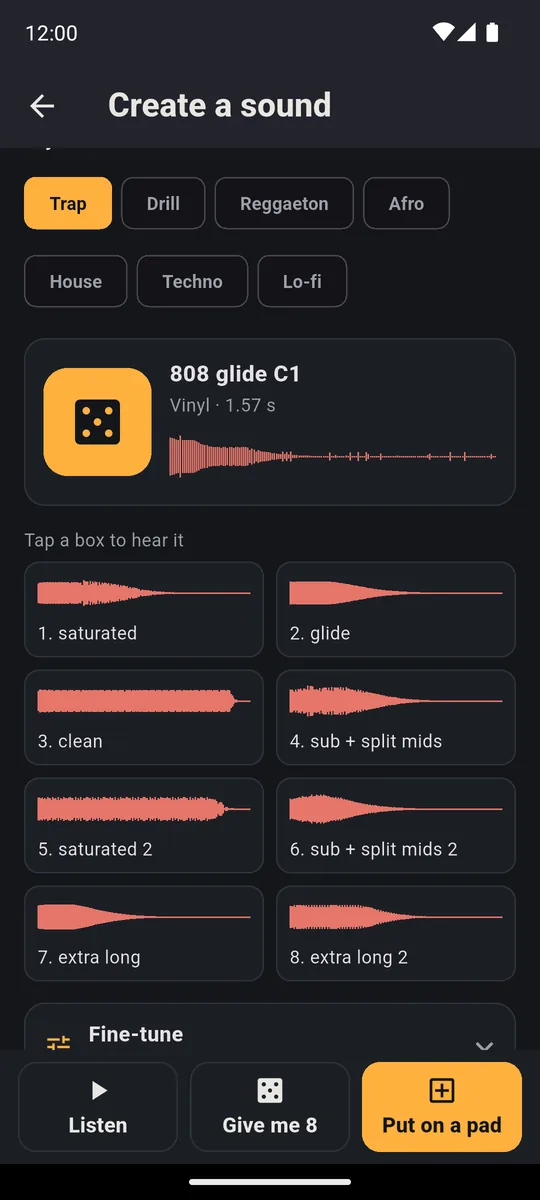
808 type, Trap style: the dice and the eight tiles to listen to, with Put on a pad at the bottom.
A 16-pad kit in one tap
Full kit makes 16 sounds at once, one for every pad of a bank (a page of 16 pads). Already like one of them? Tap its bookmark, Keep pad: it stays as it is and you redo the others. When you’re happy with the kit, Put in a bank… loads it onto a bank. If the bank already has sounds, the app asks before overwriting it, and Undo is there afterward.
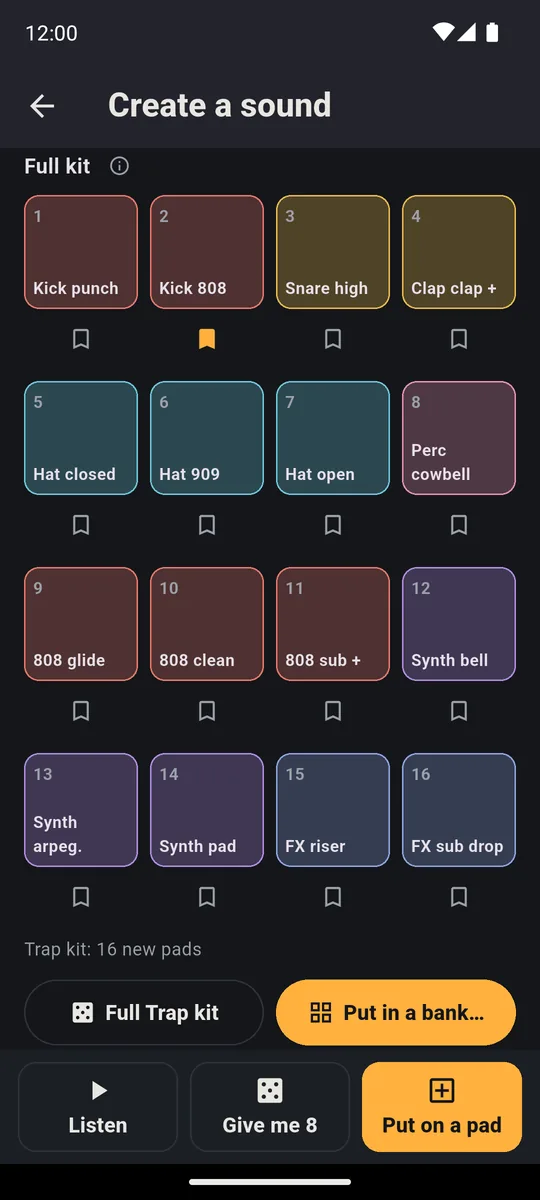
Sixteen pads made with the dice: the Keep pad bookmark under every pad, Put in a bank… at the bottom.
Fine-tune: change the character
Is the sound almost right? Fine-tune fixes it without starting over:
- Recipe: pick another way of building it, or All
- Character: Clean, Vinyl, Tape, Cassette, 8-bit, 12-bit, Saturated, Radio or Phone
- Finish: up to two
- four knobs: Length, Tone (Octave for pitched sounds), Dirt and Brightness
For a lo-fi sound try Cassette and a little Dirt; for a clean 808 raise Length and keep Clean.
After that, it’s a pad like any other
When a dice-made sound is on a pad, the pad panel says Made with the dice and offers Make a similar one: same recipe, another version. From there you tune it with Pitch, trim it and edit it like any sound.
A dice-made 808, bass or synth has its own real note, so it plays well on the Keyboard too: an 808 on the Minor scale can’t hit a wrong note (the page on playing in key explains how). If you’d rather write the rhythm on a grid, see the drum machine page.
An example: a trap beat made of your own sounds
Want a beat where every sound is new? Start with the Trap Style. Make a Kick and put it on the first pad, then a Snare or Clap on the second, Hats & cymbals on the third and an 808 on the fourth. Roll the dice until each sound feels right, or use Give me 8 and choose by ear. Then record the loop in the looper: press REC and play the four pads in time. The full recipe, with tempo and hi-hat rolls, is in the guide to making trap beats on your phone.
The same goes for a lo-fi, house or reggaeton beat: change the style and the dice gives you sounds of that genre.
Not AI, and it works offline
The phone calculates the sound with a synthesis program, the way a synthesizer does: no download, no plugin, no server, so no waiting. It’s in the same spirit as Random Beat, which builds beats from musical rules. The same dice that hands you a kick on a plane hands you an 808 in the rehearsal room.
What’s free and what isn’t
Create a sound is a full-PadLoop feature. During the 7-day trial it’s open along with everything else. In the free version it doesn’t open: Create in the pad panel takes you to the full PadLoop page, where Create a sound is the first item, and the SAMPLE tab only shows “The sampler belongs to the full PadLoop” with the Unlock full PadLoop button. Banks A and B, 2 looper tracks and one project stay free forever. For prices see pricing and FAQ.
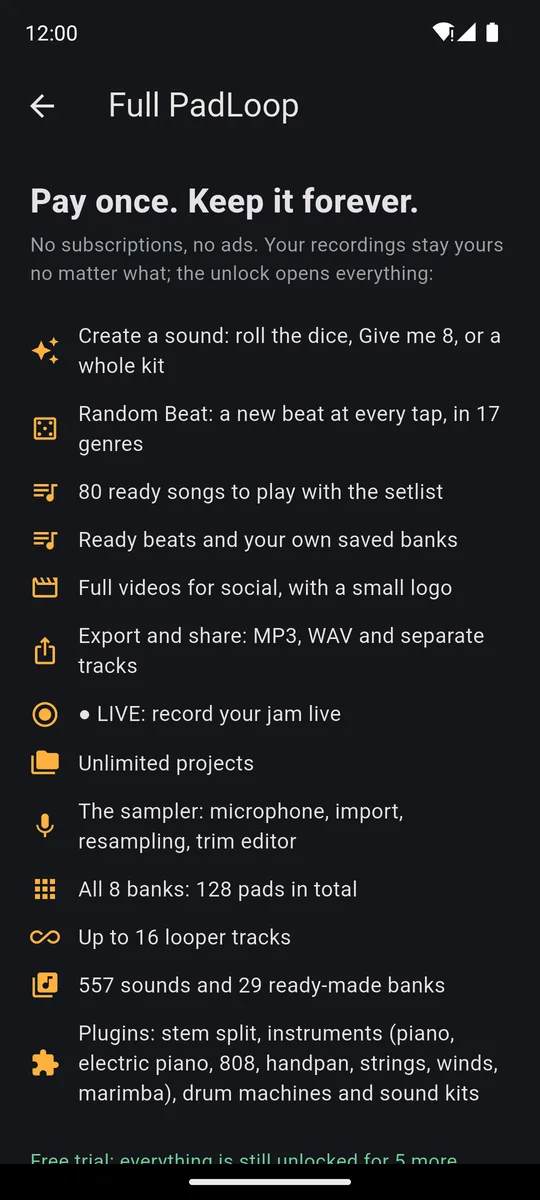
In the free version, this is where Create takes you: Create a sound is the first thing on the list of what you unlock.
Good to know
- One sound at a time, but a kit is one tap. For a whole bank use Full kit: 16 sounds in a single tap.
- The bank asks before erasing. Put in a bank… never overwrites anything without telling you.
- For sounds that already exist (your voice, a file, a video), use the SAMPLE tab: the page on how to sample your voice and any sound explains it.
Make a 16-pad kit in one tap and play your first beat on it: the 7-day trial has everything unlocked.On iPhone: in MORE tap the top row, then Start the free trial. It costs nothing and does not renew.
Get PadLoopQuestions about Create a sound
How do you make drum sounds on a phone?
In PadLoop, open the SAMPLE tab, tap Create a sound, pick a type and a style and roll the dice: the phone invents the sound and you hear it right away. Then Put on a pad places it on a pad.
Does Create a sound use AI?
No. It’s synthesis: the phone builds the sound with a program, starting from sound recipes (there are 120). No artificial intelligence and no server.
Do I need internet to make sounds?
No. There is nothing to download and no plugin: the sound is made on your phone, even on a plane.
What sounds can I make?
Nine types: Kick, Snare, Clap, Hats & cymbals, Percussion, 808, Bass, Synth and FX. There are seven styles: Trap, Drill, Reggaeton, Afro, House, Techno and Lo-fi.
Can I make a whole drum kit?
Yes: Full kit makes 16 sounds at once, one per pad. If you already like one, its Keep pad bookmark leaves it as it is while you redo the others. Then Put in a bank… loads them onto a bank.
Is Create a sound free?
It’s part of full PadLoop: open during the 7-day trial, then yours with the one-time unlock. In the free version it doesn’t open: Create in the pad panel takes you to the full PadLoop page, and the SAMPLE tab only shows what the sampler does, with the button to unlock it. Banks A and B, 2 looper tracks and one project stay free forever.
Can I undo it if I don’t like the result?
Yes. After Put on a pad or Put in a bank, the Undo button in the message puts the pad back the way it was, SEQ notes included.
How is this different from SAMPLE?
SAMPLE takes sounds that already exist: microphone, files, videos. Create a sound invents new ones with the dice, with nothing to record.
Last updated: