Loop pad
A loop pad you can try right here, then keep on your phone
Tap the pads below over a looping beat. In the PadLoop app any pad becomes a loop: one tap starts it on the next bar, another tap stops it, and it stays at your tempo.
- Try 16 pads over 5 beats in your browser
- In the app: Loop mode, starts in time from 1/16 to 8 bars
- Free on banks A and B, no ads, Android and iPhone
A loop pad is a grid of pads where every pad starts a loop, always in time. Try one right here: press ► to start a beat, then tap the 16 pads over it. In the PadLoop app, on Android and iPhone, any pad becomes a real loop pad: one tap starts the loop on the next bar, another tap stops it.
Pick a beat with ► and play on top: the pads change sounds and are already in key with the loop. On a computer: keys 1-4, Q-R, A-F, Z-V.
In the browser the beat loops and each pad plays once, to hear how it sounds. In the app you choose which pads keep going on their own, and when they start.
Your first loop pad in five steps
- Turn on the pencil at the top (it edits the pads) and tap a pad on bank A or B (a bank is a page of 16 pads: the letters A to H).
- Under Mode choose Loop: one tap starts the sound and it keeps going, another tap stops it.
- In MORE, under Loop recording, set Pad loops in time to 1 bar: the loop waits for the next bar and starts in time.
- For a ready-made loop, under Tempo choose In time with the project and check the Sample BPM: the loop follows your tempo without changing pitch.
- Put two loop pads in the same Choke group: starting one stops the other, so you can swap parts without counting.
The Loop pads blink while they wait, then start together at the start of the bar.
Turn the pads into loops on your phone and switch parts on the bar: 7 days with everything unlocked, then banks A and B stay free.On iPhone: in MORE tap the top row, then Start the free trial. It costs nothing and does not renew.
Get PadLoopWhere the loops come from
The pads of banks A and B come with drums, 808s, basses and chord stabs. Any of them can play in Loop mode, and that's free forever. For real musical loops, open the Sound library from a pad: with the pencil on, tap the pad and choose Change. The Grooves category has ready-made loops, and the ones without a lock go on banks A and B in the free version too.
Want your own loops? With the sampler you record a groove from the mic, import an audio file or take the sound from a video, trim it and put it on a pad. The sampler, the full Sound library and the 29 Ready banks come with full PadLoop and are open during the 7-day trial.
Start loops on the beat without counting
Pad loops in time is in MORE, under Loop recording. The choices go from Now (the default: the loop starts the moment you tap) to 1/16, 1/8, 1 beat, 1 bar, 2 bars, 4 bars and 8 bars.
With 1 bar, a pad you tap mid-bar blinks and waits: it starts exactly on the next 1. Changed your mind? Tap it again while it blinks and it cancels. With the music stopped, the first loop starts right away and gets the beat going, and the next ones wait for their boundary. Normal hits on the other pads stay instant.
Swap loops like a DJ: Choke group and Legato
In the pad panel, Choke group has the choices None, 1, 2, 3 and 4. Pads in the same group cut each other off. Put a verse groove and a chorus groove in group 1: one tap on the chorus and the verse stops, with no gap.
For a Loop pad in a group there's also Legato. With it on, the new loop doesn't start from the top: it starts from the point the group's loop had reached. It's the trick for switching between two versions of the same groove, a full one and a filtered one, without losing your place.
Keep the loops at your tempo
A loop recorded at 90 BPM (the speed, in beats per minute) sounds wrong in a project at 120. In the pad panel, under Tempo, choose In time with the project: PadLoop stretches the loop to the project's tempo without changing its pitch.
It needs the Sample BPM, the tempo the loop was recorded at, from 60 to 200. Tap Detect and PadLoop finds it; if it reads double or half, fix it with ÷2 or ×2. After a tempo change, only loops set this way follow the new BPM.
Loop pad or looper?
They're two ways to make music with loops. A loop pad plays loops that are already made: you choose which ones play and when. A looper records what you play, pass after pass, on up to 16 tracks.
In PadLoop you can use both at once: loops on the pads, and your takes on the looper tracks. If you mostly want to finger-drum, the drum pad page covers the 128 pads, effects and note repeat. If you want a full beat to play over, there are the Ready beats.
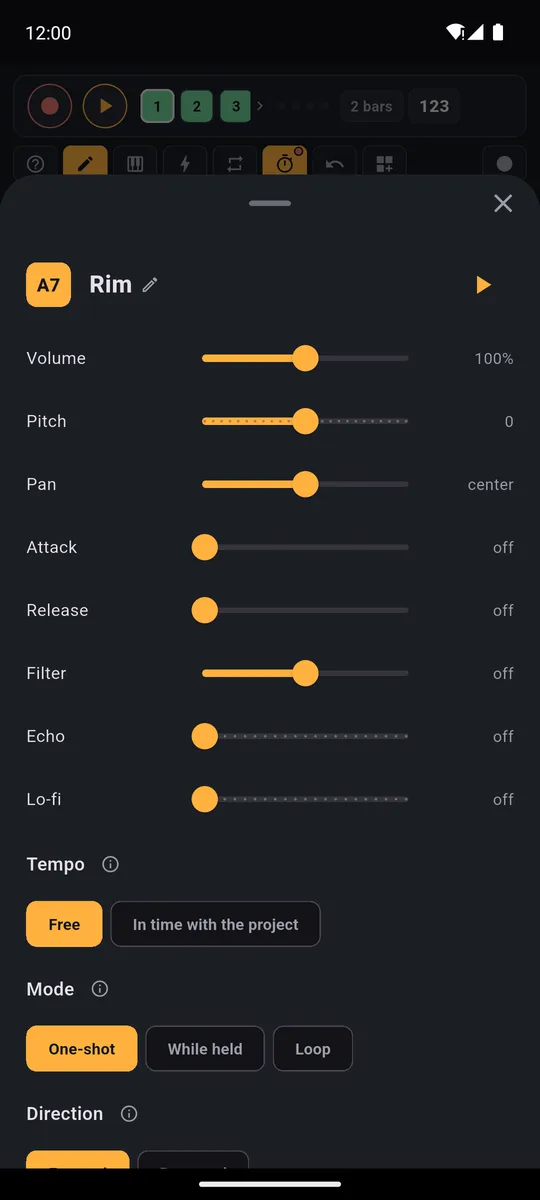
Mode, Choke group and Legato, then volume, pitch, effects and Tempo, all for one pad.
Try your own loops, the whole Sound library and the Ready banks for 7 days, with everything unlocked.On iPhone: in MORE tap the top row, then Start the free trial. It costs nothing and does not renew.
Get PadLoopGood to know
- To keep what the loop pads play, record it with ● LIVE. Taps on Loop pads play live but don't go into the looper tracks or the export. ● LIVE, part of full PadLoop, records your whole jam.
- To have a loop inside a track for free, switch the pad back to One-shot and put it on the first step of the SEQ (the step grid) on track 1 or 2: it starts on its own every loop. The loop length has to match.
- Stopping: tap a Loop pad again and it stops. With Pad loops in time set to anything but Now, ■ stops the loop pads too.
- The Keyboard and ⟳ don't use Loop pads: the scale Keyboard and note repeat only play the other pads.
Loop pad questions
What is a loop pad?
A grid of pads where each pad starts a loop (a piece of music that repeats) instead of a single hit. One tap starts it, another tap stops it, and the loops stay in time with each other.
Is there a loop pad online for free?
Yes, the one on this page: 16 pads over five looping beats, in your browser, no sign-up. Here the beat loops and each pad plays once. In the PadLoop app every pad can become a loop.
Can I use my own loops?
Yes, with the sampler: record from the mic, import an audio file or take the sound from a video, then put it on a pad and set it to Loop. The sampler comes with full PadLoop and is open during the 7-day trial.
Do the loops stay in time?
With Pad loops in time (in MORE) each loop starts and stops on the boundary you pick, from 1/16 to 8 bars. With In time with the project the loop also follows the tempo when you change the BPM.
Is the loop pad free?
Loop mode, Pad loops in time, Choke group and Legato work in the free version on banks A and B. The other six banks, the full Sound library, the sampler and the Ready banks come with the one-time purchase, all open in the 7-day trial.
Does PadLoop work on Android and iPhone?
Yes, on Android 7 and up and on iPhone with iOS 15 and up. It has no ads and no subscription, and the pads work without internet.
What's the difference between a loop pad and a looper?
A loop pad plays loops that are already made: you start and stop them. A looper records what you play, pass after pass, and builds the loop with you. PadLoop does both.
Last updated: