Pad controllers
MPD218, Launchpad and MPK Mini with an Android app: ready-made maps
Plug in the pad controller and pick the ready-made map: pad 1 on the controller plays pad 1 in the app. Then set velocity, channel and knobs.
- 4 ready-made maps: MPD218, MPC Chromatic C1, MPC Classic, Launchpad (Drum)
- Velocity, MIDI channel, knobs and faders
- MPK Mini recognized in the SEQ to write notes and steps
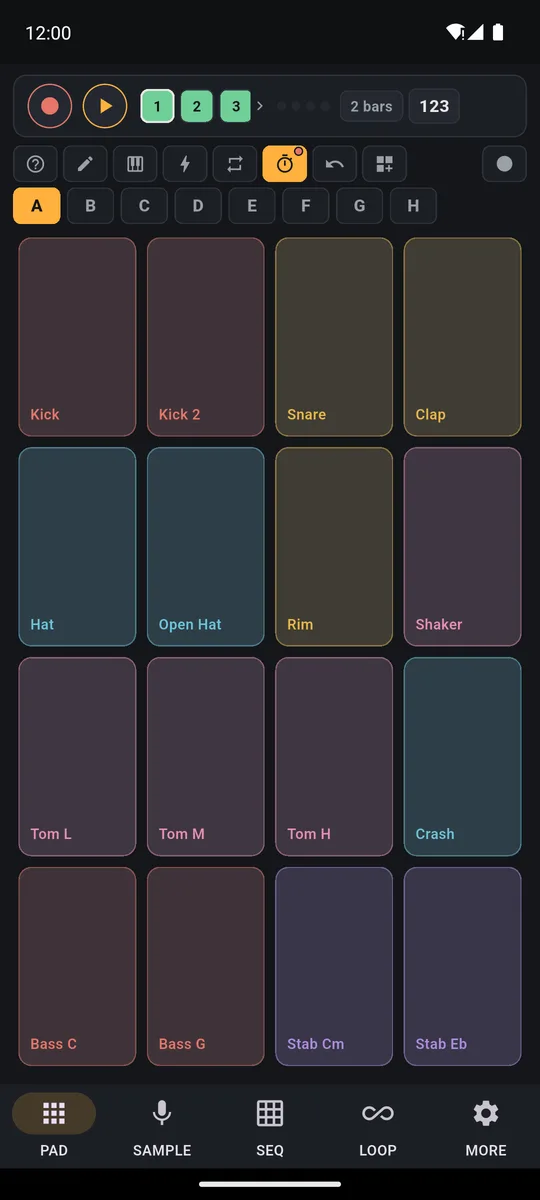
Got a pad controller and an Android phone? Plug in the USB cable and pick the ready-made map: PadLoop has four, for the Akai MPD218, MPC – Chromatic C1, MPC – Classic and Novation Launchpad (Drum). Pad 1 on the controller plays pad 1 in the app, with nothing to map by hand. Then set velocity, channel and knobs. The MPK Mini has no map, but in the SEQ it writes notes and steps. Everything is free. This guide is about Android.
From cable to ready-made map
- Open PadLoop and plug in the controller with a USB cable, using the right adapter for your phone’s port: it connects automatically, even if it was already plugged in.
- Go to MORE → MIDI and tap the name of the connected controller to open its page.
- Tap Pick a ready-made map and choose yours: Akai MPD218, MPC – Chromatic C1, MPC – Classic or Novation Launchpad (Drum).
- Hit a pad and check Last note received, or open See what comes in: you see which pad PadLoop plays.
- Set Velocity and MIDI channel, and with Assign a knob put the filter or the reverb on a knob.
Often the app suggests one: if the device name matches a map, the page says “Looks like a …: you can pick it here”. It’s only a suggestion, never applied on its own: you always choose.
Plug in your MPD218 or Launchpad and hit the pads: the ready-made map is free. The 7-day trial also opens banks C to H.On iPhone: in MORE tap the top row, then Start the free trial. It costs nothing and does not renew.
Get PadLoopWhich map do I pick?
Ready-made maps only change how the notes are laid out: channel, velocity and knobs stay as you set them.
| Map | What it does |
|---|---|
| Akai MPD218 | Factory Preset 1: the controller’s banks A–C are the app’s banks A–C, with pad 1 at the bottom left |
| MPC – Chromatic C1 | The controller’s bank A is the app’s bank A, with pad 1 at the bottom left |
| MPC – Classic | Bank A only; the other banks don’t play until you map them by hand |
| Novation Launchpad (Drum) | Drum mode (Custom 1): the lower-left block is bank A, the one above it B, the ones on the right C and D |
A bank is a page of 16 pads (the letters A to H). Remember: banks A and B are free; C to H need the 7-day trial or the full version.
What if my controller isn’t listed?
The MPK Mini has no ready-made map. To play the pads, use the fixed notes: note 36 is pad 1 of bank A, and higher notes move through the banks up to F. If the keys don’t land where you want, Map key → pad (MIDI learn) moves them one by one. For other keyboards and pad controllers, the controller’s page has settings to adapt them:
- What the pads play: Fixed notes or The bank you see (the first notes play the bank open on screen).
- How many pads: 16 pads, 12 keys or 8 pads; and How many notes each bank moves up: 16 or 12.
- Where pad 1 is on the controller: top left or bottom left (on MPC and MPD it’s at the bottom).
- Keyboard: notes too far away: Silence or Bring back by octaves.
Each setting has a “(default)” option, and Back to “default” restores them all. For a regular keyboard played at the real notes, see the guide to the MIDI keyboard.
Velocity and channel
Velocity sets how your hit strength turns into volume: Normal, Light (plays loud even when you hit softly), Heavy (you need to hit harder) or Always full (every hit at maximum). It doesn’t depend on Touch dynamics, which is only about your finger on the screen.
MIDI channel picks which channel to listen to: All or 1 to 16. It matters when the controller sends keys and pads on different channels, like the MPK Mini.
Knobs and faders
Tap Assign a knob, then turn the knob or move the fader: PadLoop recognizes it. Pick what it controls:
- Sound: master filter, reverb, echo, selected track volume, filter and resonance of the last pad played
- Tempo: BPM and swing
- SEQ: strength, note, length or ratchet of the chosen cell
Ordinary knobs and faders work, and so do the most common encoder types. If the knob is far from the current value, the sound doesn’t jump: the control picks up once the knob reaches it.
See what comes in
Something not playing? In MORE → MIDI, tap See what comes in. Each line shows the message (note, strength, port, channel, knob) and what PadLoop did with it: “Plays pad 1”, “Pad 1 is empty: no sound”, “To the SEQ”, “Not used by PadLoop”. The Speed box measures how long PadLoop takes to hand a hit to the audio engine; the delay of the controller, the cable or Bluetooth and the speaker can’t be measured by the app. Clear wipes the list. The monitor only runs while the page is open.
Pad controllers and the SEQ
In the SEQ, the controller’s pads do one of two things, and the first time, the app asks which: Pick sounds (each pad picks the row) or Turn on steps (each pad lights a cell). Learn the pads learns them as you press them in order, starting from 1. The MPD218 and the MPK Mini are recognized by name: by default the MPD218 turns on steps and the MPK Mini picks sounds, with the keys on channel 1 and the 8 pads on channel 10. With a keyboard, Write with keys appears too, covered in the step sequencer guide.
In the SEQ, the Launchpad is still just a pad controller: its grid doesn’t light up, because PadLoop sends no MIDI out.
Good to know
- This guide is about Android. For connecting keyboards and for Bluetooth, see the page on the MIDI keyboard.
- No MIDI clock, no MIDI out. The tempo is the project’s BPM, and PadLoop doesn’t light the pads.
- MPK Mini: no ready-made map, SEQ only. Other controllers: fixed notes and MIDI learn.
- Closed banks: after the trial, banks C to H don’t play even from the controller.
Bring your MPK Mini into the SEQ and write a bass with the keys and a hi-hat with the pads: the SEQ is free on tracks 1 and 2, the rest you try in the 7-day trial.On iPhone: in MORE tap the top row, then Start the free trial. It costs nothing and does not renew.
Get PadLoopPad controller questions
Does the Akai MPD218 work with Android?
Yes. Plug it in over USB with the right adapter for your phone’s port: PadLoop connects it automatically. Then, in MORE → MIDI, open the controller and pick the Akai MPD218 ready-made map, made for the factory Preset 1.
How do I use the Novation Launchpad with PadLoop?
Put it in Drum mode (Custom 1) and pick the ready-made map Novation Launchpad (Drum): the lower-left block plays bank A, the one above it B, the ones on the right C and D. PadLoop sends no MIDI out, so it doesn’t light the pads.
Does the MPK Mini have a ready-made map?
No. The MPK Mini is recognized only in the SEQ, where the keys write notes and the 8 pads pick sounds. To play the app’s pads, use the fixed notes (36 is pad 1 of bank A) or Map key → pad.
Do I have to pay to use controllers?
No: connecting, ready-made maps, knobs and the MIDI monitor are free. The usual limits apply: banks C to H play only during the 7-day trial or with the full version.
Does it respond to how hard I hit?
Yes. Velocity has 4 choices (Normal, Light, Heavy, Always full) and sets how your hit strength turns into volume. It doesn’t depend on Touch dynamics, which is only about your finger.
Can I use the controller’s knobs?
Yes. With Assign a knob you turn the knob and choose what it controls: master filter, reverb, echo, track volume, BPM, swing or the strength and note of a SEQ cell.
How do I see what my controller sends?
In MORE → MIDI, tap See what comes in: each line shows the message (note, strength, channel, knob) and what PadLoop did with it, for example Plays pad 1.
Can I send MIDI to the controller or sync the tempo?
No. PadLoop receives MIDI but doesn’t send it, and it doesn’t follow MIDI clock: the tempo is the project’s BPM.
Last updated: